
Do you feel like your Facebook Ads budget is just a shot in the dark? Do you ever wonder if there’s a more strategic way to calculate and set it? You’re not alone in wondering how much to spend on Facebook ads.
Well, marketers, business owners, and content creators, it’s time to gear up — we’re about to explore the secret depths of Facebook Ad budgeting.
Get ready to unlock the mysteries of successful ad spending on Facebook!
Bonus: Use our free Facebook Ads budget calculator to figure out exactly how much you need to spend to get the results you want. Let us do the math for you!
Types of Facebook ads budgets
Facebook ad budgets control the amount you spend on your advertising.
When determining your Facebook ads budget, you will be faced with two choices:
- How to divide your ad dollars between all of your ad sets (campaign budgets vs. ad set budgets), and
- How each ad set spends its allotted money (Lifetime budget vs. daily budget Facebook ads)
Depending on the kind of ad campaign you’re running, these budget choices can help you maximize your hard-earned advertising dollars.
Tip: If you’re not clear on the difference between Facebook campaigns, ad sets and ads, check out the Meta Blueprint lesson on how to structure ads.
Campaign and ad set budgets
You can set an overall budget for your campaign or individual budgets for your ad sets. Before setting either, consider your total budget for Facebook ads (we’ll help you figure this out below).
Campaign budgets are like one big bucket of money that flows to all of your ad sets. It chooses which ad set receives funds based on which has the best opportunities. If you’re flexible with how your budget is distributed, then this choice is the least labor-intensive and typically nets results at a low cost.
Alternatively, you can choose to set individual ad set budgets. This option means you control how much is spent on each ad set. Individual ad set budgets are helpful when your bid strategies differ between sets or you have a large discrepancy in your audience sizes.
Individual ad set budgets are also helpful when you’re testing different ad tactics to see how they perform.
Lifetime and daily budgets
Whether you go with a campaign budget or an ad set budget, you will need to decide between a lifetime and a daily budget.
With a daily budget, you set the average ad spend per day. These are great if you want to spend roughly the same amount per day. Daily budgets are not a hard cap, meaning they can fluctuate slightly day-to-day.
A lifetime budget, on the other hand, is the total amount you want to spend from start to finish. If you know how much you want to spend and don’t care if you spend more on Friday than on Monday, these are for you. Lifetime budgets are a hard cap; they will not exceed your limit.
Facebook ads budget calculator
Listen, we would never send you out into the jungle of digital marketing without the right tools. That’s why we’ve created a Facebook ads budget calculator that will do the math for you. Download the handy Facebook ads budget calculator to figure out exactly how much you need to spend to get the results you want.
Bonus: Use our free Facebook Ads budget calculator to figure out exactly how much you need to spend to get the results you want. Let us do the math for you!
In order to use this calculator, you’re going to need to know a few things. Don’t worry; this isn’t going to be anything like your math class in high school. We promise you can’t fail this lesson!
For the sake of this example, we’ll be using a faux company, Business Bats, as a stand-in. Business Bats sells baseball bats for your business needs, whether that’s smashing up your printer Office Space style or practicing your swing in the boardroom to burn off some post-meeting energy. Business Bats is beloved by cubicle-dwellers worldwide.
Find your CPM, CTR, and conversion rates
You will need to have run at least one previous Facebook ad campaign for this section. If you haven’t run any campaigns, head down to the “How to get a benchmark without having run a Facebook ad campaign” section below. Otherwise, read on to gather the right data and instructions on how to calculate a Facebook ad budget.
Your CPM (cost per thousand impressions), CTR (click-through rate), and conversion rates can all be found in Facebook Ads Manager.
The default column view is Performance, so you’ll need to select the Performance and Clicks view under the Columns drop-down menu to see your CPM and CTR.
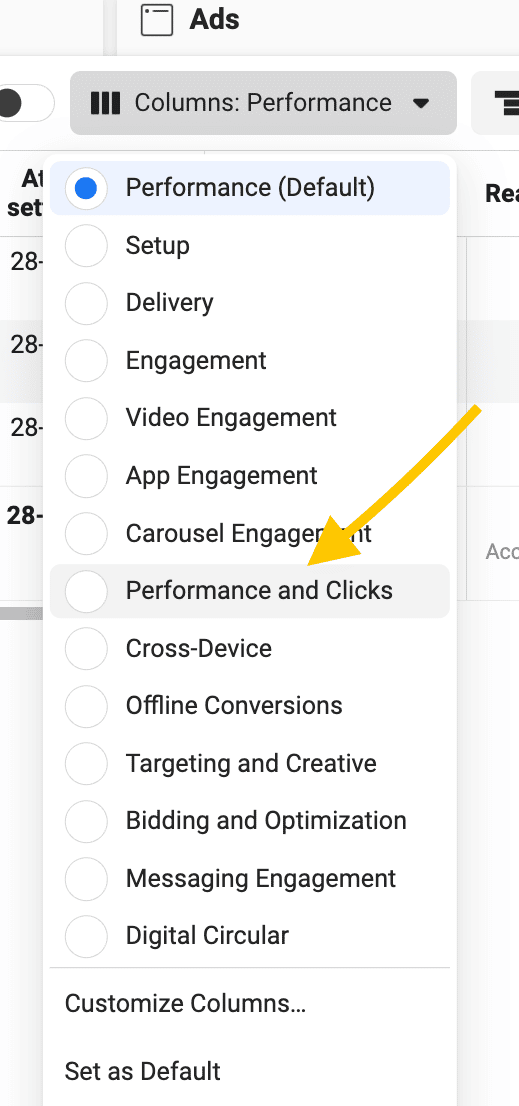
Once you’ve changed your column view, just scroll right to find your CPM and CTR.
Next, it’s time to find your conversion rate. Start by deciding how to classify your ‘conversions.’ A conversion can be many things, such as a consumer initiating a check-out on your site or installing your app. Think of it this way: What do you want someone to do after viewing your ad?
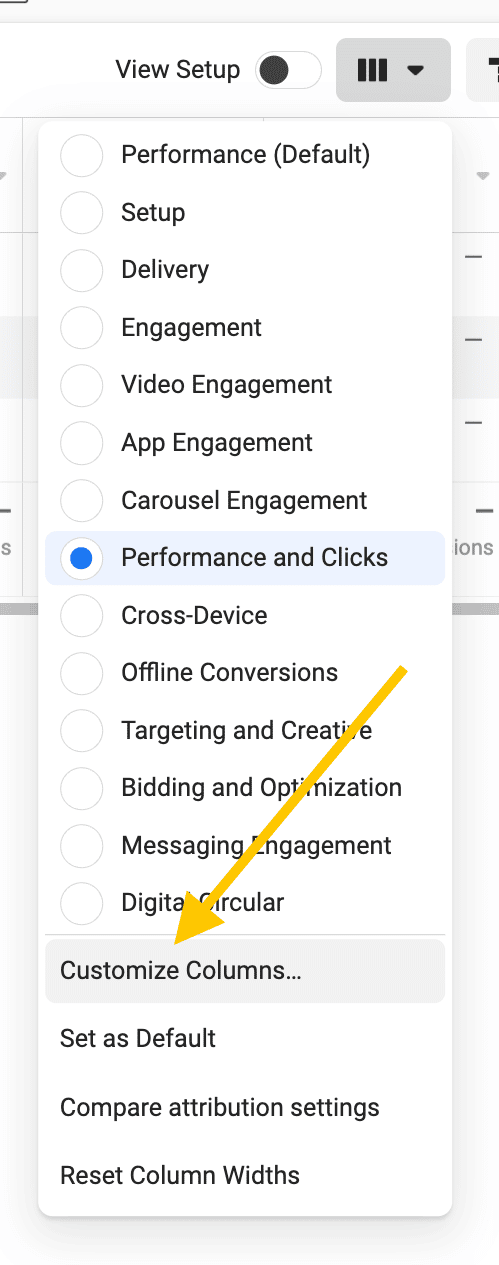
Once you’ve decided on an event to define your conversion, you can customize the main reporting dashboard on your Facebook Ads Manager. Click on Columns: Performance and then scroll down to Customize Columns at the bottom.
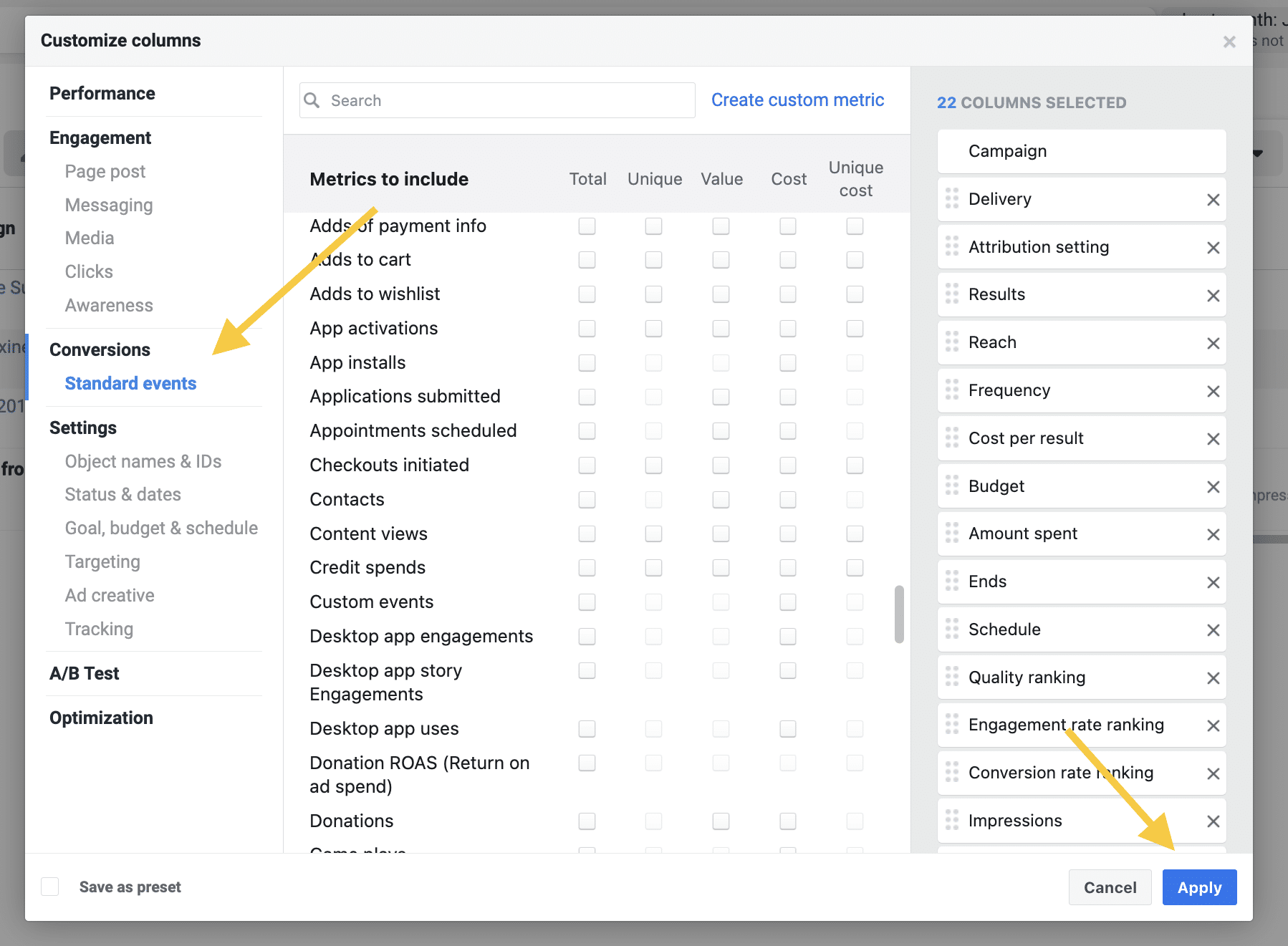
Next, click on Conversions, Standard Events on the left. From here, you can click off the metric you would like to measure for your conversion rates. Then click Apply.
How to calculate your CPM, CTR, and conversion rates yourself
Knowing how to calculate social media metrics is a skill all marketers should have. That way, you can find out what you need to know no matter where your data is saved.
Your CPM is calculated by the amount you spend on your campaign and the number of impressions your ad got. So, you take your total ad spend, divide it by your impressions, then multiply that by 1000. If you spent $300 and had 5,000 impressions, you would have a $60 CPM.
CPM = (Total ad spend/Impressions) x 1000
Your CTR is the number of ad clicks you received divided by the number of ad impressions, then multiplied by 100. If you had 100 clicks and 5,000 impressions, you would have a 2% CTR.
CTR = (Total ad clicks/Total ad impressions) x 100
Your conversion rate is calculated by taking the number of conversions from your Facebook ad and dividing it by the total number of link clicks your ad received, then multiplying by 100. If you had 100 conversions and 2,500 link clicks, you would have a 4% conversion rate.
Conversion rate = (Total conversions from ad/Total link clicks from ad) x 100
How to ballpark your budget if you’ve never run a Facebook ad campaign
If you’ve never run a Facebook ad campaign and don’t have any historical data to pull from, you can use industry benchmarks for your numbers.
Keep in mind that benchmarks can vary wildly depending on different factors, like industry. Take conversion rate benchmarks, for example.
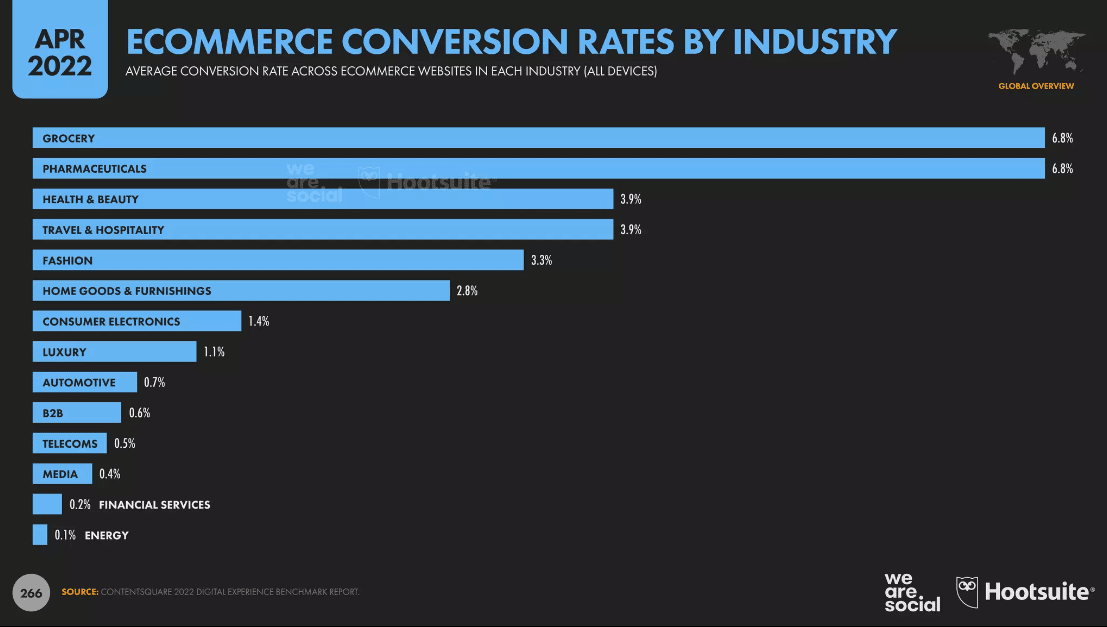
Source: Hootsuite’s Q2 Digital Trends update
Benchmarks aren’t perfect, but you still need somewhere to start. So, grab some benchmarks that are closely related to your business for your jumping-off point.
Pro tip: Hootsuite’s Q4 Digital Trends update discusses CPM and CTR benchmarks on page 262. You can find conversion rate benchmarks from Hootsuite’s Q2 Digital Trends update on page 266.
For Business Bats, we will use 1.2% for our CTR rate and $8.15 for our CPM, since those are the averages for Q3 2022. Business Bats doesn’t exactly fit in any of the industries highlighted above, so we’ll use a 2.3% conversion rate since that’s the average of the industry benchmarks for Q1 2022. Average ecommerce conversion rates are around 2.5-3%, so this number is a pretty reasonable baseline.
In the next section, we’ll find Business Bats’ ideal Facebook ads budget using these numbers.
How to set your Facebook ads budget
You can calculate your Facebook ads budget manually, or you can do it the easy and fun way with our Facebook Ad Budget Calculator!
Step 1. Download the calculator
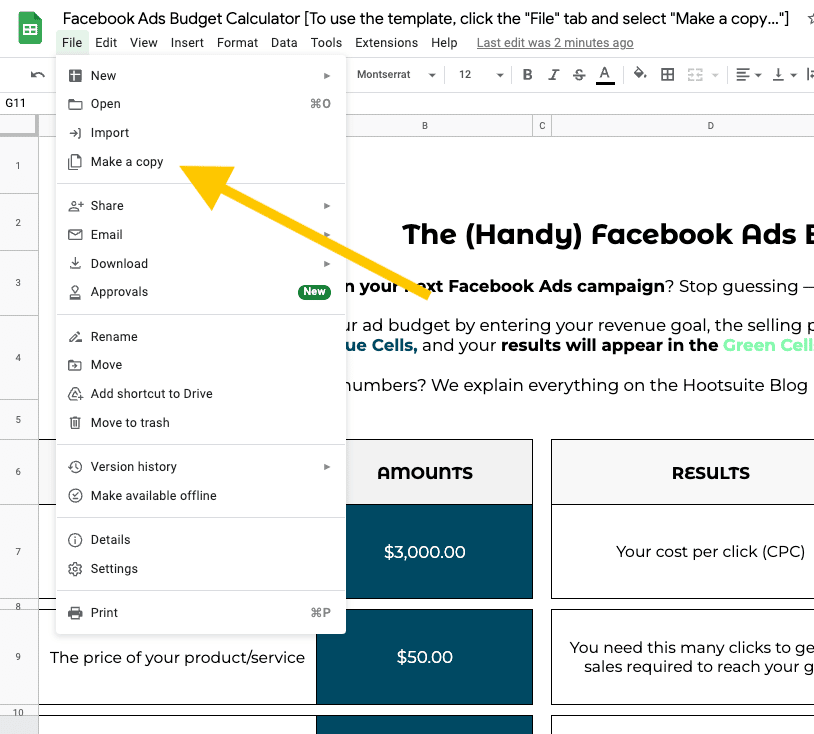
Your first step is to download the Facebook Ad Budget Calculator and copy it to your own Google Drive.
Step 2. Input your numbers into the corresponding cells
Fill out Column B with the numbers you got by following the instructions above. Choose your revenue goal and add in the cost of your product or service.
For Business Bats, we would like to make $3,000 off this campaign and our bats each cost $50.

Step 3. Review your budget in column G
According to our calculations, for Business Bats to make our revenue goal, our Facebook ad campaign budget should be around $1,770. Not bad!
How to change your Facebook ads budget
Now that you know what your budget needs to be, you can head to Facebook Ads Manager to adjust your numbers.
You simply have to hover over the ad set or campaign you want to adjust. Click Edit, type in the budget change you’d like to make, and click Publish. Your ad budget should adjust within 15 minutes. And voila, you have changed the budget for your Facebook ad.
What is the best Facebook ads budget for small business?
Unfortunately, there is no one-size-fits-all answer when it comes to deciding how to budget for Facebook ads or the best Facebook ad budget for small businesses.
Several factors can influence your budget, like your industry, your goals, and the habits of your audience.
To be frank, determining your optimal budget is going to take some trial and error. But there are a few best practices you can employ to figure it out.
Start experimenting
Determining the budget of your Facebook advertising calls for experimentation. Changing the elements in your ads, such as copy, visuals, targeting, budget, and timing, can lead to insight into what works.
There are a number of other tactics you can also try, such as targeting lookalike audiences and targeting audiences interested in your competitors.
Testing different strategies at different levels helps you make decisions about how to allocate your online marketing budget effectively, ultimately driving conversions within your targeted audience and gaining a high ROI for your investment.
Give it time
Not seeing the results you were hoping for after one day? Don’t panic.
As you experiment with different ad types, be sure to give your ad sets time to develop and perform. You’ll want to see how they do at different points during the week. Are Fridays better than Mondays? Only time will tell.
Evaluate and adjust
Once you’ve seen how your ad variations perform, you’ll have a much better idea as to what works and what doesn’t. Check Facebook’s data to see which ad sets performed the best, then mirror those strategies for your future ad spends.
You may want to take your top three performing ad sets and recreate them for your next campaign. Tweak them slightly based on your learnings and data from your experimentations. After doing this a few times, you’ll end up with the absolute best-performing ad sets.
Be sure to keep experimenting as you go!
Start with what you can afford
You don’t have to spend a lot of money for your ads to be successful. You can set a minimum daily budget for your Facebook ads that you can afford. Your Facebook ads budget can be as much as you’re comfortable spending.
At Hootsuite, we’ve experimented with budgets as low as $100. It just goes to show you don’t need a lot to begin.
Heed Facebook’s minimum budget recommendations
While you definitely shouldn’t go broke trying to run ad campaigns, you should pay attention to Facebook’s minimum budget spend recommendations. The platform will send you an alert when your budget is too low to gain the results you want. And this can give you great insight into how much to expect to spend in the future.
Experiment with scaling your budget
Once you’ve got a good number in your mind for your minimum spend, you might start wondering how to scale Facebook ad budgets. Try increasing your budget and see if conversions increase at the same rate.
Get the most out of your Facebook advertising budget with Hootsuite. Easily create, manage, and optimize all your Facebook ad campaigns in one place. Try it free today.