Table of Contents
Key takeaways
- Meta Verified is a paid subscription on Instagram, Facebook, and WhatsApp that gives you a verified badge, impersonation protection, direct customer support, and increased reach.
- Pricing for the Standard plan starts at $11.99/month on the web and $14.99/month on mobile, with separate tiers for individuals and businesses.
- Meta Verified for Business is now available alongside individual subscriptions, expanding verification across Facebook, Instagram, and WhatsApp.
- You can still get verified for free if your account qualifies as a notable public figure, celebrity, or brand under legacy verification.
What is Meta Verified?
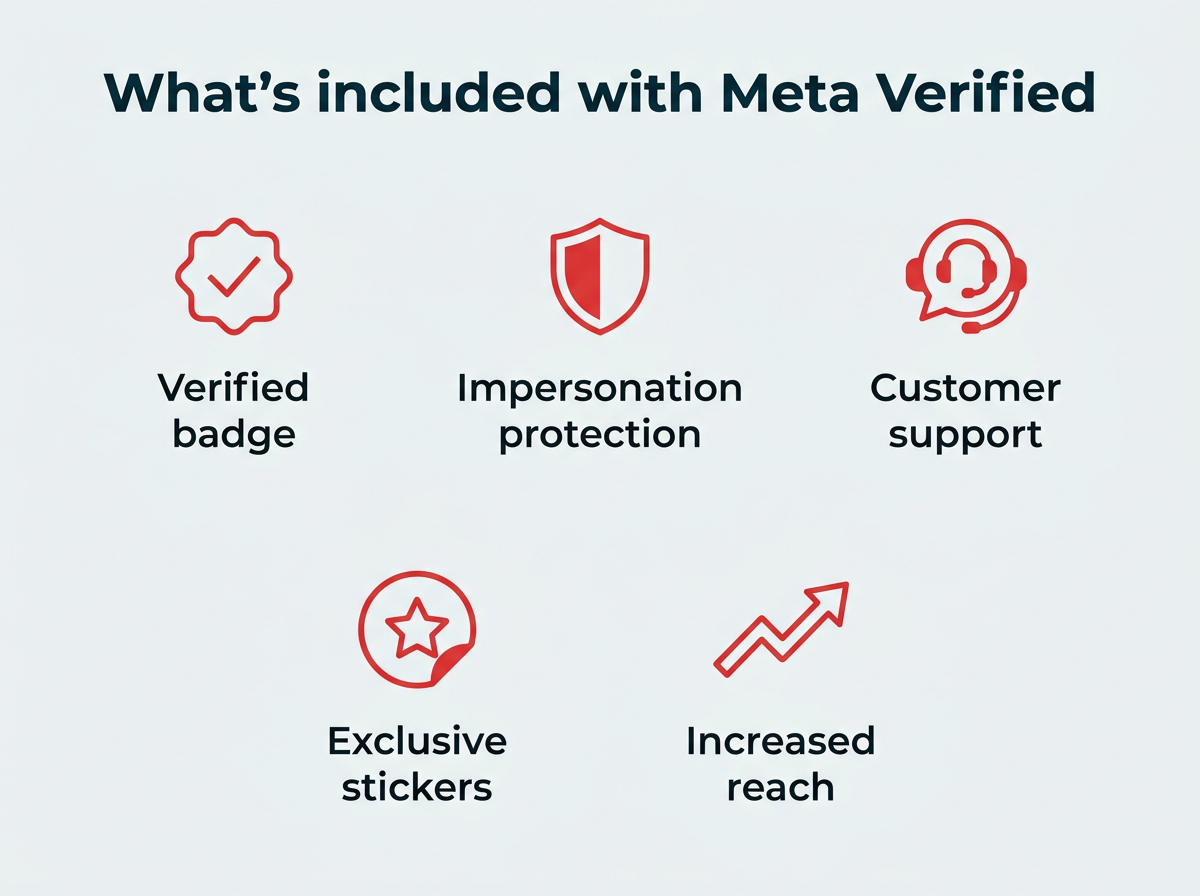
Meta Verified is a subscription bundle for creators and businesses on Instagram, Facebook, and WhatsApp. It includes:
- Account verification (including the blue check badge)
- Account impersonation protection
- Exclusive stickers
- Increased reach
- Access to human customer support agents
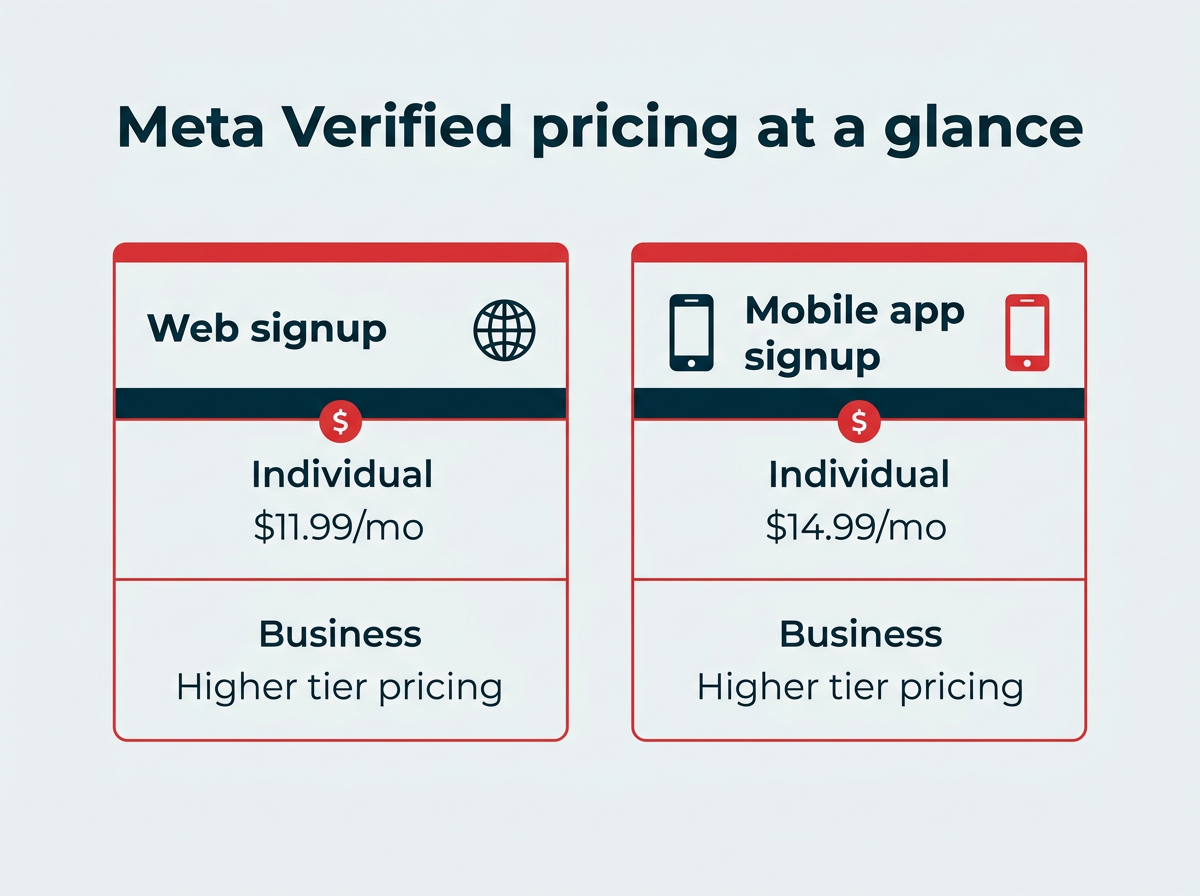
A Meta Verified Standard subscription costs $14.99/month when you sign up on iOS and Android. Or, you can pay $11.99/month by signing up through the web. Businesses pay a separate, higher rate (more on that below).
The original verified badges on Instagram and Facebook were, and still are, available to public figures, celebrities, and brands. These types of accounts can still apply for the original style of verification if they are notable (for example, they appear in news stories or are household names).
The Meta Verified badge and the legacy verification badge for notable accounts look the same. They both get the familiar blue check mark, and both indicate that the account has gone through a verification process.
However, the original style of verification badge (which is free) does not include the extra benefits included with the Meta Verified bundle. An individual who has the original style of verification as a notable profile can apply to Meta Verified to access the other components of the subscription.
The TL;DR version is that there are now two ways to get verified badges on Facebook and Instagram:
- If you are a celebrity, public figure, or well-known brand, you can request a verification badge on Instagram or Facebook.
- If you are an individual or a business, you can apply for Meta Verified.
Meta has been clear that it sees this as a long-term product for everyone. The Meta for Creators announcement of Meta Verified says the company wants “to build a subscription offering that’s valuable to everyone, including creators, businesses and our community at large.” That vision has largely played out, with the program now covering individuals, businesses, and multiple platforms, and contributing to $690 million in non-ad revenue in Q3 2025.
Both types of accounts must follow the Community Standards to keep their badge.
How much does Meta Verified cost in 2026?
Meta Verified cost depends on the platform you use to sign up and whether you’re subscribing as an individual or a business. Mobile signups cost more than web signups because Apple and Google take a cut of in-app purchases.
Here’s how the pricing breaks down:
| Subscriber type | Web signup | Mobile app signup (iOS/Android) |
|---|---|---|
| Individual (Instagram or Facebook) | $11.99/month | $14.99/month |
| Business (Facebook, Instagram, WhatsApp) | Higher than web due to app store fees | Higher than web due to app store fees |
Individual pricing
For creators and individuals, the Meta Verified Standard subscription is $11.99/month through the Facebook web interface, or $14.99/month if you sign up through the Instagram or Facebook mobile app. Each platform is billed separately, so verifying both an Instagram and a Facebook account means two subscriptions.
Business pricing
Meta Verified for Business uses tiered pricing that starts higher than the individual plan and scales up depending on the features and number of add-ons a business chooses. Businesses can subscribe on Facebook, Instagram, and WhatsApp, with each platform billed on its own. For the current rates in your region, check the Meta Business Help Center, since business pricing varies by country and plan level.
Who can get Meta Verified?
Meta Verified is now available in most countries where Instagram, Facebook, and WhatsApp operate, so the old waitlist and country restrictions from the 2023 launch no longer apply. Eligibility differs slightly for individuals and businesses.
Requirements for individuals
The Meta Verified requirements to apply as an individual are:
- Your account must represent a real individual person, not a company or brand.
- You must be 18 years or older.
- You must not violate the Terms of Use or Community Standards on Instagram or the Terms of Service or Community Standards on Facebook.
- Your profile must use your full real name, which must match the name on your government-issued ID.
- Your profile photo must show your face, which must match the photo on your government-issued ID.
- You must enable two-factor authentication.
- You must have a prior posting history (i.e., you cannot apply for a brand-new account).
Requirements for businesses
To apply for Meta Verified for Business, an account must:
- Represent a registered, active business rather than an individual.
- Have a presence on the platform where it’s applying (Facebook Page, Instagram professional account, or WhatsApp Business account).
- Comply with Meta’s Terms of Service and Community Standards.
- Provide business verification documents, which may include a business registration number or supporting documentation.
- Meet any additional platform-specific criteria outlined in the Meta Business Help Center.
Benefits of Meta Verified
Remember, Meta is promoting this program as a subscription bundle, not just a verification plan. So, what are the Meta Verified benefits you get for that monthly subscription fee?
Verified badge
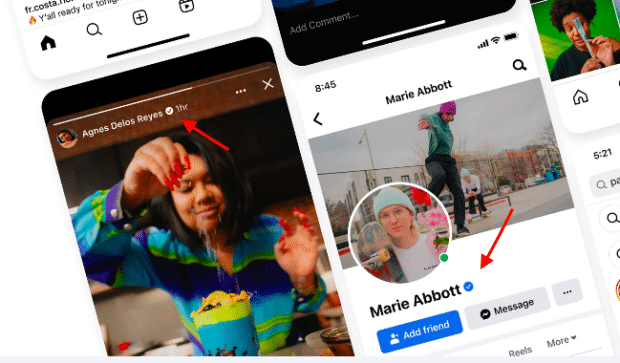
As the name suggests, Meta Verified includes a verification process. After checking your government ID to confirm your identity, Meta will provide you with a verified badge.
This badge looks exactly the same as the verification badge given to “notable” accounts.
Source: Meta
Impersonation protection
Meta Verified includes “proactive account monitoring for impersonators who might target people with growing online audiences.”
Meta uses its machine learning systems to flag accounts that copy your name and photo before those fakes can reach your audience. Regarding its efforts to combat fake accounts on Facebook and Instagram, Meta says:
“Our investments in machine learning technology are critical to help us detect faster … We balance machine learning with a trained team of experts who review and take action on violating content.”
The same resources power the proactive account monitoring included with your subscription.
Access to customer support
You’ll get access to real human customer support agents through live chat. Meta says this account support addresses “most common issues,” such as login trouble, hacked accounts, and content problems.
Requests for access to customer support are a constant theme in comments left on anything Meta CEO Mark Zuckerberg posts to his profiles. For creators and businesses that depend on their accounts, direct support access is one of the most practical reasons to subscribe.
Exclusive stickers and stars
Paid users get access to exclusive Stories stickers on Facebook and Instagram. There are also exclusive Reels stickers on Facebook.
Increased reach and visibility
Meta says participants in the Meta Verified program get more visibility across Facebook and Instagram comments, search, recommendations, and suggested accounts. Your posts and profile are more likely to surface to people who don’t already follow you.
The increased reach makes the biggest difference for accounts that don’t already have a large following, according to Meta:
“Subscribers with a smaller following may see a more noticeable impact to their reach since their audiences are smaller.”
To benefit from the increased reach, your content still has to follow the recommendation guidelines. It’s also still a good idea to understand the Facebook algorithm and the Instagram algorithm to maximize your reach.
Meta Verified for Business
Meta Verified for Business extends the subscription to brands and companies across Facebook, Instagram, and WhatsApp. Before this launched, businesses could only pursue free legacy verification, which required meeting Meta’s notability bar. Now any eligible business can pay for a verified badge and the surrounding perks.
A business subscription includes:
- A verified badge on the business profile
- Proactive impersonation protection to guard against copycat accounts
- Direct access to customer support agents
- Enhanced profile features and, on higher tiers, add-ons like additional verified accounts for employees
- Increased reach in search and recommendations
For smaller businesses that were never eligible for legacy verification, this is the first straightforward path to a blue check. You can review the full feature list and pricing tiers in the Meta Business Help Center.
Meta Verified on WhatsApp
Meta Verified WhatsApp brings verification to the WhatsApp Business app and WhatsApp Business Platform. For businesses that handle customer conversations over WhatsApp, the verified badge appears next to the business name inside chats and on the business profile, so customers can trust they’re talking to the real company.
On top of the badge, WhatsApp business subscribers get impersonation monitoring and account support. The verification works a little differently from Instagram and Facebook because WhatsApp is built around messaging rather than a public feed, so the badge shows up where customers interact with you directly. For the current details and setup steps, see the WhatsApp Help Center.
Is Meta Verified worth it?
Whether Meta Verified is worth it depends on how much you rely on your accounts and whether you already qualify for free verification. Here’s a balanced look.
Reasons it can be worth the subscription:
- Direct customer support is hard to get any other way, and it matters if your account is ever hacked or restricted.
- Impersonation protection saves time and reputation if scammers copy your profile.
- The increased reach helps smaller accounts get discovered.
- The badge builds trust with new audiences and customers.
Reasons to think twice:
- The reach boost is modest for accounts that already have a large following.
- You pay per platform, so verifying Instagram, Facebook, and WhatsApp adds up.
- If you already qualify for free legacy verification, the badge alone isn’t a reason to pay.
- The badge doesn’t replace consistent posting and a real content strategy.
Who gets the most value from Meta Verified
The subscription pays off most for:
- Creators building an audience who want the reach boost while their following is still small, especially on Instagram where 80% of adults ages 18–29 are active.
- Small businesses that were never eligible for legacy verification but want a trust signal.
- Accounts in competitive or scam-prone niches where impersonation is a real risk.
- Businesses that run customer service through WhatsApp and want a verified badge in chats.
How to get verified for free
You can still get verified for free through legacy verification, which Meta grants to notable public figures, celebrities, and well-known brands that meet its notability criteria. There’s no subscription fee, but you have to prove your account is authentic, unique, and in the public interest.
To try the free route, follow our guides on how to get verified on Instagram and get verified on Facebook. Keep in mind that free legacy verification gives you the badge only, without the extra Meta Verified benefits like support and impersonation monitoring.
How Meta Verified compares to other platform verification programs
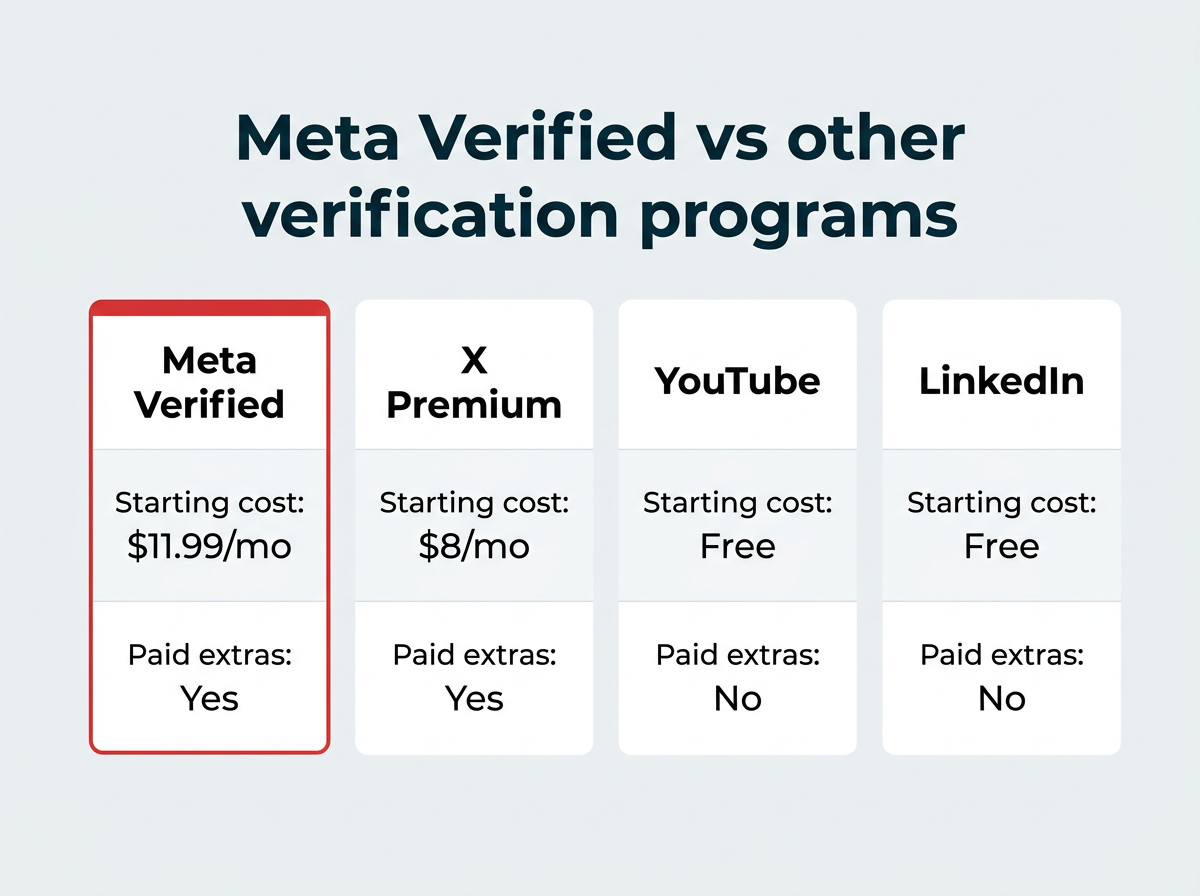
Paid verification is now common across social platforms, reflecting broader social media trends shaping 2026. Here’s how Meta Verified vs X Premium and the other major programs stack up.
| Program | Starting cost | Key features | Eligibility |
|---|---|---|---|
| Meta Verified | $11.99/mo (web) | Verified badge, impersonation protection, customer support, increased reach | Individuals and businesses meeting ID and eligibility rules |
| X Premium | $8/mo (web) | Blue checkmark, reduced ads, longer posts, edit button, reply boosting | Any account meeting basic activity requirements |
| YouTube verification | Free | Channel verification checkmark, no extra features | Channels with 100,000+ subscribers or notable status |
| LinkedIn verification | Free | Verified identity or workplace badge | Anyone who verifies identity or employer |
Meta Verified sits in the middle: it’s the priciest social media subscription, but it bundles in support and impersonation protection that free programs like YouTube and LinkedIn verification don’t offer.
How to sign up for Meta Verified
Applying for the program is quite simple. You can do it from the Instagram app, the Facebook app, the Facebook web interface, or, for businesses, through the Meta Business Suite.
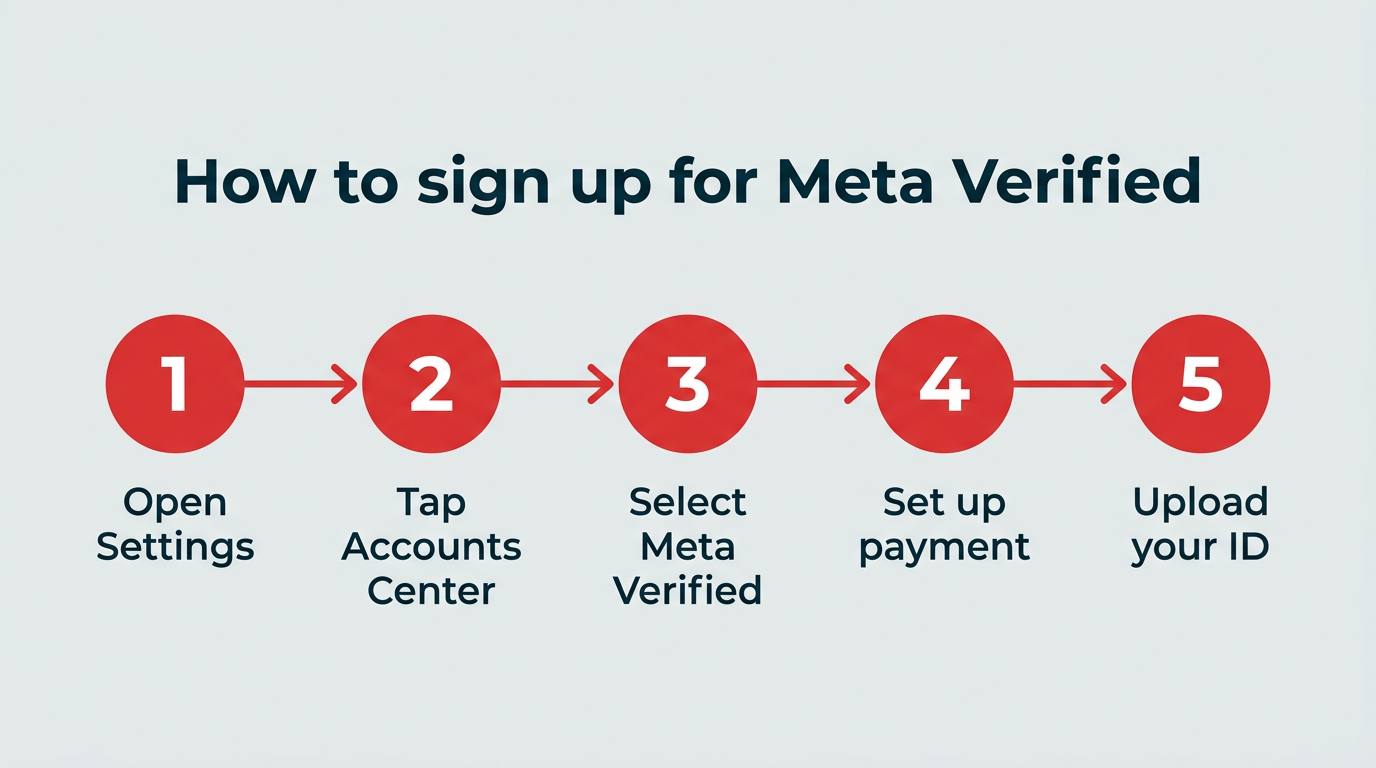
How to sign up on Instagram or Facebook (mobile app)
- Open Instagram or Facebook, and from your profile, open Settings.
- Tap Accounts Center, then tap Meta Verified.
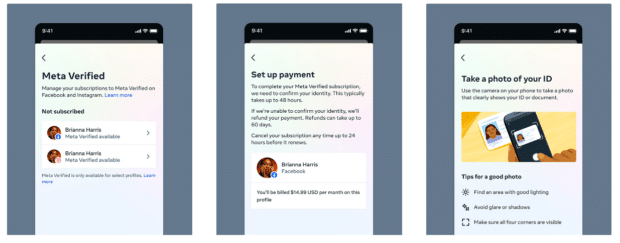
- If your account is eligible, it will say Meta Verified available. Tap the relevant account name, review the list of benefits, then tap Continue.
- Set up or confirm your payment method and tap Pay now ($14.99/month via the app for the Standard plan).
- Complete the verification process and upload a photo of your ID. Your ID must match the profile name and photo on the Instagram or Facebook account.
Source: Meta
How to sign up on Facebook (web)
- From the Facebook profile you want to verify, click the three dots icon on the right of the top menu.
- Click Subscribe to Meta Verified ($11.99/month via the web for the Standard plan).
How to sign up for Meta Verified for Business
- Open the Meta Business Suite or the settings for your Facebook Page, Instagram professional account, or WhatsApp Business account.
- Find the Meta Verified option and select the plan tier that fits your needs.
- Provide your business verification documents and confirm payment.
- Complete the review process. For platform-specific steps, follow the Meta Business Help Center.
Verification of your account can take up to 48 hours.
Once you’re verified, you cannot change the username, profile name, date of birth, or photo on your account (unless you want to re-do the verification process).
Note: Although it’s called “Meta Verified,” you still have to apply (and pay) separately on Instagram, Facebook, and WhatsApp if you want to verify accounts on more than one platform.
FAQ: Meta Verified
What is Meta Verified?
Meta Verified is a paid subscription verification program for Instagram, Facebook, and WhatsApp, bundled with benefits including live chat customer support, impersonation protection, and increased reach. It’s available to both individuals and businesses.
How much does Meta Verified cost?
Meta Verified’s Standard plan costs $14.99/month when you sign up through the Instagram or Facebook mobile app, or $11.99/month when you sign up through the Facebook web interface. Business plans start higher and are billed per platform.
Is Meta Verified worth it?
Meta Verified is worth it if you are a creator or business that values impersonation protection, direct customer support, and a potential boost in reach, but it may not be necessary if you already qualify for free legacy verification.
How do you get Meta Verified for free?
You can get verified on Instagram or Facebook for free by applying for legacy verification, which is available to public figures, celebrities, and well-known brands that meet Meta’s notability requirements. This gives you the badge only, without the paid subscription benefits.
Can anyone be Meta Verified?
Meta Verified is available to individuals aged 18 or over and to eligible businesses in most countries where Meta’s apps operate. You must use your real name on your profile, and that name must match your government-issued ID.
How do you get Meta Verified on Facebook?
To join the program from Facebook on the web, click the three dots icon in the top menu of your profile and then click Subscribe to Meta Verified. On mobile, open Settings, tap Accounts Center, then tap Meta Verified.
What is Meta Verified for Business?
Meta Verified for Business is a paid subscription that gives business accounts on Facebook, Instagram, and WhatsApp a verified badge, impersonation protection, and access to customer support, along with enhanced profile features on higher tiers.
Does Meta Verified work on WhatsApp?
Yes, Meta Verified for Business is available on WhatsApp, giving business accounts a verified badge that appears in chats and on their business profile, plus impersonation monitoring and support.
Can you lose your Meta Verified badge?
Yes, Meta can remove your verified badge if you violate community standards, change your profile name or photo without re-verifying, or cancel your subscription.
What is the difference between Meta Verified and legacy verification?
Meta Verified is a paid subscription available to anyone who meets the eligibility requirements, while legacy verification is a free badge granted to notable public figures, celebrities, and brands based on notability criteria. The two badges look identical, but only Meta Verified includes support, impersonation protection, and increased reach.
Save time managing your social media marketing strategy with Hootsuite. Publish and schedule posts, find relevant conversions, measure results, and more â all from one dashboard. Try it free today.