Table of Contents
Social media management tools help you manage your social media accounts with ease.
When you can handle scheduling, analytics, reporting, and more in a single tool, you can dedicate less time to busywork and more time to building campaigns that work.
Let’s explore what social media management tools are, why they matter, and which ones are worth your time in 2026.
Key takeaways
- The best social media management tools make your life easier by bringing scheduling, engagement, and analytics into one place.
- Choose a tool that fits your goals, not just one with the most features. For instance, if your brand lives on TikTok, make sure your tool supports short-form video and scheduling for that specific platform.
- Don’t treat your tool like a “set it and forget it” system. Real results come from showing up daily and routinely checking reports to see what’s working.
- Go for a platform that grows with you. The best tools evolve with new features, integrations, and AI updates so your social strategy stays ahead of the curve.
A social media management tool is software that helps you run all your social accounts from one place. You can schedule posts, track performance, respond to comments and DMs, and pull custom reports from a single dashboard.
For teams managing multiple social media channels, these tools keep content consistent, make reporting faster, and free up time for strategy and creative work.
Key features of social media management tools
The key features of good social media management tools include:
- Scheduling and publishing: Write posts ahead of time and schedule them to go out when your audience is online.
- Collaboration and approvals: Make sure everyone on your team can see the content calendar, suggest edits, and approve posts before they go live.
- Analytics and reporting: Get clear data on what’s working, without spending hours in spreadsheets.
- Social listening: Keep an ear out for brand mentions, trending hashtags, or competitor updates.
- AI help: Use AI to brainstorm captions, fine-tune timing, or repurpose posts across platforms.
- Unified inbox: Reply to DMs, comments, and mentions from one dashboard instead of jumping between apps.
- Integrations: Plug into tools you already use — like Canva for visuals or Google Business Profile for updates.
- Media library: Store your best-performing content, templates, and brand assets so they’re easy to reuse.
Managing social media by hand works fine when you’ve only got one channel. But once you have two, three, four, or even ten accounts across different platforms, with different approval processes, your team needs a more efficient way to manage it all.
Social media management tools make it easier to:
- Stay consistent. Keep your posting schedule on track across LinkedIn, TikTok, Instagram, and more.
- Work as a team. Use collaboration and approval workflows to reduce errors and keep messaging on-brand.
- Track performance. Get cross-platform analytics in one dashboard instead of cobbling together native reports.
- Catch conversations. Monitor mentions and hashtags in real time so you never miss customer feedback or competitor moves.
- Scale campaigns. Run multi-region or multi-channel campaigns without juggling dozens of spreadsheets.
- Prove ROI. Create automated, shareable reports that show leadership how social contributes to traffic, leads, or sales.
| Tool | Best for | Key features | Pros | Cons | Pricing (as of 2026) |
| Hootsuite | Marketing teams of all sizes, from startups to enterprises. | Best Time to Publish tool Customizable analytics dashboards Social listening for all major platforms (including Bluesky!) | All-in-one platform Scales with your business Deep analytics and reporting | Higher cost than very basic tools | Plans start at $99 per month. 30-day free trial available. |
| Buffer | Small businesses and startups on a budget. | Simple scheduling, publishing | Easy to use, affordable | Light on analytics and collaboration, no social listening | Paid plans start at $6 per month. Free plan available. |
| Later | Creators and influencers focusing on TikTok and Instagram. | Drag-and-drop content calendar Link in bio | Great for Instagram visuals | Narrow scope, weaker outside Instagram/TikTok | Plans start at $18.75 per month. 14-day free trial available. |
| Agorapulse | Mid-size teams focused on engagement & workflows | Unified inbox Scheduling Basic reporting | Solid engagement tracking User-friendly | Reporting not as advanced Fewer integrations than Hootsuite | Plans start at $99 per month. 30-day free trial available. |
| Zoho Social | Small business looking for a budget-friendly CRM and social media tool. | Scheduling Monitoring Analytics | Affordable if part of Zoho suite | Lacks most advanced features | Plans start at $15 per month. Free plan available. |
| HubSpot Social | Businesses already using HubSpot CRM | Publishing Analytics CRM integration | Seamless CRM tie-in One login for sales + social | Social feels like an add-on Expensive | Marketing Hub plan starts at $1,034 per month and up. |
| Sprout Social | Medium to large social teams. | Social listening Influencer marketing management Deep analytics | Strong CRM-style inbox | Expensive Limits on profiles | Plans start at $199 per month. |
| Sprinklr | Enterprise-level businesses with global presence. | Global reach Sprinklr AI+Unified-CXM | Extremely powerful Customizable for global teams | High pricing Complex user personas Onboarding overwhelm | Plans start at $249 per user per month. |
| Planoly | Creators and influencers focusing on Instagram and Pinterest. | Drag-and-drop visual planner Monetization tools | Great for visual planning | Limited platform integrations Basic analytics | Plans start at $16 per month.14-day free trial available. |
| Notion | Freelancers and small social teams who need a simple way to plan and track their content. | Customizable templates Collaborative workspaces Centralized content hub | Flexible Affordable | No scheduling features No social analytics | Paid plans start at $10 per month. Free plan available. |
| Sendible | Small to mid-sized agencies juggling multiple clients | Easy onboarding and setup Client Connect widget Client-focused features Bulk scheduling | Agency-friendly | White-labeling is an expensive add-on Basic AI assistant | Plans start at $89 per month. |
| SocialPilot | Small to mid-size businesses | Scheduling Bulk posting White-label reports | Budget-friendly Simple to use | Weaker listening tools Basic reporting | Plans start at $30 per month. |
| Asana | Mid-to-large marketing teams | Workflow/project management Calendar view Task assignments | Great for cross-team collaboration | Not built for publishing or analytics | Plans start at $13.49. Free plan available. |
| Canva Content Planner | Small businesses & creators designing visuals | Content creation Schedule posts Templates | User-friendly Strong visual tools | Limited analytics No listening | Plans start at $18 per month. Free plan available (no scheduling). |
1. Hootsuite
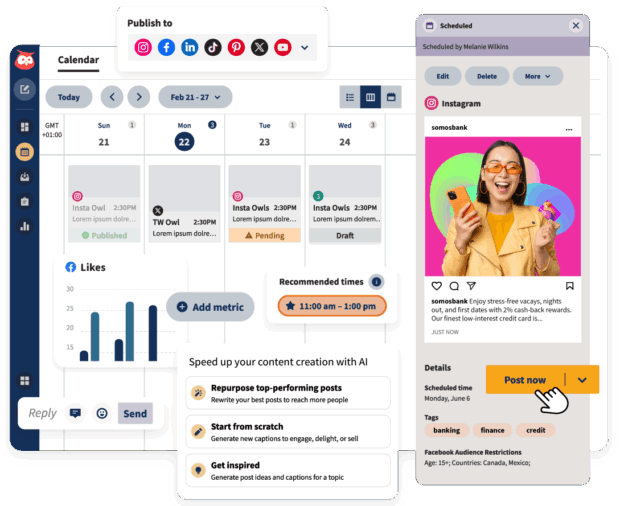
Hootsuite is an all-in-one tool that brings everything you need for social media into one place — planning, posting, engaging, listening, and reporting.
Best for: Brands and marketing teams who want a single, easy-to-use platform to plan content, manage engagement, track results, and use AI to improve performance across all their social channels.
Top features:
- Simple drag-and-drop content calendar
- AI tools for captions, ideas, AI social listening, and repurposing
- Best Time to Publish for data-driven scheduling
- Social listening to track mentions, hashtags, and trends
- Unified inbox for comments, DMs, and mentions
- Visual analytics that show what’s performing best
- Approval workflows to keep posts on-brand
- Integrations with Canva, Slack, Google Drive, and more
Pros:
- Cross-post content across every major social network without duplicating work
- Clear, visual reports that prove ROI
- AI and automation save hours of manual work
- Keeps large teams organized and consistent
Cons:
- Some advanced features are limited to top tiers
- Takes a little time to set up for bigger teams
Pricing (as of 2026): Plans start at $99 per month. Advanced and Enterprise plans include more users and advanced features. Try it free for 30 days!
Meet the Suite
Understand what matters, decide what to do next, and take action across every social workflow — all from one connected suite.

2. Buffer
Source: Buffer
Buffer is a straightforward tool for scheduling and publishing social media posts. It’s built for small teams and solo marketers who want an easy way to plan social content without the extra bells or whistles.
Best for: Freelancers, creators, and small businesses that want a simple, low-cost way to schedule and publish social media content.
Top features:
- Visual content calendar for planning posts
- Queue system to automate daily scheduling
- Basic analytics for post engagement and reach
- Link shortener and campaign tracking
Pros:
- Easy to set up and learn
- Clean, user-friendly interface
- Affordable plans, including a free option
- Works well for individuals or small teams
Cons:
- Limited reporting and insights
- No built-in social listening
- Lacks advanced collaboration or approval tools
- Not ideal for managing multiple brands or regions
Pricing (as of 2026): Free plan available. Paid plans start at $6 per month with added analytics, hashtag manager, and content approvals.
3. Later

Source: Later
Later is a social media management tool designed for creators. It lets you plan, preview, and schedule posts before publishing, so your feed stays polished and consistent.
Best for: Creators and influencers who focus mainly on Instagram and TikTok and want a simple way to plan posts, track engagement, and connect with brands.
Top features:
- Visual Planner to organize and preview your feed
- Creator Marketplace that connects influencers and brands for partnerships
- Linkin.bio to turn your feed into a clickable storefront
- Media library to store photos, videos, and captions
- Basic analytics for post performance and follower growth
Pros:
- Easy, visual interface built for creators
- Great for planning aesthetic feeds and short-form video
- Helpful tools for finding sponsorships and affiliate campaigns
Cons:
- Limited platform support beyond Instagram, TikTok, and Pinterest
- No free plan (only a 14-day trial)
- Analytics are basic compared to tools like Hootsuite
- Collaboration and approval tools are minimal
Pricing (as of 2026): Plans start at $18.75 per month, billed annually. A 14-day free trial is available.
4. Agorapulse

Source: Agorapulse
Agorapulse is a social media management tool for teams. It helps manage conversations and track performance without added complexity.
Best for: Small to mid-sized teams that want an organized way to reply to comments, monitor messages, and report on performance.
Top features:
- Unified inbox for comments, messages, and reviews
- Content calendar with scheduling and queue options
- Basic social listening for brand mentions and keywords
- Competitor and campaign reports
- Built-in CRM features for tracking user interactions
Pros:
- Keeps engagement organized in one dashboard
- Easy for teams to use and onboard
- Clear, simple reporting
Cons:
- Fewer integrations than Hootsuite
- Reports lack customization options
- Listening tools aren’t as deep as enterprise platforms
- Limited automation and AI support
Pricing (as of 2026): Plans start at $99 per month. No free plan, but a 30-day free trial is available.
5. Zoho Social

Source: Zoho Social
Zoho Social is built for small businesses that want to plan posts, track engagement, and connect social data directly to their CRM.
Best for: Small businesses or startups that want an affordable tool for posting, tracking, and managing social media alongside customer data — especially if they already use Zoho CRM.
Top features:
- Scheduling and publishing tools with an intuitive calendar
- Built-in task management for planning and to-dos
- Team chat and live collaboration features
- Social monitoring for mentions and keywords
- Integrated CRM tools for tracking customer interactions
- Reports on engagement, reach, and response time
Pros:
- Easy to learn and set up
- Works with other Zoho products
- Includes task tracking and live chat for collaboration
- Very affordable for small teams
Cons:
- Works best if you’re already using Zoho CRM
- Limited innovation compared to bigger platforms
- Fewer analytics and automation options than Hootsuite
- Social features feel secondary to the CRM tools
Pricing (as of 2026): Free plans available for basic publishing (up to 6 channels). Paid plans start at $15 per month. Higher tiered plans include more advanced features like custom reports and content approvals, and go up to $65 per month.
6. HubSpot Social

Source: HubSpot
HubSpot Social is a social media management tool built into its CRM. It connects posts, conversations, and campaigns directly to customer data.
Best for: Mid-to-large marketing teams that already use HubSpot and want to manage social media, track engagement, and report results without leaving the CRM.
Top features:
- Centralized social inbox for DMs, comments, and mentions
- Content calendar for scheduling across Facebook, Instagram, LinkedIn, and X (Twitter)
- Built-in CRM integration to personalize engagement and track leads
- Campaign tracking to measure ROI from social to sales
Pros:
- CRM connection for tracking leads and conversions
- AI-powered insights that surface trends and opportunities
- Strong reporting for proving ROI to leadership
- Easy to align social media with broader digital marketing campaigns
Cons:
- Expensive, with key features locked behind higher tiers
- Limited social platform support (no TikTok, YouTube, or Pinterest)
- Onboarding takes time and often requires training
- Feels more like a CRM with social tools than a full social platform
Pricing (as of 2026): HubSpot’s Marketing Hub plan starts at $1,034 per month, with enterprise plans beginning around $4,700 per month.
7. Sprout Social

Source: Sprout Social
Like Hootsuite, Sprout Social is a tool for large and enterprise-level teams managing multiple social media accounts and looking for detailed analytics. But heads up. Sprout Social comes with a pricey subscription and a big learning curve.
Best for: Medium to large teams that run many accounts and want strong analytics, social listening, and influencer tools.
Top features:
- Advanced analytics and detailed performance reports
- Social listening to track mentions and trends
- Influencer and campaign management tools
- Shared inbox for messages and comments
- Post scheduling and team approvals
- Integrations with major ad and CRM platforms
Pros:
- Strong data and analytics capabilities
- Helpful for tracking influencer campaigns
- Strong listening tools to spot brand mentions
- Ideal for teams focused on measurement and ROI
Cons:
- Expensive, even for small teams
- Only allows a few accounts per plan
- Calendar view isn’t very visual
- Can be hard to learn at first
Pricing (as of 2026): The Standard Plan starts at $199 per month for up to five social profiles. Advanced plans go up to $399 per month, and Enterprise plans require custom pricing.
8. Sprinklr

Source: Sprinklr
Sprinklr is a social media management platform for larger teams. It supports scheduling, listening, and analytics across 30+ social, messaging, and review channels.
Best for: Enterprise-level companies that manage many social accounts, languages, and teams worldwide.
Top features:
- Scheduling, listening, and reporting for 30+ social and messaging platforms
- Sprinklr AI+ for content ideas, message sorting, and sentiment tracking
- Unified-CXM dashboard to connect social, marketing, and sales data
- Advanced analytics with global and regional reporting
Pros:
- Good for managing large, global social teams
- Deep analytics and reporting tools
- Strong AI support for task management and insights
- Supports regional networks like Weibo and LINE
Cons:
- One of the most expensive platforms on the market
- Takes time to set up and train team members
- Interface can feel crowded and confusing
- Better suited for corporations than small or mid-size businesses
Pricing (as of 2026): Entry-level plans start at $249 per user per month, with limited features. Enterprise pricing is available through custom quotes.
9. Planoly

Source: Planoly
Planoly carved out its niche as a go-to tool for Instagram and Pinterest scheduling, but it’s evolved into much more.
While I wouldn’t recommend it for the seasoned social media manager, its focus on visual planning makes it perfect for creators who love curating a cohesive aesthetic.
Best for: Creators and influencers who focus on Instagram or Pinterest and want a visual, drag-and-drop way to plan posts and design a cohesive feed.
Top features:
- Visual planner to drag, drop, and rearrange your feed
- Tools to plan content by season, campaign, or partnership
- Monetization tools like a virtual storefront and email automation
- Content drafts and template library
- Mobile app for quick edits and on-the-go scheduling
Pros:
- Easy, visual setup made for creators
- Great for planning a polished, cohesive aesthetic
- Simple tools for selling products or promoting links
Cons:
- Limited to Instagram, TikTok, and Pinterest
- Reporting tools are basic
- No social listening or advanced analytics
- Not built for larger teams or brands
Pricing (as of 2026): Plans start at $16 per month, with a 14-day free trial available.
10. Notion
Source: Notion
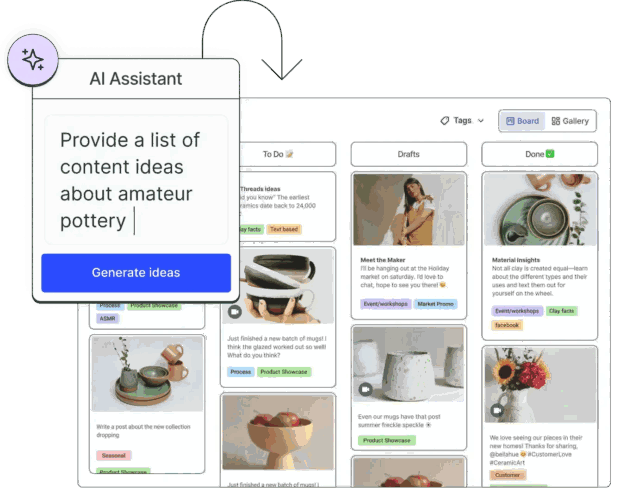
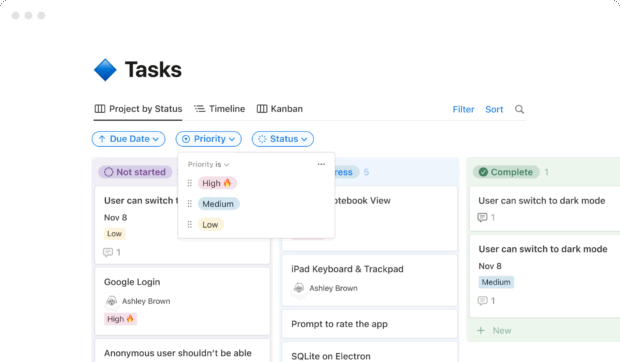
While not strictly a social scheduler, Notion still deserves a place on the list. It’s a customizable workspace tool that lets social teams build dashboards. It’s an easy way to plan, organize, and track social content.
Best for: Freelancers and solo social media managers who want a free, flexible space to plan, brainstorm, and track content ideas.
Top features:
- Custom templates for social media calendars, to-do lists, and campaign planning
- Kanban boards to track posts by status (idea, draft, approved, posted)
- Real-time collaboration for teams or clients
- Central hub for storing briefs, captions, and media files
- Integrations that can connect Notion with publishing tools
Pros:
- Very flexible — you can build it to fit your own workflow
- Easy to use for brainstorming, planning, and storing ideas
- Great for collaboration and sharing workspaces
- Free plan with generous limits
Cons:
- No built-in scheduling or auto-posting
- No social analytics or engagement tracking
- Requires setup — nothing is ready out of the box
- Better for planning than publishing
Pricing (as of 2026): The Free Plan includes individual usage. Paid plans start at $10 per month, and come with more collaborators and customization features.
11. Sendible
Source: Sendible
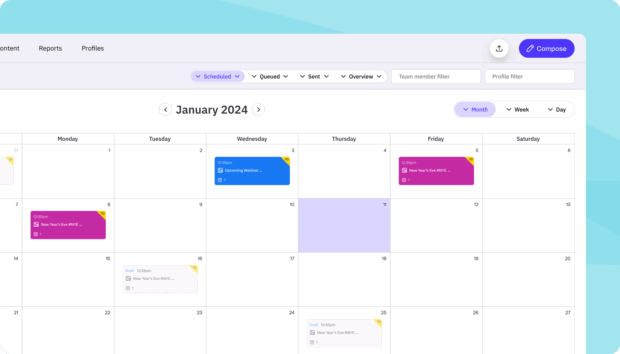
Sendible is a social media management tool built for agencies. It helps manage clients and schedule content, with simple onboarding and easy setup. That said, some features — like AI and white-label reporting — cost extra.
Best for: Small to mid-sized agencies that want a simple, client-friendly way to manage multiple social accounts in one place.
Top features:
- Scheduling and publishing tools for all major social platforms
- Centralized dashboard and shared content calendar
- Team collaboration tools and workflow approvals
- Reporting and analytics (with optional white-label reports)
- AI assistant for post ideas and caption support
Pros:
- Fast onboarding for agencies and clients
- Secure login system for client account access
- Helpful tutorials and customer support
- Simple, organized dashboard
Cons:
- No free plan
- White-label reporting costs extra
- AI tools are basic
- Limited customization compared to enterprise platforms like Hootsuite
Pricing (as of 2026): Plans start at $89 per month for the Traction Plan, which includes basic client management tools. Plans go up to $750 per month.
12. SociaPilot

Source: Social Pilot
SocialPilot offers all the basics a social media team needs: scheduling, reports, and client tools. It’s steady, reliable, and friendly to smaller agencies. However, it doesn’t rival big-league platforms in depth or innovation.
Best for: Small to medium agencies or social teams that want tools that cover scheduling, reports, and client workflows without breaking the bank.
Top features:
- Smart queues and bulk post scheduling
- Content library for reusable posts and assets
- Social inbox to manage comments and messages across platforms
- Analytics and reporting (with options to white-label)
- AI credits to assist with content ideas and captions
Pros:
- Core features offer good value
- Good client tools (approval flows, separate dashboards)
- Clean, simple interface that’s easy to use
- Flexible plans that scale with team size
Cons:
- Fewer advanced analytics or AI features than Hootsuite
- Free trial, but no free forever plan
- Some core functions (inbox, library) locked behind higher tiers
- Interface can feel a bit basic for power users
Pricing (as of 2026): Plans begin at $30 per month for 7 social media accounts, and go up to $200 per month for up to 50 accounts. A free trial is available.
13. Asana
Source: Asana
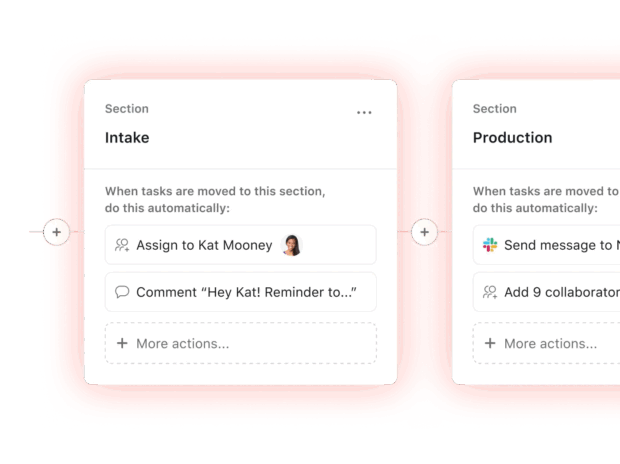
Asana is a project management platform that many social teams use to stay organized. I’ve used it to plan campaigns, track approvals, and keep content moving. But if you’re looking to schedule or publish posts, you’ll need another platform for that.
Best for: Teams that want a clear, visual way to plan and track social content, but don’t need built-in publishing or analytics.
Top features:
- Customizable task boards to organize content by stage or platform
- Timeline and calendar views to see campaigns at a glance
- Task dependencies to manage approvals and deadlines
- Real-time collaboration with comments and attachments
- Templates for social calendars and campaign planning
Pros:
- Easy to organize projects and see what’s coming next
- Great for collaboration and tracking progress
- Customizable enough to fit any workflow
Cons:
- Doesn’t post directly to social media
- No analytics or reporting for social performance
- Needs setup time to make it work for content planning
Pricing (as of 2026): Asana has a free plan for basic use. Paid plans start at $13.49 per month for more advanced workflows and features.
14. Canva Content Planner

Source: Canva
Canva Content Planner lets you schedule posts from the same place you design them. It’s not as advanced as a full social media management platform, but it’s quick, easy, and gets the job done.
Best for: Small businesses and creators who design their own visuals and want a simple way to plan and post content directly from Canva.
Top features:
- Schedule posts across Instagram, Facebook, LinkedIn, and X (Twitter)
- Create and publish content in one place
- Visual content calendar for planning ahead
- Access to thousands of templates and brand kits
- Collaboration tools for sharing feedback and approvals
Pros:
- Easy to use
- Great for visual content planning
- Saves time by combining design and scheduling
- Affordable for individuals and small teams
Cons:
- Limited analytics and engagement data
- No social listening or advanced workflows
- Not built for managing multiple brands or large-scale campaigns
Pricing (as of 2026): The Pro plan starts at $18 per month and includes the Content Planner, premium templates, and brand tools. The free plan does not include social media scheduling tools. A free trial is available.
The right tool depends on your team’s size, goals, and budget. Here are the key things to consider before you commit:
- Team size: Small teams may only need basic scheduling and analytics. Larger organizations benefit from collaboration tools, approval workflows, and shared inboxes.
- Number of accounts: If you manage more than a few profiles or brands, look for unlimited scheduling, bulk posting, and account grouping.
- Integrations: Check that your tool connects with the apps you already use, like Canva, Google Drive, Slack, or HubSpot.
- Analytics depth: Simple tools offer basic engagement data. Enterprise platforms like Hootsuite or Sprinklr provide advanced analytics and ROI tracking.
- Social listening: Not every platform includes it. If monitoring conversations or competitors matters to your social media strategy, make sure it’s built in.
- AI features: Look for tools that help with caption writing, best-time suggestions, or automatic reporting to save time.
- Budget: Start with free trials. Affordable tools like Zoho Social or SocialPilot suit smaller teams, while Hootsuite is better for mid-sized to enterprise businesses that need scale.
- Ease of onboarding: “If a platform takes weeks to set up or feels overwhelming to use, you’re already losing time,” says Christine Colling, Social Media Lead at Durable. “Look for a tool that works for you immediately and doesn’t require a degree to get started,” she adds.
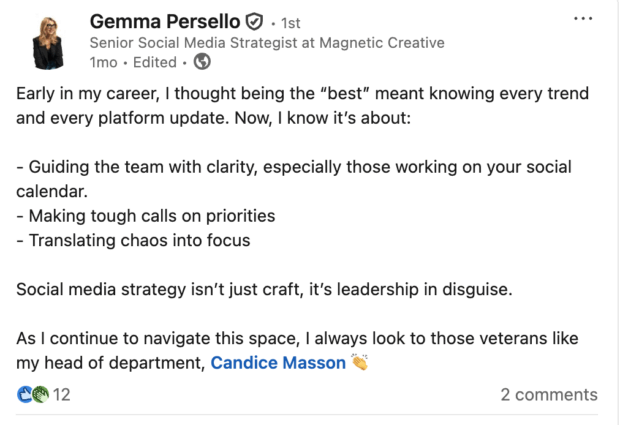
To learn how social teams can make the most of their tools, I spoke with Gemma Persello, Senior Social Media Strategist at Magnetic Creative. Here’s what she had to say about choosing the right social media marketing tools.
1. Choose tools that fit your content strategy
The best tool is the one that supports your brand’s content goals, not just the one with the longest feature list.
“A social media management tool should be chosen based on how well it supports the brand’s specific focus channels and content forms,” says Persello. “For example, if a brand wants to grow on TikTok by publishing video content, does the tool allow publishing to TikTok, selecting custom thumbnails, tags, etc.?”
Her advice: Think about where your audience is and what kind of content you’re prioritizing this year. Then, choose a tool that fits those needs.
2. Don’t treat your tools as ‘set it and forget it’
One of the biggest mistakes teams make is thinking their social media platform will do the work for them, Persello observes.
“A common mistake is treating the tool as a ‘set it and forget it’ solution,” she explains. “Teams often focus too much on scheduling content and neglect the crucial aspects of community management and real-time engagement.”
To avoid this, she recommends dedicating time every day to engagement, not just posting. “Ensure that a portion of the team’s time is always allocated for actively monitoring conversations, responding to comments and messages, and participating in relevant discussions,” she says.
She also suggests checking reports more often. “View reporting daily, weekly — not just monthly. These tools are powerful if you use them properly.”

Source: Gemma Persello
3. Choose tools that evolve with you
Even the best social strategy can fall flat if the tools can’t keep up.
“I think it’s also important to remember that the best social media management software are those that adapt,” says Persello. “The social media landscape is constantly evolving, so choosing a tool that is regularly updated with new features and integrations, and that provides excellent customer support, is vital for long-term success.”
For Persello, a good platform doesn’t just make work easier, it grows with you as your audience, channels, and needs change.
Source: Gemma Persello
FAQ: Social media management tools
What are the best social media management tools for enterprise teams?
How do social media management platforms help businesses scale operations?
What features should companies look for in a social media management tool?
How do social media management tools support collaboration, approvals, and governance?
How do businesses measure ROI using social media management platforms?
Save time managing your social media presence with Hootsuite. Publish and schedule posts, find relevant conversations, engage your audience, measure results, and more — all from one dashboard. Try it free today.