Table of Contents
Key takeaways
- Social media security threats are escalating, with AI-powered phishing, deepfake impersonation, and account takeover attacks hitting organizations of every size.
- A documented social media security policy with role-based access, two-factor authentication, and quarterly audits is the foundation of protection.
- Real-time monitoring and governed approval workflows help teams catch impersonation, scams, and breaches before they cause lasting damage.
- Enterprise tools like Hootsuite Social OS centralize security, compliance, and publishing governance in one connected system.
Social media security refers to the practices used to protect your social media accounts, information, and privacy. For organizations, it also covers who can access branded accounts and how that access is governed. These measures provide protection from threats like:
- Hacking and account takeover
- Phishing
- Malware
- Data breaches
- Identity theft
- Deepfakes and synthetic media
- Spread of misinformation
Platforms like Instagram, Facebook, and LinkedIn are relied upon for communication, marketing, and customer service. Therefore, social media security awareness is important for both business and personal accounts.
Social media security matters because a single compromised account can expose customer data, drain ad budgets, and damage a brand’s reputation in hours. Social accounts contain a wealth of data. They’re linked to personal information, customer connections, credit card details, and so much more. Without social media security protocols in place, all that information is at unnecessary risk.
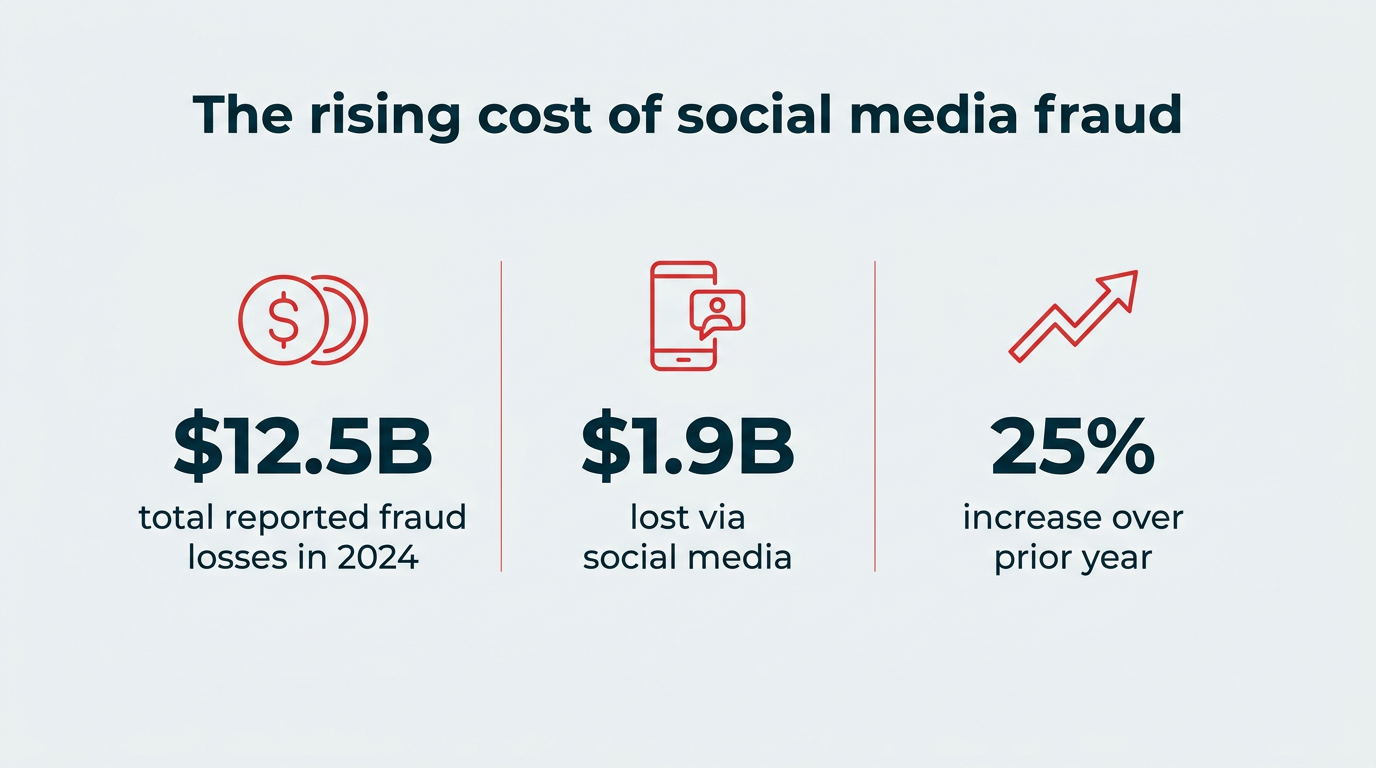
The financial stakes are significant. Consumers reported losing $12.5 billion to fraud in 2024, a 25% increase over the prior year, according to the Federal Trade Commission. Social media remains one of the most common channels scammers use to reach victims, which means impersonation of your brand can carry a direct cost to your customers.
Beyond the dollars, there’s the reputational and regulatory exposure. A hijacked account that publishes fraudulent offers, or an employee who shares regulated information, can trigger customer complaints, regulator scrutiny, and in regulated industries, legal consequences.
Treating social accounts as part of your broader risk management program is no longer optional for enterprise teams.
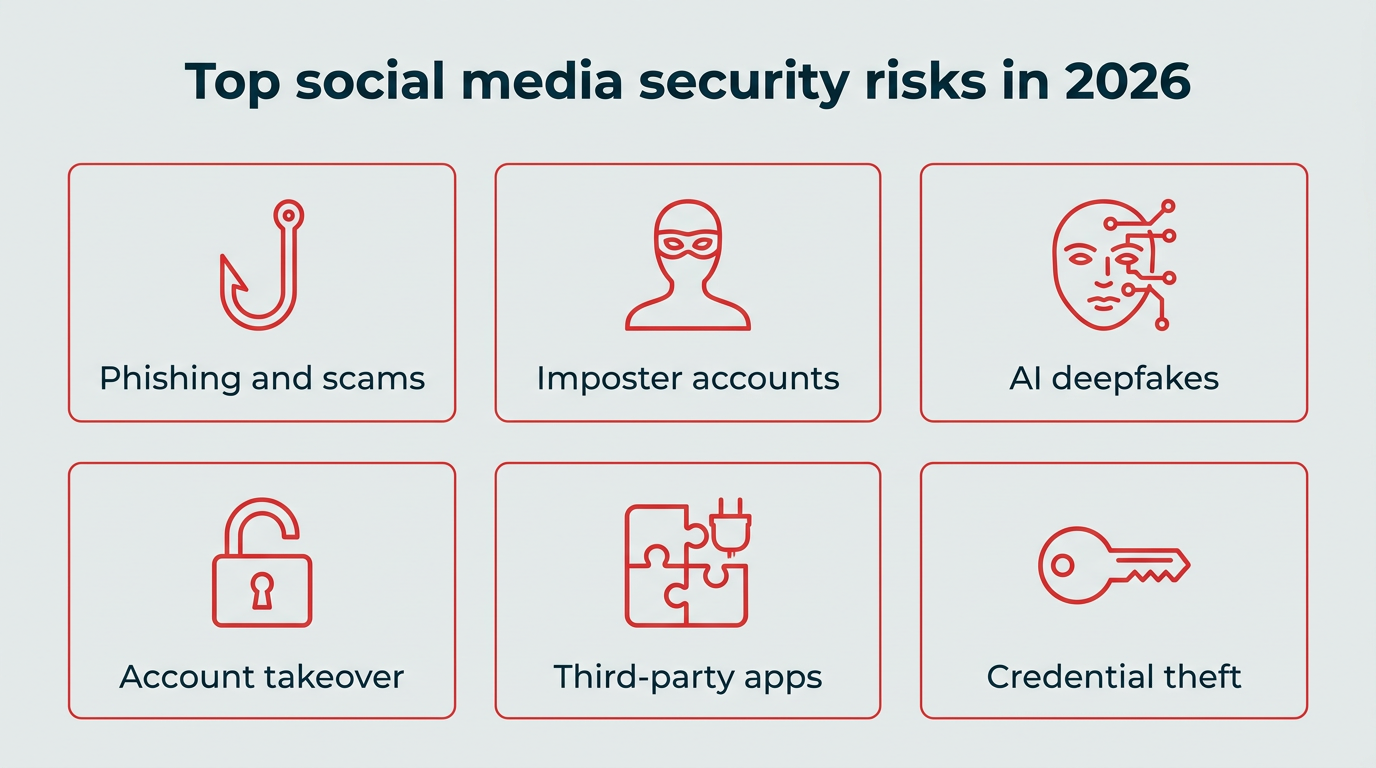
The threat landscape has shifted from opportunistic scams to organized, automated attacks. Here are the risks most likely to affect your brand accounts today.
Phishing and social media scams
Phishing scams are some of the most common social media cyber security risks. The goal of a phishing scam is to get you or your employees to hand over passwords, banking details, or other sensitive information.
The tactics vary, but most fall into a few recognizable patterns:
- Fake giveaways: Fraudsters impersonate well-known retailers to offer a significant coupon or prize, then collect personal information to “claim” the non-existent reward.
- Fake customer support: Accounts that mimic your support handle reply to customer complaints and request login or payment details.
- Investment and crypto pitches: Often run through hijacked or impersonated business accounts to borrow credibility.
- Lottery and inheritance claims: Someone claims to be a lottery winner who wants to share their winnings.
Online shopping and investment scams are also significant problems on social media. Of the 2024 fraud reports the FTC received where consumers identified how they were contacted, social media accounted for $1.9 billion in reported losses, more than any other contact method.
Social media is also the most common contact method for scammers targeting working-age adults, which makes brand impersonation a shared problem between your marketing and security teams.

Source: Federal Trade Commission
Imposter and fake accounts
Imposter accounts are profiles built to look like they belong to your company, and they’re relatively easy to create. This is one reason why getting verified on social networks is so valuable.
Impostor accounts can target your customers, employees, or prospective hires. Your connections may be tricked into handing over confidential information. In turn, your reputation suffers. Imposter accounts may also try to con employees into handing over login credentials for corporate systems.
The volume is substantial. LinkedIn’s Community Report shows the platform took action on tens of millions of fake accounts, with automated defenses blocking 97.8% of them at registration and 99.7% stopped proactively before a member report. A small share, however, was only caught after members reported the accounts, which is why monitoring your own brand mentions still matters.

Source: LinkedIn
Meta reports similar scale on Facebook, where it actions hundreds of millions of fake accounts each quarter and estimates that roughly 4–5% of monthly active users are fake.
AI-powered phishing and deepfake threats
AI has changed social engineering from a manual craft into a scalable operation. There’s a lot of information about your business, and your employees, on social media. That’s not new. What is new is the ability to gather crumbs of information from multiple sources and use it to generate convincing, targeted content at volume.
That plays out in a few ways:
- Spear phishing at scale: Attackers scrape LinkedIn and other profiles to generate personalized messages that reference real colleagues, projects, and reporting lines.
- Deepfake audio and video: Synthetic clips of executives are used to authorize payments or request credentials, often delivered through DMs or follow-up calls.
- Synthetic profiles: AI-generated photos and bios make fake recruiter, partner, and support accounts far harder to spot.
- Chatbot impersonation: Automated accounts that mimic your support tone and respond instantly to customer complaints.
Deepfake attacks are no longer theoretical. A Gartner survey found 62% of organizations experienced one in the past year. The scale is well documented: in one widely reported case, a Hong Kong finance employee transferred roughly $25 million after joining a video call where every other participant was a deepfake of a senior colleague.
Audiences are struggling to keep up too. Roughly 20% of Gen X say it’s hard to tell what’s real or fake regarding social content generated by AI. Younger generations find it only slightly easier: 15% of Millennials and 14% of Gen Z also struggle here.

AI tools can also give scams a veneer of legitimacy. In one case in point, a Canadian man was scammed by a fraudulent Facebook customer support line. He felt comfortable giving his information to the scammer because a chat with an AI assistant told him the phone number he found online was legitimate. It was not.
Malware attacks and account takeovers
Account takeover happens when an attacker gains direct control of your profile, usually through stolen credentials, malware, or a compromised employee device. In one of the more public examples, the X (formerly Twitter) U.S. Securities and Exchange Commission account was hacked in January 2024, with the false post moving markets within minutes.
If hackers gain access to your social media accounts, they can cause enormous brand reputation damage.
A newer threat to social media business accounts is hijacking a social media ad account with attached payment methods. They can then run fraudulent ads that appear to come from a legitimate source (you) but actually direct the user to malware or scams.

Source: W/Labs
Vulnerable third-party apps
Locking down your own social accounts is great. But hackers may still be able to gain access through vulnerabilities in connected third-party apps.
Instagram specifically warns about third-party apps that claim to provide likes or followers:
“If you give these apps your login information … they can gain complete access to your account. They can see your personal messages, find information about your friends, and potentially post spam or other harmful content on your profile. This puts your security, and the security of your friends, at risk.”
Audit your connected apps at least once a quarter. Revoke access for anything you no longer use, anything tied to a former employee, and any tool your team can’t identify. Every active integration is another door into your account.
Password theft and credential attacks
Those social media quizzes asking about your first car or elf name might seem like harmless fun. But they’re a common method for gathering password information. Or to learn personal details that are often used as forgotten password clues.
By completing them, employees can compromise their cyber security on social media.
Credential theft remains one of the most reliable ways into an account. Verizon’s 2025 Data Breach Investigations Report found that stolen credentials were involved in 22% of breaches, and that reused passwords give attackers access across multiple systems once a single set leaks.
Employees can also unwittingly provide clues to their forgotten password hints. This info may appear in posts about life events. Think: graduations, weddings, and birthdays. It’s always best to limit personal information shared online, especially on public profiles.
Social media security best practices for 2026
Now that you know the risks, here’s how to mitigate them. Start with these eight practices:
- Use strong, unique passwords and a password manager
- Enable two-factor authentication and passkeys
- Limit access with role-based permissions
- Train employees on social media security awareness
- Set up real-time monitoring and alerts
- Review and update privacy settings regularly
- Secure mobile devices and connections
- Audit your security measures quarterly
Use strong, unique passwords and a password manager
Password hygiene is the cheapest security win available to your team. Every social account should have its own long, randomly generated password that appears nowhere else in your stack.
A few rules worth writing into policy:
- Use a password manager: It removes the temptation to reuse or write down credentials, and makes rotation painless.
- Aim for length over complexity: A long passphrase is harder to crack than a short string of symbols.
- Never share passwords over chat or email: Use a social media management platform with permissions instead.
- Rotate after any staff change: Especially for accounts that were shared before you moved to role-based access.
Enable two-factor authentication (and passkeys)
Two-factor authentication is not foolproof. But it does provide a powerful extra layer of protection for your social media accounts. It’s best practice to enable it for all secure social media accounts, even if it can sometimes be annoying.
In fact, a lack of two-factor authentication contributed to the SEC account hack.
Where a platform supports them, passkeys are the stronger option. Passkeys replace passwords with a cryptographic credential tied to your device, which means there’s nothing for a phishing page to capture. Facebook, Instagram, X, and LinkedIn all support passkey or authenticator-app login, and app-based codes are preferable to SMS wherever you have the choice.
Limit access with role-based permissions
Limiting the number of people who can access and post on your social accounts is an important defensive strategy.
You might focus on threats coming from outside your organization. However, employees are a significant source of accidental data breaches.
You may have whole teams of people working on social media messaging, post creation, or customer service. But not everyone needs to know the passwords to your social accounts, or have the ability to post. Apply the principle of least privilege: give each person the narrowest access that lets them do their job, and nothing more.
You can use Hootsuite to collaborate on secure social media without sharing passwords. Permissions are assigned by role-based access, and content moves through an approval workflow before anything goes live. If someone leaves the company, you disable their seat instead of resetting every platform password.

Train employees on social media security awareness
Your team is the layer attackers target first, so training deserves the same cadence as any other security control. Fold social media specifics into onboarding, then refresh at least twice a year.
Cover these points:
- How to spot impersonation: Fake recruiter DMs, lookalike support handles, and urgent requests from “executives.”
- Run phishing simulations: Include social DMs, not just email, so the exercise reflects how attacks actually arrive.
- Make reporting easy: One named contact and one channel, with no penalty for false alarms.
- Explain the personal-account overlap: Quizzes, location tags, and life-event posts can feed credential attacks on work systems.
Set up real-time monitoring and alerts
Real-time monitoring is how you catch a problem while it’s still small. Keep an eye on all of your social channels, including the ones you use every day and those you’ve registered but never used.
Use your social media monitoring plan to watch for:
- Imposter accounts using your name, logo, or executive photos
- Suspicious activities, including unexpected logins or posts
- Phishing links or fake promotions attributed to your brand
- Inappropriate mentions of your brand by employees
- Inappropriate mentions of your brand by anyone else associated with the company
- Negative conversations or sudden sentiment shifts about your brand
Lumen, the integrated insights and listening app inside Hootsuite Social OS, surfaces these signals across social and web sources so your team gets alerted to spikes, sentiment swings, and impersonation attempts as they happen rather than after a customer complains.
Review and update privacy settings regularly
Privacy settings drift as platforms ship changes, so schedule a review rather than assuming last year’s configuration still holds. This applies to both your personal and business accounts.
People seem to be well aware of the potential privacy risks of using social media. In fact, 81% of U.S. adults feel data collected by companies will be used in ways they’re not comfortable with. Those concerns, of course, don’t stop people from using their favorite social channels. The number of active social media users has grown to more than 5.7 billion, which means an enormous pool of potential targets.
Make sure you and your team understand privacy policies and settings. Check what’s visible to the public on each profile, what’s exposed in employee bios, and which audience defaults apply to new posts. Provide privacy guidelines for employees who use their personal social accounts at work, or to talk about work.
Secure mobile devices and connections
Most social publishing happens on a phone, which makes device security part of your social security posture. Surprisingly, 16% of Americans never use phone locking features such as a passcode, fingerprint, or face recognition. Their social accounts and other data are completely accessible to anyone who gets their hands on their mobile device.

Source: Pew Research Center
Failing to update phone software also exposes users to unnecessary risk. Only 42% of American smartphone users have their software set to update automatically, and 3% never update their smartphone software at all.
For any device used to access brand accounts, require a screen lock, turn on automatic updates, enable remote wipe, and use a VPN on public Wi-Fi. Open networks in airports, hotels, and cafes are easy places to intercept traffic or spoof a login page, so treat them as untrusted by default.
Audit your security measures quarterly
Social media security threats are constantly changing. Quarterly security audits of your social media measures, alongside your regular social media audit, will help keep you ahead of fraudsters.
At least once a quarter, review:
- Social network privacy and security settings: Platforms routinely change these. X disabled two-factor authentication via text message for non-premium users, then rolled out passkeys as a login option. Both are security changes that belong in your policy.
- Access and publishing privileges: Check who has access to your social media management platform and publishing rights on each account. Make sure former employees have had their access revoked, and that anyone who changed roles no longer holds access they don’t need. Confirm ownership of each account is documented as part of your social media governance model.
- Connected third-party apps: Revoke anything unused or unrecognized.
- Recent online security threats: Maintain a good relationship with your IT team so they can keep you informed of new risks and social engineering tactics. Big hacks and major new threats will also be reported in mainstream news outlets.
- Your social media policy and guidelines: As new networks gain popularity and new threats emerge, a quarterly review keeps the document useful.
A social media security policy is the document that turns good intentions into enforceable practice. It defines who can access your accounts, what they can publish, and what happens when something goes wrong. Build on your broader social media policy for employees rather than creating a separate, competing document.
Include these components:
- Account inventory and ownership: Every branded account, who owns it, and who has access.
- Password and authentication requirements: Minimum length, password manager use, mandatory two-factor authentication or passkeys, and rotation triggers.
- Access levels and approval workflows: Which roles can draft, approve, and publish, and how content moves between them.
- Rules for personal social media use: What’s acceptable on business equipment, and what employees should avoid, such as quizzes that ask for personal information.
- Device and software standards: Screen locks, automatic updates, VPN use, and rules for public Wi-Fi.
- Threat recognition guidance: How to identify and avoid scams, phishing, impersonation, and deepfake attempts.
- Incident response plan: Who to notify, in what order, and how quickly, if an account is compromised or a security concern arises.
- Review cadence: A named owner and a set date each quarter to revisit the document.
Ownership usually sits with social or communications, co-signed by IT security and legal. In regulated industries, loop in compliance early, since publishing rules and record-keeping obligations will shape your approval workflow. A policy nobody has read won’t protect you, so pair it with training and make it part of onboarding.
Enterprise governance and compliance
Enterprise governance is what keeps a policy working across dozens of accounts, regions, and teams. At scale, manual checks break down, so the controls need to live inside the systems your team already publishes from.
That usually means three things: centralized permissions so access is granted and revoked in one place, governed approval workflows so nothing publishes without the right sign-off, and an audit trail so you can show a regulator or auditor who published what and when. For teams in finance, healthcare, and the public sector, that audit trail is often the difference between a manageable incident and a reportable one.
Social media security checklist for 2026
Use this as a quick reference when you’re setting up or reviewing your program.
Security action | Frequency | Responsible team |
|---|---|---|
Confirm two-factor authentication or passkeys on every account | Monthly | Social media team |
Review who has access and publishing rights | Quarterly | Social media lead and IT |
Audit and revoke connected third-party apps | Quarterly | IT security |
Check platform privacy and security settings | Quarterly | Social media team |
Monitor for imposter accounts and brand mentions | Daily | Social media team |
Rotate passwords after any staff or role change | As needed | Social media lead |
Run phishing and social engineering training | Twice yearly | IT security and HR |
Review and update the social media security policy | Quarterly | Social, IT, and legal |
Test the incident response plan | Annually | Social, IT, and comms |
Verify device locks, updates, and VPN use | Quarterly | IT security |
No single tool covers every risk, so most teams combine a governed publishing platform with external threat monitoring. Here’s how the options compare.
Tool | Best for | Key security features | Pricing model |
|---|---|---|---|
Hootsuite Social OS | Teams that need governance, monitoring, and publishing in one system | Role-based access, governed approval workflows, Lumen listening, compliance controls, audit trails | From $99/user/month; Enterprise custom |
ZeroFOX | External threat intelligence and brand impersonation takedowns | Automated alerts on fake accounts, malicious links, and scams | Custom, quote-based |
1Password Business | Credential management across social and internal systems | Shared vaults, access controls, breach monitoring, passkey support | Per-user subscription |
1. Hootsuite Social OS
With Hootsuite, team members never need to know the login information for any social network account. You control access and permissions so everyone gets only the access their role requires, and you can disable a seat the moment someone leaves without touching platform passwords.
From there, content moves through governed approval workflows that route drafts from creator to approver automatically. Notifications make sure everyone knows when an approval or revision is waiting, and every action is logged, which gives you the audit trail compliance teams ask for.
For regulated teams, Hootsuite’s Proofpoint integration adds another review layer by automatically checking social content against your policy and relevant regulations before it publishes.

Learn more about setting up Proofpoint here.
Hootsuite is also an effective social monitoring tool that keeps you ahead of threats. Lumen, the integrated insights and listening app, watches social and web sources for mentions of your brand and keywords, so you know right away when suspicious conversations emerge.
For example, say people are sharing phony coupons, or an imposter account starts posting in your name. You’ll see that activity in your streams and can take action before your customers get scammed.
Hootsuite is also FedRAMP authorized and Cyber Essentials compliant. Learn more about our risk management program and information security policies.
Meet the Suite
Understand what matters, decide what to do next, and take action across every social workflow — all from one connected suite.

2. ZeroFOX

Source: ZeroFOX
ZeroFOX is a cybersecurity platform that provides automated alerts of:
- Dangerous, threatening, or offensive social content targeting your brand
- Malicious links posted on your social accounts
- Scams targeting your business and customers
- Fraudulent accounts impersonating your brand
It also helps protect against hacking and phishing attacks, and supports takedown requests for impersonating accounts and domains.
3. 1Password Business

Most social account takeovers start with a stolen or reused password, which is why a business password manager belongs in your security stack. 1Password Business gives teams shared vaults with permissions, so credentials for accounts that can’t use role-based access are still controlled rather than passed around in chat.
It also supports passkeys, flags credentials that appear in known breaches, and lets you revoke a departing employee’s access in one step. Pair it with your publishing platform and your team never needs to see a raw social password.
Credential hygiene handles one risk. For the comment-level threats that reach your audience directly, such as spam links and phishing replies, build content moderation into your monitoring routine so problem comments are hidden before followers click through.
FAQ: Social media security
How do I secure my social media accounts?
What are the most common social media security risks?
Which is the most secure social media platform?
What are the top 3 social media privacy concerns?
What should a social media security policy include?
How can AI be used to attack social media accounts?
What is two-factor authentication for social media?
How often should I audit social media security?
What tools help protect social media accounts from hackers?
Save time managing your social media marketing strategy with Hootsuite. Publish and schedule posts, find relevant conversions, measure results, and more â all from one dashboard. Try it free today.