Table of Contents
Social media advertising is a brand’s best bet for reaching new audiences in 2026 (and yes, even the followers who never seem to see your posts).
By putting budget behind your social strategy, you take control of who sees your content, with precise targeting that traditional advertising can’t match.
Keep reading to find out if social media advertising is a good fit for your business, how much you should set aside to get started, and which social networks to prioritize.
Key takeaways
- Social media advertising uses paid ads on platforms like Facebook, Instagram, and LinkedIn to reach specific audiences beyond organic posts.
- Paid social ads can help brands hit clear goals, such as building awareness, driving website traffic, or increasing conversions.
- Most social platforms offer multiple ad formats, including image, video, carousel, and Stories ads, giving brands flexibility in how they show up.
- Successful social ad campaigns start with a clear objective, strong audience targeting, and ongoing performance tracking.
- Key metrics to monitor include reach, engagement, click-through rate (CTR), and conversions. These metrics help you improve future campaigns.
Social media advertising is a form of digital advertising where brands pay to reach their target audiences on a social platform like Facebook, Instagram, TikTok, LinkedIn, or X.
The number of people who see your social media ads is referred to as your “paid reach.” This is different from your “organic reach,” which refers to people who see your content when it’s distributed by a platform’s algorithm.
Social advertising is constantly evolving, too.
Standard Meta (then Facebook) ads are no longer the only way to reach users. Advertisers can now take advantage of the rise of new platforms such as TikTok, Snapchat, Reddit, and others that are constantly updating their advertising capabilities to stay competitive.
Social media advertising helps businesses reach the right people, control their ad spend, and measure results more clearly than most other marketing channels.
Let’s take a closer look at its benefits below:
- Specific audience targeting. Social platforms offer very detailed ad targeting. When you micro-target users with ad campaigns, you reach only the audience most interested in your products, which maximizes your ad spend.
- Real-time adjustments. Social ads provide instant feedback. You can easily gauge the effectiveness of an ongoing campaign and make changes based on performance, including reallocating budget to your best-converting ads with just a few clicks.
- Simple ROI tracking. It’s not always easy to calculate the return on investment (ROI) of your overall social strategy, but social ad metrics and reporting show you the real value of your work in dollars and cents.
The most important social media advertising platforms are the ones your target audience actually uses — but for most brands, YouTube, Facebook, and Instagram offer the largest reach across age groups.
Here’s a quick summary of age demographics from the Pew Research Center, noting the percentage of U.S. adults who say they use a specific platform.
| Platform | Ages 18-29 | Ages 30-49 | Ages 50-64 | Ages 65+ |
| 68 | 80 | 74 | 57 | |
| 80 | 62 | 40 | 19 | |
| X (Twitter) | 33 | 25 | 16 | 10 |
| Snapchat | 58 | 31 | 13 | 4 |
| YouTube | 95 | 92 | 85 | 64 |
| 37 | 40 | 30 | 20 | |
| 48 | 35 | 16 | 6 | |
| TikTok | 63 | 44 | 30 | 12 |
| Threads | 15 | 10 | 6 | 3 |
Source: Pew Research Center
TL;DR: Overall, YouTube and Instagram see strong adoption among Gen Z and millennials, while Facebook offers a broad reach across older age groups. Platforms like Snapchat and TikTok skew younger, making them more effective for targeting audiences under 40.
Of course, age is just one factor to consider when prioritizing your advertising on social media.
Not every channel is the right channel for you. It’s best to understand what value each channel provides and who your target audience is. Where can you find the right audience interested in your product or service? What is your ideal demographic? Do you have enough budget to be on multiple channels without spreading yourself thin? Once you have answers to a few of these questions, it’s easier to determine which platform to use.
For more demographics details, check out our full guide to social media demographics for marketers.
Here are the paid social media advertising campaign objectives and formats available on each of the major social platforms.
Facebook Ads
Facebook ads objectives
- Awareness: Introduce your brand to more people.
- Traffic: Send traffic to your website.
- Engagement: Bring in more likes, comments, and shares.
- Leads: Direct viewers to a lead-generation form.
- App promotion: Promote your app or game.
- Sales: Drive sales conversions.
Facebook ad formats
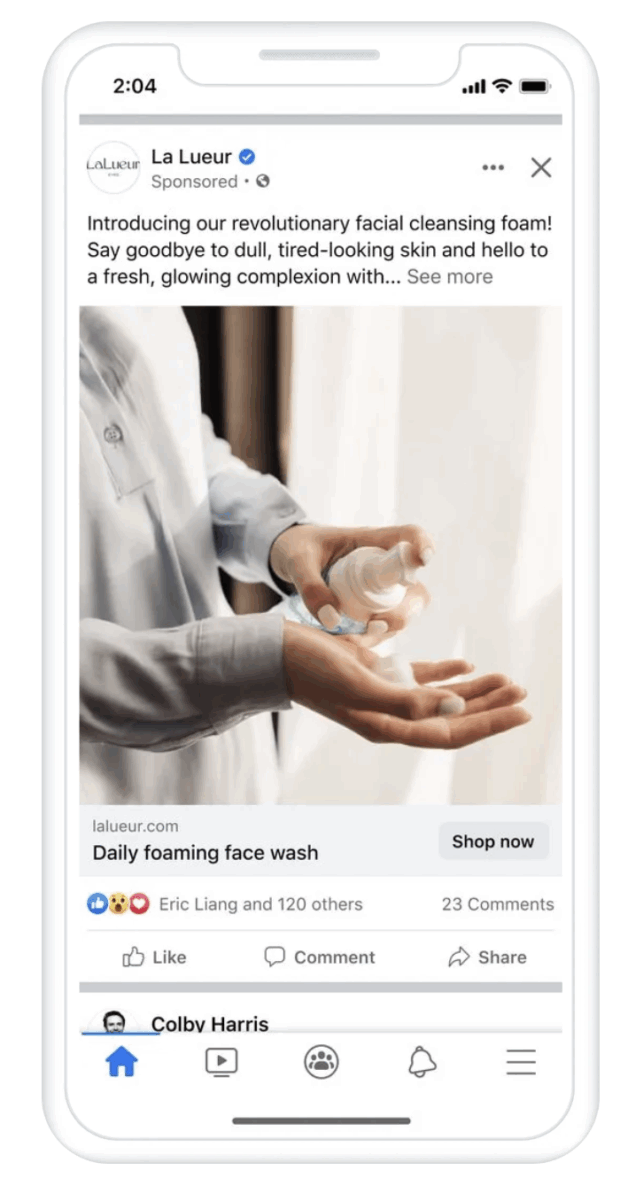
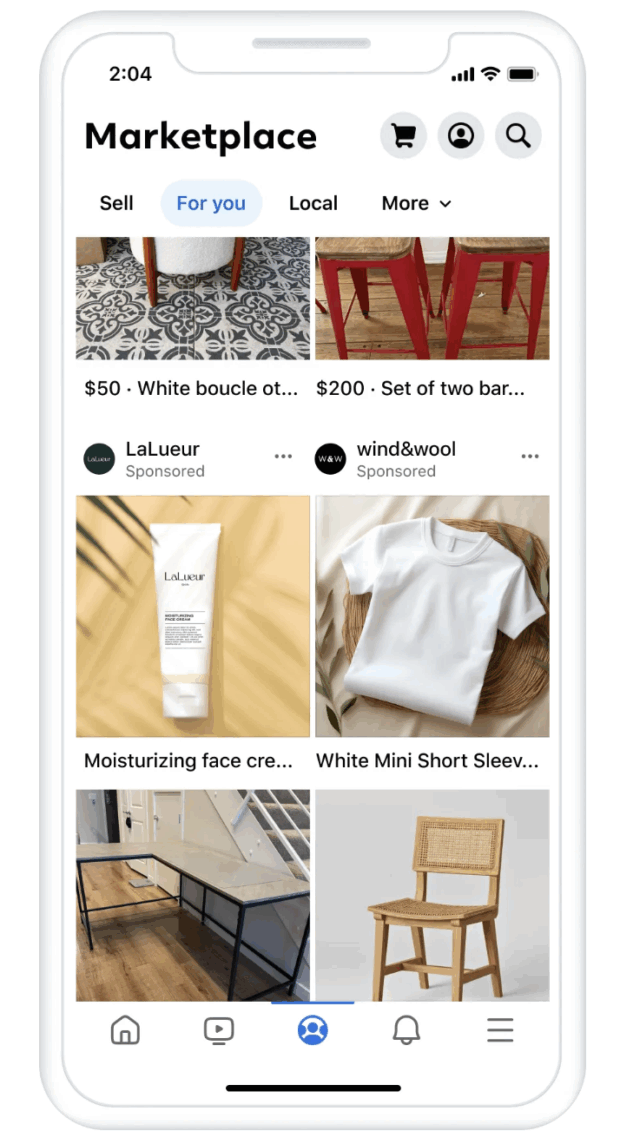
- Photo: A single image (not necessarily a photo) to promote your products, services, or brand.
- Video: A vertical or horizontal video designed for quick engagement or deep dives.
- Stories: A full-screen, vertical video that appears between Stories.
- Messenger: Within Messenger, users can start a conversation with your brand.
- Carousel: Up to 10 images or videos that users can swipe through, each with its own headline, description, or link.
- Slideshow: A video ad made from images and text that uses less data than standard video ads.
- Collection: A mobile-first shopping experience that lets people browse and purchase products directly within the app.
- Playables: Interactive previews that allow users to try an app before downloading.
For more details, head over to our Facebook Advertising Guide.
Instagram Ads
Instagram ads objectives
- Awareness: Introduce your brand to more people.
- Traffic: Send traffic to your website.
- Engagement: Bring in more likes, comments, and shares.
- Leads: Direct viewers to a lead-generation form.
- App promotion: Promote your app or game.
- Sales: Drive sales conversions.
Instagram ad formats
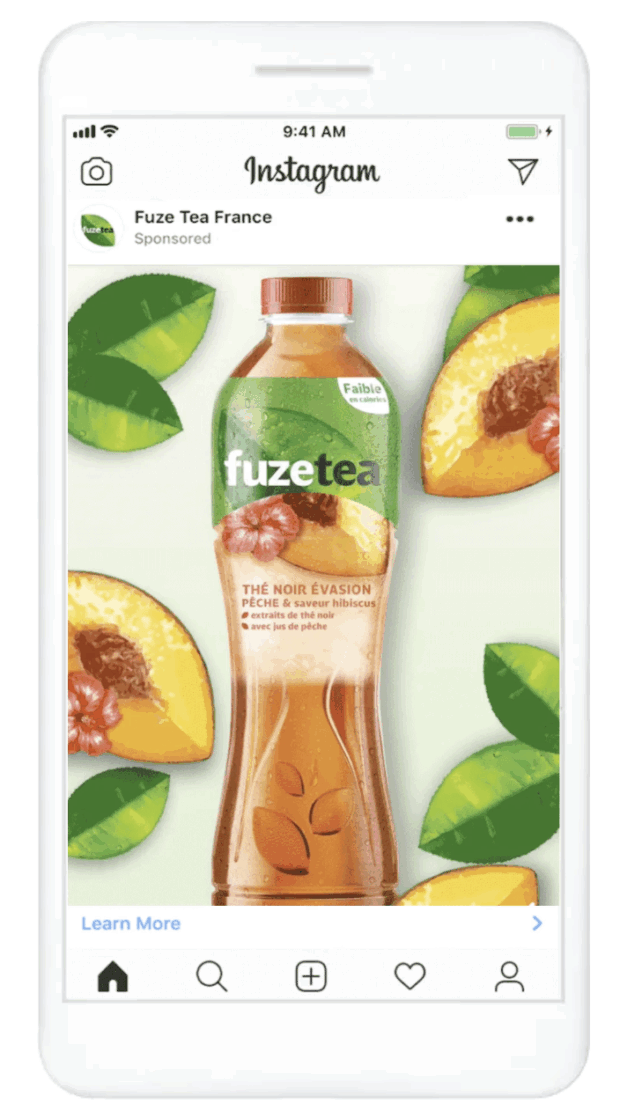
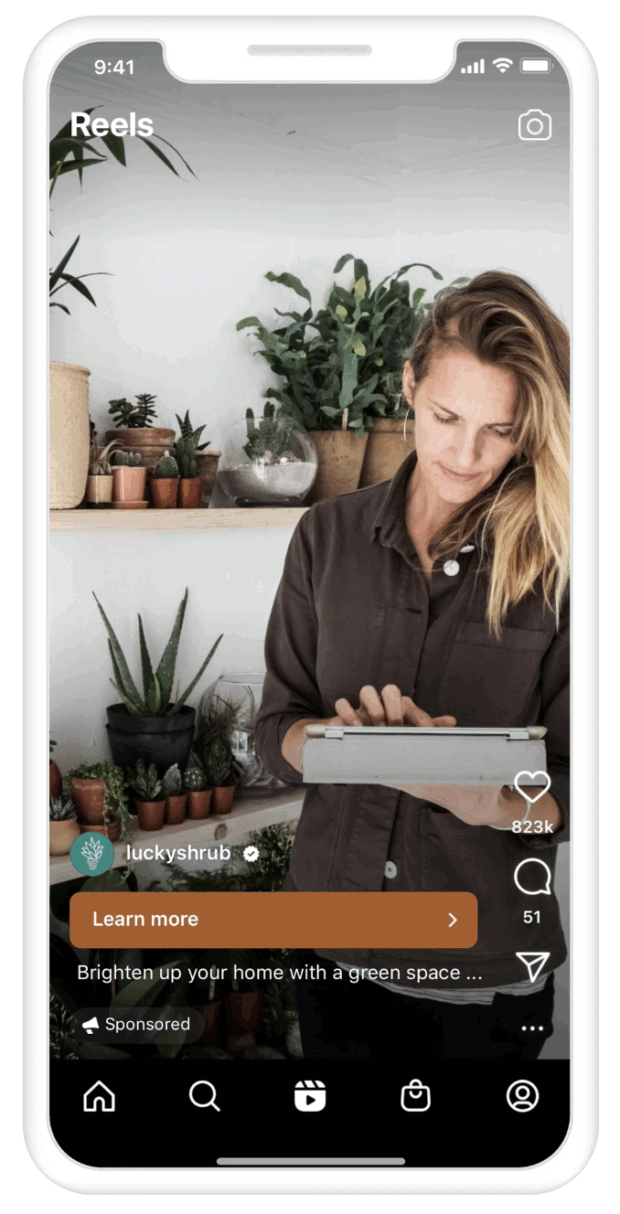
These are mostly the same as the options for Facebook, since both types of ads are created through Meta Ads Manager.
- Photo: A single image (not necessarily a photo) to promote your products, services, or brand.
- Video: A square or horizontal video
- Stories: A full-screen, vertical video that appears between Stories.
- Carousel: Up to 10 images or videos, each with its own headline, description, or link.
- Reels: A full-screen, vertical video that appears between Reels and within the feed.
- Instagram Shop: Carousel or collection-style ads featuring square images, where users can check out either on your website or directly within an Instagram Shop.
Read more in our guide to Instagram Advertising.
TikTok ads
TikTok ads objectives
- Reach: Introduce your brand to more people, especially younger audiences.
- Traffic: Send traffic to your website.
- Video views: Get more video views.
- Community interaction: Increase traffic to your profile page.
- Product sales: Drive sales conversions.
- Website conversions: Drive other conversions, like adding an item to cart or registering for your newsletter.
- Lead generation: Direct viewers to a lead-generation form.
- App promotion: Promote your app or game.
TikTok ads formats
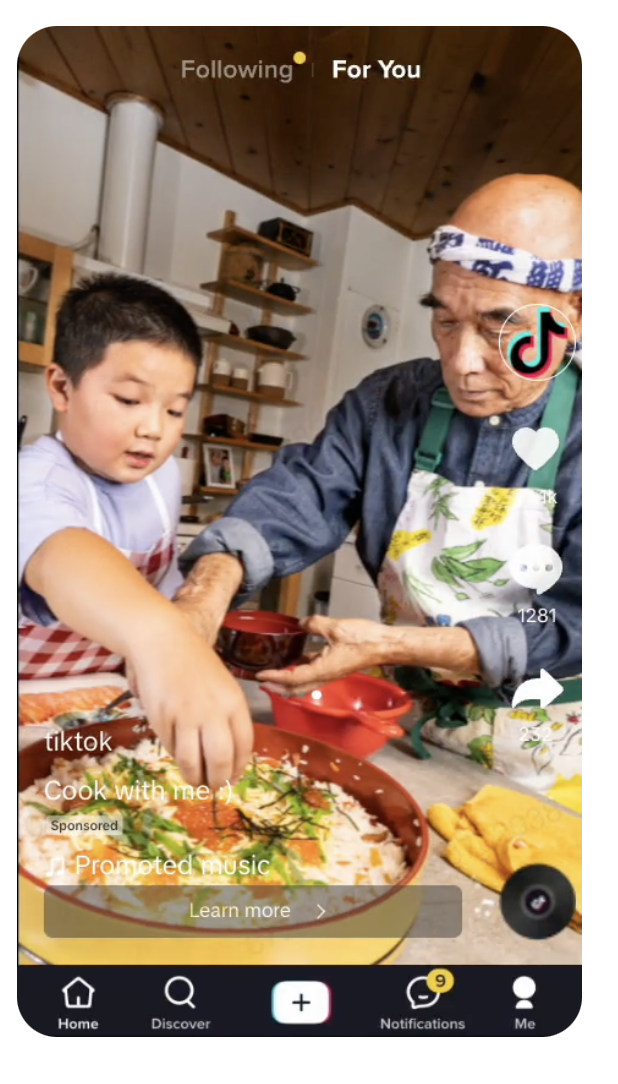
- Image: A single full-screen image to promote your products, services, or brand.
- Video: A full-screen video ranging from 5 to 60 seconds.
- Carousel: A swipeable series of 2 to 35 images, with clickable images or calls to action depending on your campaign objective.
- TopView: A video ad shown as soon as someone opens TikTok. It starts with a 3-second video takeover before transitioning into an in-feed video. Only available through a sales representative for qualified customers.
- Spark ads: Boosted organic posts that let brands amplify their own content or posts from creators (with permission).
- Playable ads: Offer a preview of your app or game.
- Live shopping ads: Ads that allow viewers to browse and purchase products during a TikTok live stream.
- Video shopping ads: Shoppable videos that let users purchase products directly from your product catalog.
Learn more in our guide to TikTok ads
X (Twitter) ads
X (Twitter) advertising objectives
- Reach: Introduce your brand to more people.
- Video views: Get more video views.
- App installs: Promote your app or game.
- Website traffic: Send traffic to your website.
- Engagement: Drive more likes, replies, reposts, and so on.
- App re-engagement: Get existing but infrequent users of your app to re-engage.
- Website conversions: Increase sales and other conversions, like adding an item to cart or registering for your newsletter.
X ads formats

- Promoted Ads: The core X ad format (formerly Promoted Tweets), which can include text, images, videos, or carousels.
- Vertical video ads: Full-screen, sound-on mobile ads. This is the fastest-growing ad surface on the platform.
- X Amplify: Pre-roll ads that appear before video content in 15+ categories.
- X Takeovers: Spotlight Takeover puts sponsored ads on the Explore tab, while Timeline Takeover puts ads at the top of a user’s timeline when they open X.
- X Live: Ad budget to your X Live to maximize reach.
- Dynamic product ads: Retargeting ads that appear when someone has engaged with a product on your website.
- Collection ads: A hero image paired with smaller product thumbnails, allowing users to browse multiple destinations from a single ad.
Take a deeper dive into advertising on X.
Snapchat ads
Snapchat ads objectives
- Awareness: Introduce your brand to more people and drive traffic to your website.
- Snap promote: Promote a specific story to get more subscribers.
- Promote places: Advertise a physical location.
- App installs: Send viewers to the app store to download your app or game.
- Drive traffic to website: Send traffic to your website.
- Drive traffic to app: Promote your app or game.
- Engagement: Bring in more likes, comments, and so on.
- Video views: Get more video views.
- Lead gen: Direct viewers to a lead-generation form.
- Website conversions: Drive sales and other conversions, like adding an item to cart or registering for your newsletter.
- Catalog sales: Drive sales conversions from your catalog.
- App conversions: Drive conversions within your app.
- Calls and texts: Encourage viewers to call or text your business with a tap.
Snapchat ads formats
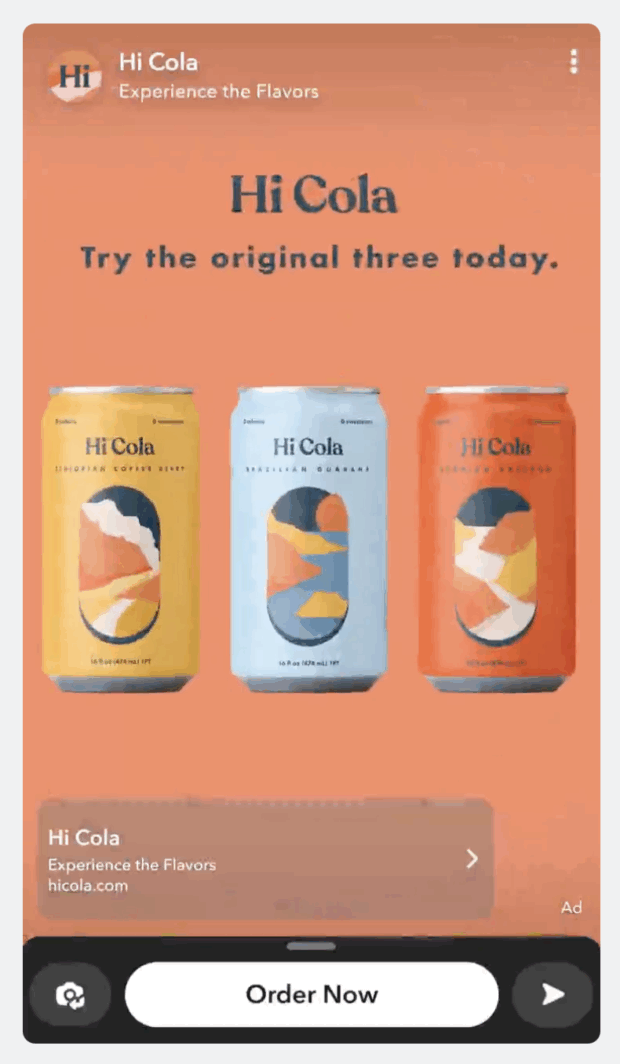
- Single image or video ads: A single image or video with a CTA.
- Collection ads: Swipeable, tappable product tiles.
- Sponsored snaps: Ads sent directly to users’ inboxes as Snaps. Users can reply, and brands can enable automated responses to continue the conversation.
- Story ads: A series of video or image ads that users can tap through like a normal Story experience.
- AR lenses: Interactive, sponsored camera filters.
- AR filters: Image overlays that users can add to their Snaps.
- Commercials: Non-skippable video ads up to 3 minutes long, with the first 6 seconds required viewing.
LinkedIn ads
LinkedIn ads objectives
- Brand awareness: Introduce your brand to more people.
- Website visits: Send traffic to your website.
- Engagement: Bring in more likes, comments, shares, and so on.
- Video views: Get more video views.
- Lead generation: Direct viewers to a lead-generation form.
- Website conversions: Drive sales and other conversions, like adding an item to cart or registering for your newsletter.
- Job applicants: Promote job opportunities to qualified LinkedIn members based on skills and experience.
LinkedIn ads formats

- Single image ads: A single image to promote your products, services, or brand.
- Video ads: Native video ads ranging from 3 seconds to 30 minutes.
- Carousel ads: A swipeable set of 2 to 10 clickable cards.
- Event ads: Ads designed to drive registrations for events, linking directly to your event landing page.
- Document ads: In-feed ads that let users open and read documents like PDFs, Word files, or PowerPoint decks — best for lead generation.
- Thought leader ads: Ads that promote organic content from individual LinkedIn profiles, such as executives or subject-matter experts.
- Click-to-message ads: Ads that open a pre-filled message in LinkedIn Messaging when users click the call to action.
- Article and newsletter ads: Sponsored long-form content that appears directly in the feed. When paired with the Lead Generation objective (Article Ads only), the CTA reads “Unlock Article.”
- Sponsored Messaging: Direct messages sent to your target audience’s LinkedIn inbox.
- Spotlight ads: Right-rail desktop ads that highlight a specific product, service, or event.
- Follower ads: Right-rail desktop ads designed to bring in new followers.
Get all the step-by-step instructions in our LinkedIn advertising guide.
Pinterest ads
Pinterest ads objectives
- Brand awareness: Introduce your brand to more people.
- Video view: Rather than just bringing in more views, this objective aims to maximize play times and completion rates.
- Consideration: Increase Pin clicks and outbound clicks.
- Conversions: Drive conversions like adding an item to cart or registering for your newsletter.
- Catalog sales: Drive sales conversions from your catalog.
Pinterest ads formats

- Image ads: A single image to promote your products, services, or brand.
- Video ads: Video Pin ads are available in standard or max width, with max width expanding across the full mobile screen.
- Carousel ads: Swipeable ads featuring 2-5 images.
- Shopping ads: Single-image ads pulled directly from your product catalog.
- Collections ads: A mobile-only format with one hero image and three smaller product thumbnails.
- Idea ads: Multi-page Pins that combine video, images, text, and lists.
- Showcase ads: Multi-card ads, each with its own interactive features and links.
- Quiz ads: An interactive multiple-choice ad with options for multiple outbound links.
- Premier spotlight ads: A full-day placement using max-width video on the Pinterest home feed and search page, designed for major launches or seasonal moments. Availability is limited.
- Top of Search ads: Premium ads that appear in the top search results and within Related Pins for relevant queries. Availability is limited.
- Local inventory ads: Ads that show nearby Pinterest users which products are available in-store, helping drive foot traffic.
Learn more in our guide to Pinterest ads.
YouTube ads
YouTube ads objectives
- Awareness: Introduce your brand to more people
- Consideration: Make your brand top of mind when people start thinking about making a purchase
- Action: Drive sales and other conversions, like adding an item to cart or registering for your newsletter.
YouTube ads formats

- In-stream ads: Skippable or unskippable (up to 30 seconds) videos that run before, during, or after other videos.
- Bumper ads: Non-skippable video ads up to 6 seconds long that appear before, during, or after a video.
- In-feed video ads: Video ads shown as a thumbnail with text that appear in search results, next to related videos, and on the mobile YouTube homepage.
- YouTube Shorts ads: Swipeable video or image ads that appear between Shorts in the Shorts feed.
- Watch feed ads: Ads that appear in the recommended video feed on mobile and beside the video player on desktop.
- Masthead ads: Premium placements that autoplay at the top of the YouTube desktop or mobile app, available only through a Google sales representative.
Learn more about YouTube advertising.

Build and post ads for Facebook, Instagram, LinkedIn, and X. Our targeting and reporting are seriously easy.
Start free 30-day trial1. Good Protein combines brand ads with creator content

The protein shake brand Good Protein ran a social media advertising campaign on TikTok in which they used Spark Ads to promote creator content alongside brand ads. Creators shared everything from recipes to reviews, while the brand answered questions through video responses.
Why this works: Social media users often trust creators more than brands themselves. Showcasing a variety of voices improved average watch time by 25%.
2. PureGym embraces “real Reels”

PureGym ran lo-fi, handheld Reels ads designed to blend seamlessly into the Reels feed. By mirroring the look and feel of organic content, the ads felt more native — helping drive stronger watch time and engagement.
Why this works: Brands can sometimes be tempted to make their ads look a little too slick. But it can be more effective to match the style of the typical organic content found on the surface you’re using.
Going more casual gave PureGym a 5.6x increase in Thruplays over previous Reels ads. Bonus: The ads were cheaper and faster to create than their usual, more formal ads.
3. NARS Cosmetics boosts ROI with Instagram Shop ads

NARS Cosmetics tested shopping ads that allowed customers to checkout via their Instagram Shop versus ads that directed customers to the NARS website to complete their purchase.
They found that adding the Instagram Shops checkout option increased ROI by 6% and decreased cost per purchase by 24%.
Why this works: This is a prime example of why testing is so important. The ad pointing customers to the NARS website was working just fine. Why mess with a good thing? Would customers be as willing to check out within the Instagram Shops interface? In fact, they were more willing to do so, something NARS would never have known without testing.
4. Cetaphil gets trendy on Pinterest

Cetaphil leaned into trending topics paired with the Pinterest Trend Badge to show Pinners that they were aligning their content (and new products) with statistically significant trends on the platform.
Why this works: Cetaphil put in the research before launching their campaign. They used keyword research to learn that people were searching for “simple skincare routine” and “skin types.” They used that information to inform their ad creative strategy, leading to a 4.5% increase in brand awareness.
Social media ad costs vary by platform and format, but most brands can expect to pay between $4 and $10 per thousand impressions (CPM) in 2026.
Overall, CPMs have been increasing across major social platforms, a sign that competition for attention is getting tougher.
Here’s a look at 2025 average CPMs for each social media channel:
Keep in mind these are pricing benchmarks, not guarantees. Your actual costs will depend on factors like who you’re targeting, when your ads run, how competitive your industry is, and even the day of the week.
The tips below show how to use paid ads to strengthen your existing social strategy rather than replace it.
1. Let organic performance inform your ads
High-performing posts make the best candidates for social ads. In fact, the easiest way to advertise on social media is to boost a top-performing, high-quality organic post.
Use what you’ve learned from your organic posts, user-generated content, or influencer partnerships as a starting point for your social media advertising strategy. Make sure to treat each platform as its own experiment, since results will vary depending on the audience.
2. Run A/B tests
Testing one ad against another to determine what works best and refine your strategy is known as A/B testing.
Optimizing ads is all about testing hypotheses. That means test, test, and test some more. You need to determine which creative resonates best, explore new platforms your audience might be on, and take advantage of new features and placements that may help give you an edge.
It’s a best practice to test several ads with small audiences to determine what works best. Then, use the winning ad for your main social marketing campaign.
We teach you the details in our guide to social media A/B testing.
3. Know what business objective you’re trying to achieve
It’s awfully hard to achieve your goals if you don’t know what your goals are in the first place.
“Campaign ‘success’ can mean many things,” says Bruce-Kotey. “To determine success, you have to start with a clear goal or OKR.”
Understanding your ultimate goal is critical. It ensures you choose the right social network to advertise on and find the right advertising solution within that platform. Your goal will even guide your creative strategy.
4. Know your target audience
Know exactly who you’re trying to reach to take maximum advantage of the targeting options and maximize your ROI.
Developing audience personas can help you understand exactly which audience segments to focus on.
Pro tip 💡: If you have a brick-and-mortar business, try using “geofencing” to target mobile users so they only see ads when they are close enough to walk in your front door.
5. Measure results and report on them
Having concrete data on ad performance, and how they contribute to business goals (purchases, leads, and so on) is a key part of proving (and improving) ROI.
Knowing which ads are most cost-effective will ensure you get the budget you need to continue your work.
The major social networks offer analytics to help you measure the results of ads.
You can also use tools like Google Analytics and Hootsuite Advanced Analytics to measure results across networks from a single dashboard. A social media report is a great way to track your results and look for great content to promote with social ads.
Manage social media advertising campaigns
When you manage your social ads alongside your organic content, you can clearly see the overall picture of your social content strategy. You can compare performance, juggle your budget, and really dig deep into the relative ROI of each campaign.
If you’re already using digital marketing tools like Mailchimp, HubSpot, or Salesforce, you can integrate those, too, so you have all your sales data in one place.
Here’s how to do it:
- From Hootsuite Composer, click Create, then choose the platform on which you want to run your campaign.
- Choose your objective, audience, budget, and timing.
- Add text and media to create your ad right in Composer. You can preview how it will look in different formats as you work.
- Submit your ad for review by the social platform.
- Once your campaign is running, use the analytics in Hootsuite Social Advertising to get detailed insights into the performance and ROI of your ad(s).

Manage boosted posts
The easiest way to create a social media advertisement is to boost a post. You can do this using native tools on some of the social platforms.
However, the more efficient way is to manage your boosted posts for Facebook, Instagram, and LinkedIn all from one place, alongside your organic content for all platforms in the Hootsuite dashboard.
Tip: Learn more about the difference between boosted posts and other kinds of advertising on social media.
You can schedule your boosted posts in advance as part of a campaign, and even set triggers so that your best organic posts are automatically boosted when they hit certain performance triggers.

If you have limited time (we see you, solo social media managers!), this is a hands-off way to expand your reach with social media advertising.
Here’s how to do it:
- In your Hootsuite dashboard, go to Advertise and select the type of post you want to boost: Facebook, Instagram, or LinkedIn.
- Choose your objective, audience, and placements, and click Boost (or Sponsor, for LinkedIn posts). That’s it!

FAQ: Social media advertising
What is social media advertising and how does it work?
Which social media advertising platforms deliver the best ROI?
How should enterprises build a social media advertising strategy?
What are social media advertising best practices for B2B and B2C brands?
How do you measure the success of social media advertising campaigns?
Integrate your paid and organic social strategies to strengthen connections with existing customers and reach new ones. Use Hootsuite Social Advertising to easily keep track of all of your social media activity—including ad campaigns—and get a complete view of your social ROI. Try it for free.