Table of Contents
Key takeaways
- A social media calendar organizes every upcoming post by date, platform, copy, and assets, giving your team a single view of what’s going out and when.
- Building one starts with a clear social media strategy, then moves into planning your posting schedule, brainstorming content, and scheduling with a tool like .
- The best calendars track more than dates: they include approval status, content pillars, campaign tags, and accessibility fields so reporting and optimization are built in from the start.
- A social media content calendar is not the same as a general content calendar. It focuses specifically on social posts, platform-specific formats, and publishing workflows.
A social media calendar is a strategic plan of all upcoming content, organized by publish date and platform. It captures every detail of a post, including copy, hashtags, images or videos, and any platform-specific features, so your team can publish consistently and on schedule.
A social media calendar can live in a spreadsheet, a document, or a project management tool. (We’ve got a free social media calendar template to get you started.)
In short, a social media content calendar turns scattered post ideas into a single, shared publishing plan your whole team can work from.

Social media calendar vs. content calendar: What’s the difference?
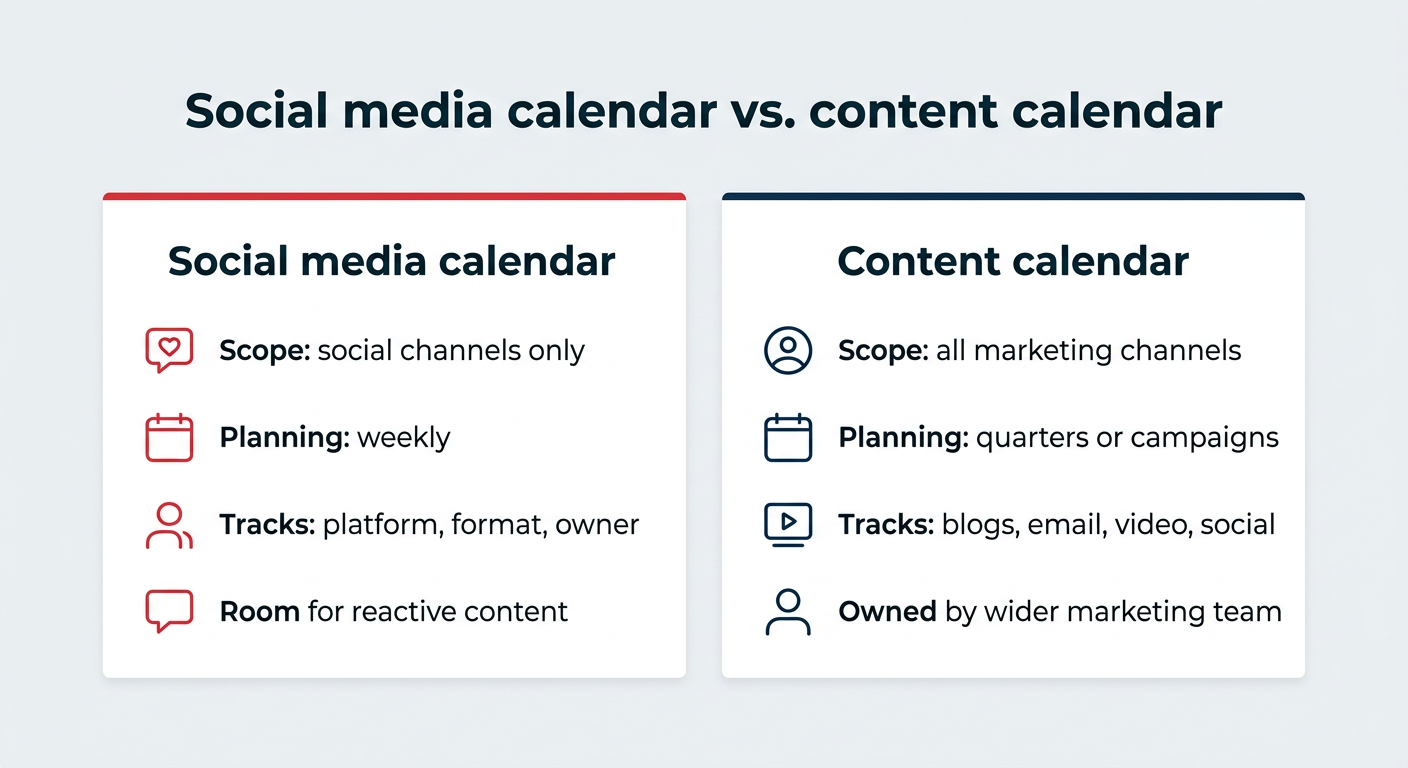
The difference comes down to scope. A content calendar maps all of your marketing content across every channel, including blog posts, email campaigns, landing pages, video, and social. It’s usually owned by the wider marketing team and planned in longer cycles, like quarters or campaigns.
A social media calendar zooms in on one channel. It tracks what publishes on each platform, when it goes live, which format it uses, and who owns every step from draft to approval to publish. Because social moves faster than most other channels, it also needs more room for reactive content.
Plenty of teams run both. The content calendar sets the themes and campaign dates, and the social media calendar handles the day-to-day posting schedule that brings those campaigns to life.
A social media calendar helps your team publish more consistently, plan smarter, and stop scrambling at the last minute. Before we get into the seven biggest benefits, here’s how to tell whether your team is ready for one.
Signs your team is ready for a social media calendar
If your team posts on more than one platform, runs multiple campaigns, or has more than one person involved in creating or approving content, a social media calendar will save you time and improve your results. A few telltale signs:
- You post on multiple social platforms. 84% of U.S. adults use YouTube, 71% use Facebook, and half use Instagram — each with different formats, audiences, and tones. A calendar keeps your team organized and turns social media from a daily scramble into a predictable rhythm.
- You want your content to perform better. When you’re posting on the fly, it’s tough to know what’s working. With a calendar, you can nail your content mix (oops, five carousels in a row), spot gaps, and post when your audience is actually active.
- Your audience is spread across different time zones. With social platforms reaching 5.75 billion users in 2026, a calendar helps you plan and schedule posts for when your global audience is actually awake (no late-night posting required).
- You have several team members creating or approving content. With a shared calendar, your team can easily track deadlines and approvals so everyone is on the same page.
- You manage multiple campaigns at once. When campaigns overlap, everything can start to blur. A calendar lays it all out on a single timeline so you can spot conflicts, space out messages, and keep your audience excited, not exhausted.
- You’ve forgotten to post (or posted twice by accident). A calendar helps you see what’s coming up, and with the right tool (like Hootsuite), you can schedule posts in advance so you never forget to hit “publish.”
- You plan content around seasons or events. Big dates arrive quickly, but a calendar helps you prep content early and hit every key moment on schedule.
If even a few of these sound familiar, it’s time to start using a social media calendar.
1. Organizes your work
A social media calendar brings structure to your publishing schedule. Instead of jumping between spreadsheets or platforms, you can see every post in one place.
In other words, you get a bird’s eye view to ensure your schedule is on track.

2. Aligns content with strategic goals
Once you have a calendar, it’s easier to zoom out and make sure every post has a purpose — whether it’s building awareness, driving engagement, or supporting a product launch.
Without one, you risk creating content last minute that may not align with your brand or your marketing strategy goals.
Here’s how Eileen Kwok, Former Social Strategist at Hootsuite, thinks about it: “At Hootsuite, we’re not making content for the sake of making content. We’re making content that aligns with our strategy, but also has fluidity with different formats.”
3. Identifies gaps
A social media calendar makes it easy to spot missing posts or gaps in your content mix (e.g., too many carousels, not enough video, or a week with nothing planned for LinkedIn).
It also surfaces missing assets before they become a problem. Do scheduled posts have all the assets they need? Are we missing any graphics or captions for product launches?
With everything mapped out in advance, you’re not chasing the design team for an urgent graphic request the day a campaign launches.
4. Improves team collaboration
Between writers, designers, social managers, and approvers, it’s easy for communication to get messy. A shared calendar helps everyone stay aligned.
At Hootsuite, we take this to the next level with custom approval workflows in Perch. Assign posts, track progress, and get sign-off fast.

5. Makes room for high-impact work
Scheduling content in advance means fewer last-minute scrambles. It frees up your team to focus on higher-impact work, like creative ideas, campaign strategy, and engaging with your audience.
And with a clear calendar, you can plan around design deadlines, approvals, and anything else that slows things down.
6. Gives you flexibility to adapt
Social moves fast. Even with the best plan, trends pop up, campaigns pivot, and algorithms change unexpectedly.
A social media calendar keeps you flexible when things change quickly. You can rearrange social media posts, slot in timely content, and keep your strategy on track.
7. Makes reporting easier
A social media calendar doubles as a record of what’s been published and why, making reporting faster. You’ll see how every post ties back to campaigns and goals, so your data actually means something.
With Perch, you can track paid and organic posts side by side in one calendar. No more bouncing between different dashboards.
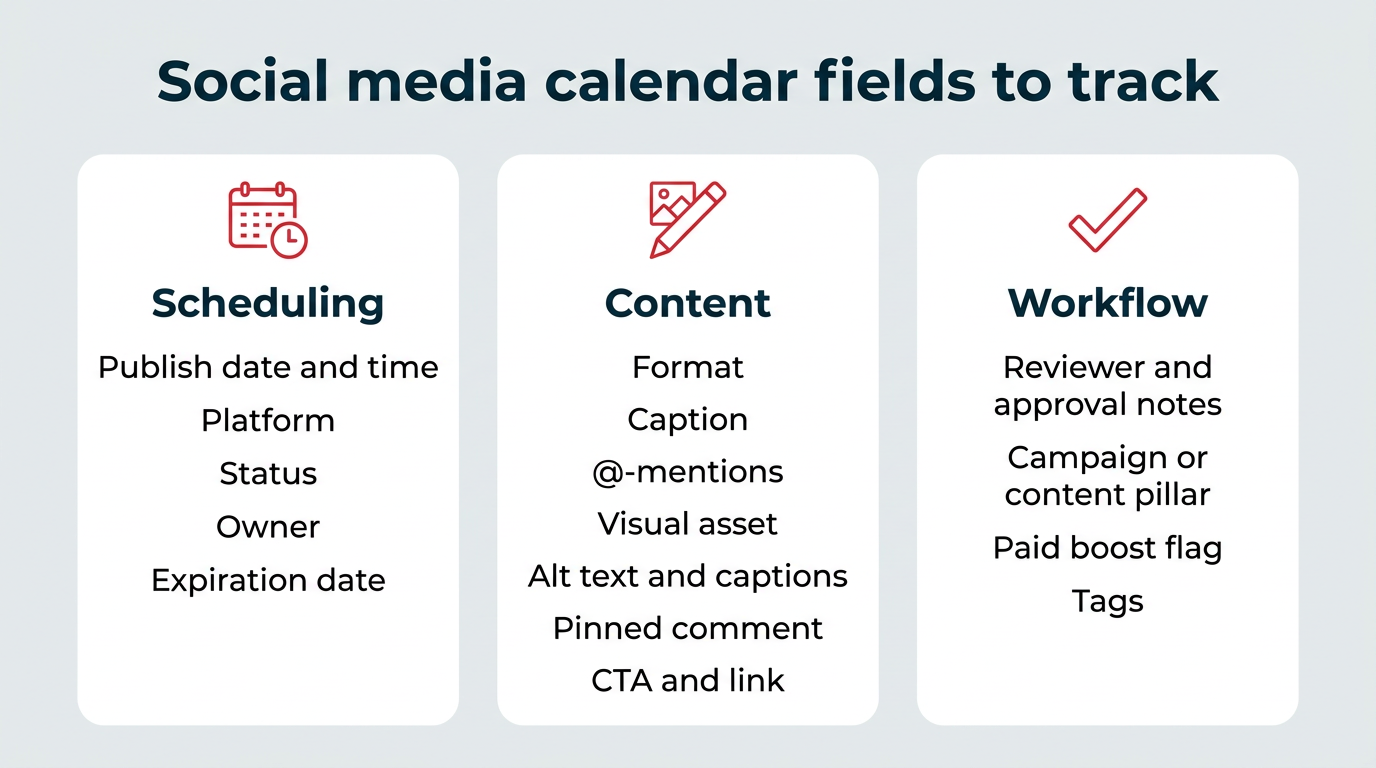
At minimum, every social media calendar should include the date, time, platform, copy, asset, and link for each post. But the best calendars go further, tracking every post across three core areas: scheduling, content, and workflow. Here’s a quick summary of the fields:
| Category | Fields to track | Why it matters |
|---|---|---|
| Scheduling | Publish date and time, platform, status, owner, expiration date | Keeps your posting schedule predictable and shows who owns what |
| Content | Format, caption, @-mentions, visual asset, alt text and captions, pinned comment, CTA and link | Ensures every post is complete, accessible, and ready to publish |
| Workflow | Reviewer and approval notes, campaign or content pillar, paid boost flag, tags | Makes approvals traceable and reporting easy after the fact |
Here’s what each category looks like in more detail.
Scheduling
- Publish date and time: When the post goes live.
- Platform(s): Where it goes live.
- Status: Draft, in review, approved, scheduled, or live.
- Owner: The person responsible for creating and scheduling the post.
- Expiration date: When the post should be archived, if necessary (e.g., after an expired offer or event).
Content
- Format: Reel, carousel, Story, static image, video, text, etc.
- Caption: The final approved copy, including any relevant hashtags.
- @-mentions: Any accounts tagged in the post.
- Visual asset: The final image or video file, linked.
- Alt text and captions: Accessibility fields for image alt and video subtitles.
- Pinned comment: A comment pinned under the post at publish time, often used for extra hashtags, links, or a conversation starter.
- CTA and link: The action and the destination URL. We recommend using a UTM link to track performance.
Workflow
- Reviewer and approval notes: The person who signs off. This could include someone from legal.
- Campaign or content pillar: The theme, launch, or initiative the post supports.
- Paid boost flag: Whether the post will be promoted or not.
- Tags: Labels for sorting and reporting later.
Most teams won’t need every field from day one, but the more you track, the easier it is to report, optimize, and repurpose down the line.
Social media calendar examples
Social media calendars come in a few common formats, and the right one depends on how many people touch your content. Here are three examples you can copy.
Example 1: Spreadsheet calendar
A spreadsheet is the simplest starting point. Each row is a post, and columns cover date, time, platform, caption, asset link, and status. It works best for solo social managers or small teams who want full control without learning a new tool. Our free social media calendar template is set up this way.

Example 2: Project management calendar
If your marketing team already plans work in a project management tool, your social calendar can live there too. Our team maps out the week in Wrike, color-coding each post by content pillar, then sends the finished posts to Perch for scheduling. This format is best when several people draft, design, and approve content.

Example 3: Publishing tool calendar
A publishing tool calendar shows scheduled posts across every network in one view, plus paid and organic side by side. This is the format most teams graduate to, because the calendar and the publishing happen in the same place.

Get your free social media calendar started today with our template. It’s set up in Google Sheets, so you can copy it and start planning in a couple of minutes.
Once you’ve got the template, the next question is usually how often to post and when. Our research across millions of posts gives you a starting point for your posting schedule:
| Platform | Recommended frequency | Best time to post (Hootsuite data) |
|---|---|---|
| 3-5 posts/week | 3 PM to 9 PM Mondays, 5 AM to 8 AM and 3 PM to 7 PM Tuesdays, 4 PM to 5 PM Thursdays | |
| Instagram Stories | 2/day | Same windows as feed posts |
| 1-2 posts/day | 9 AM on Tuesdays | |
| X (Twitter) | 2-3 posts/day | 9 AM to 11 AM Wednesdays, Thursdays, and Fridays |
| 1-2 posts/day | 4-6 AM Tuesdays and Wednesdays | |
| Threads | 2-3 posts/day | Test against your own audience data |
| TikTok | 3-5 posts/week (up to 14 for maximum engagement) | 6 AM to 9 AM on Thursdays |
| 1 post/week | Test against your own audience data |
Two notes on frequency. Across Facebook, Instagram, LinkedIn, and X, our data shows engagement peaks at around two posts per week, so you don’t need to post daily to see results. TikTok is the outlier, where posting up to 14 times per week correlates with the highest engagement. For a fuller breakdown, see our guides on how often to post and the best times to post.

Here’s the underlying engagement data by platform, if you want to see how those recommendations were reached.
And here are the engagement heatmaps behind the best-time-to-post recommendations.
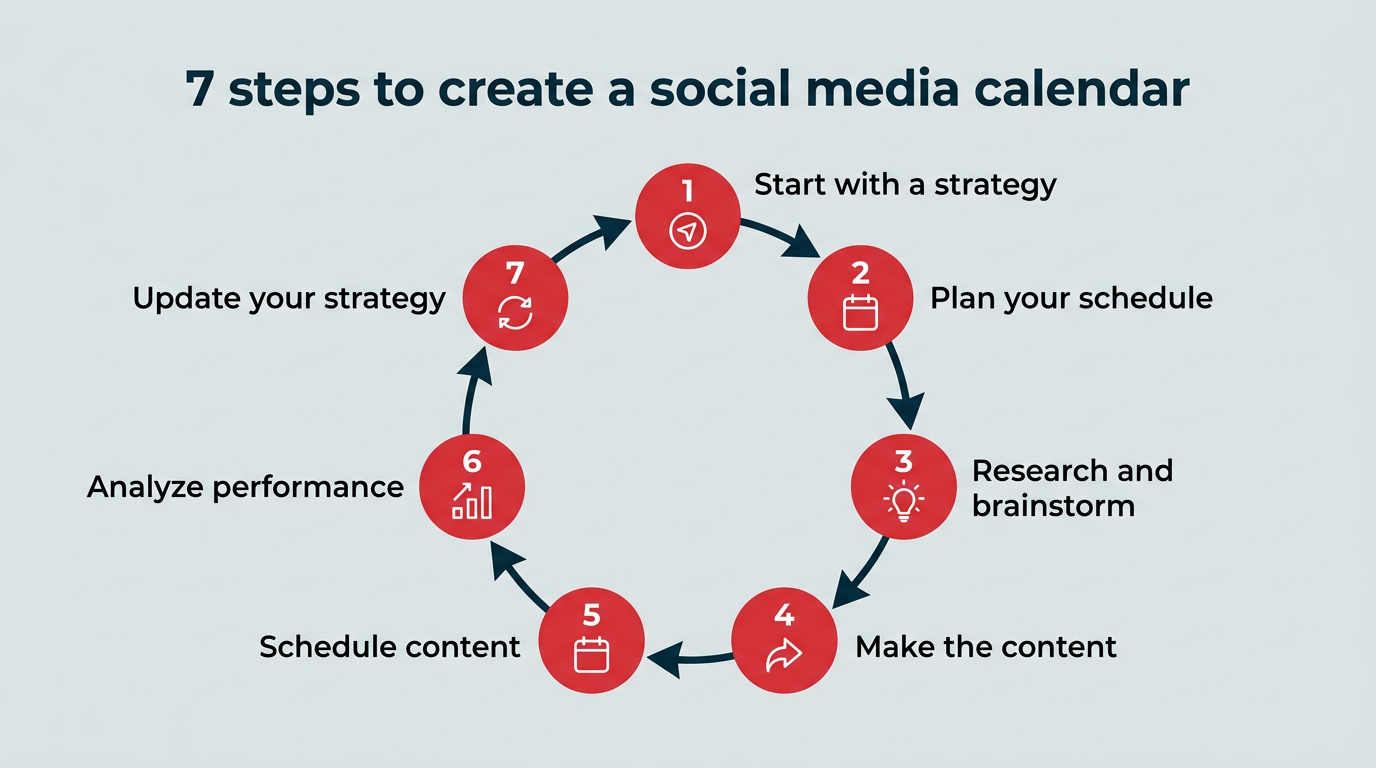
Building an effective social media calendar involves defining your strategy, planning your content, and refining your approach over time. Here’s the seven-step process we use at Hootsuite:
- Start with a social media strategy
- Plan your content schedule
- Research and brainstorm content
- Make the content
- Schedule content
- Analyze performance
- Regularly update your content strategy
1. Start with a social media strategy
Start by writing down what you want social to achieve and how you’ll measure it, because your calendar is only as good as the strategy behind it.
That means doing the less exciting things first — like pulling analytics using social media analytics tools, figuring out content pillars, and analyzing post performance — before you get to the fun things: post ideas, content creation, and testing.
Your social media strategy should include:
- Clear goals: Use the S.M.A.R.T. framework to set goals that tie directly to your business or marketing goals.
- Key metrics: Define the specific metrics that will measure your progress in reaching those goals.
- Audience insights: Get to know your audience through personas and social listening.
- Competitive analysis: Study what works (and doesn’t) for others in your space.
- Platform and content pillars: Choose which social platforms you’ll use, then outline the themes and formats you’ll post about (e.g., educational videos, promos, or company culture).
- Approval workflows: Set up clear approval workflows so everyone knows who reviews and signs off on content before it goes live.
- Reporting routine: Schedule regular check-ins to review analytics, report progress, and update your strategy.
Each social network is so different in the way it prioritizes content, and people use those networks differently. We learned a lot about this in our consumer trends report. How we show up on each network needs to be different to match the audience’s expectations.
Take the time to create or review your social strategy before jumping into creating a social content calendar. Get started or revamp your current one with our free social media strategy template.
2. Plan your content schedule
Turn your goals into a real posting schedule by deciding how many posts each platform gets per week, and who owns them.
You might prefer monthly or biweekly planning, depending on your goals, team size, and content volume. The key is consistency. A predictable schedule keeps your team aligned and your content balanced.
At Hootsuite, we plan content weekly. It gives us enough structure to organize campaigns, but still lets us pivot quickly when a trend pops off.
For example, when LinkedIn pushed out a new algorithm update, we created a post to educate our audience and meet the moment.

That said, sometimes we schedule posts months in advance if they’re part of a large campaign, such as our annual Social Trends report releases or promotional webinar content.
3. Research and brainstorm content
Once you know how many posts you need — and which content pillars they’ll support — it’s time to brainstorm ideas.
Here are a few ways to brainstorm social content:
- Start with social listening: See what your audience is talking about, what they love, and where they’re confused. This helps uncover gaps and opportunities.
- Use data and feedback: Look at comments, DMs, and post analytics to see what’s resonating and what needs tinkering.
- Write creative briefs: Once an idea sticks, outline what you need (think: visuals, captions, tone, and any platform-specific details).
- Repurpose what works: One high-performing idea can become multiple pieces of content across social media channels.
At Hootsuite, we use Miro to store (and share) all our social content ideas. Again, use whichever tool works best for your team. It can be as simple as a shared spreadsheet, document, or a note on your phone.

Social listening is especially valuable, and it’s a huge part of our brainstorming process. It helps us see how people talk about our brand, use Hootsuite, and how our content helps them manage social better.
For example, our Reel about the 80/20 rule — creating content that’s 80% educational, 20% promotional — came straight from social listening. It’s not a new concept, but social listening told us a portion of our audience weren’t familiar with it. We turned that insight into an educational post that performed well.

4. Make the content
Now it’s time for the fun part: making the actual content! Here’s how to approach it:
- Choose the right tools: Use whichever tools work for your team and the types of content you’re creating. Our team mainly uses CapCut and Canva to create high-quality content.
- Create in batches: Producing multiple posts at once saves time and helps you stay consistent. At Hootsuite, we create content months in advance for large campaigns or special initiatives, like our free educational webinars.
- But leave room for trends: Keep space in your schedule for more reactive content. Sometimes we create and post content within the same day to take advantage of a social media trend.
- Align to your pillars: Every post should ladder back to your content pillars. This keeps your messaging consistent from the first draft to the final post. Below, you can see what our content pillars looked like last year.

Pro tip 💡: There was a myth circulating that Instagram Reels created with third-party tools like CapCut get less reach vs. if you create them in-app with Instagram’s native tools. Not to worry — we experimented and found Instagram does not penalize Reels made with CapCut (or other apps).
5. Schedule content
Pick a recurring day to load your finished posts into a scheduling tool, then publish on autopilot. Most teams do this weekly, biweekly, or monthly. The key is finding a rhythm that lets you stay organized and flexible.
For example, our team plans and schedules content every Friday. One perk of doing this weekly? If a hot trend pops up, we can shift things quickly and avoid any delays in posting due to approval or misalignment with ongoing marketing campaigns.
A big part of scheduling content is making sure you’re striking the right content mix. In other words, you have enough content to satisfy each pillar: awareness, consideration, and retention/conversion.
To manage this, we color-code posts by content pillar in Wrike (see the example above) so we can easily see if we have a good mix of content for the upcoming week.
It’s also a good idea to look for content gaps and opportunities. For example, we might notice we only have a few videos planned and choose to create more (61.3% of social ad spend now goes to video), or add something educational if we’re lacking in the consideration pillar.
Once your content is finalized, scheduling it in a dedicated tool keeps everything running smoothly. We finish up any last details before we schedule each post in Perch by Hootsuite.
Here are a few Perch features we love:
- Smart scheduling: Automatically post at the best times for your audience to see your content.
- AI-powered creation with Wisdom: Ask Hootsuite’s social-first AI for content ideas, captions, and next steps.
- Unified inbox in Nest: Reply to messages, comments, and mentions in one place.
- Performance tracking: See your social media ROI with easy-to-understand insights.
- Social listening: Monitor trends, keywords, and sentiment to understand how people are talking about your brand.
- Paid + organic management: Manage paid ad campaigns, plus employee advocacy programs, influencer management, approval workflows, and more.
6. Analyze performance
Start with the numbers that matter most: Engagement rate, reach, click-through rate, and conversions. These tell you how people are interacting with your content across each platform.
From there, look for bigger patterns. Which post formats drive the most engagement? Which topics convert best? And which channels deliver the strongest reach?
For example, we recently experimented with videos on LinkedIn. We learned our LinkedIn audience loves educational videos, but most of our “TikTok-style” meme videos didn’t get much traction on the platform.
Without analytics reports, we may have guessed this info, but we wouldn’t have known for sure or been able to measure the difference trying new strategies made.
The easiest way to spot these trends is to label posts by campaign, content pillar, or format. Our team’s favorite feature in Perch is the ability to tag each post with a custom label, helping us track performance by pillar and goal.

I keep track of our metrics in a spreadsheet so the entire team can easily see how new strategies are impacting results.
Want this spreadsheet? Download our free social media audit template.

If you’re not seeing measurable results from social media planning yet, don’t worry. As my colleague Kwok points out:
Social media’s main purpose is as an awareness channel. Yes, we use it to bring in conversions, but our larger goal is always making sure we’re spreading awareness of the company. We do that by being a community for social media managers first, and presenting our tool as a solution second. Don’t be discouraged if your social media isn’t bringing in leads right away. That comes from potentially years of nurturing your audience.
7. Regularly update your content strategy
Audit your social media accounts on a regular cadence to spot what’s working.
Here’s what to review during your audits:
- Top-performing content: Double down on what’s working by looking for posts that spark the most engagement, clicks, or conversions
- Underperforming content: Look for patterns in posts that didn’t land — timing, format, or message could all be factors.
- Platform-specific insights: Compare results across channels to see where your audience is most active and which networks drive the strongest results.
- Audience sentiment: Use social listening to monitor how people talk about your brand and what topics are gaining traction.
- Competitor benchmarks: Analyze how your performance stacks up in your industry.
It’s a good idea to track key posts weekly or monthly rather than having to pull analytics for an entire year’s worth of content at once.
Last year, we completed a detailed, per-post review which was well worth the time spent. We learned what works and what doesn’t by sorting posts into low, mid, and high-performing categories.
From there, we were able to determine that for us, animated infographics were a top performer, whereas animated product videos were not, among other insights.

This deep dive helped us take a look at what we were doing last year and tweak our strategy for the year ahead.
It’s all a cycle: post content, see how it performs, test new ideas, analyze some more, tweak, and repeat.
Our top social media calendar tools for 2026 are Hootsuite, Google Sheets, Wrike, Miro, CapCut, Notion, and Asana. They cover everything from scheduling and analytics to brainstorming and video editing.
| Tool | Best for | Starting price | Key feature |
|---|---|---|---|
| Perch by Hootsuite | Planning, scheduling, and measuring social content in one place | $99/user/month (Standard plan) | Multi-network calendar with approvals, analytics, and listening |
| Google Sheets | Simple, free calendars and audits | Free | Fully customizable columns and tabs |
| Wrike | Cross-team marketing workflows | Free plan available | Task dependencies and calendar views |
| Miro | Brainstorming and campaign mapping | Free plan available | Infinite collaborative whiteboard |
| CapCut | Short-form video editing | Free plan available | Templates, effects, and auto-captions |
| Notion | Small teams who want a flexible content database | Free plan available | Database views that switch between table and calendar |
| Asana | Teams already running marketing projects in Asana | Free plan available | Calendar and timeline views for campaign planning |
Copy our stack below, or check out other social media calendar tools we recommend.
Perch by Hootsuite
Perch by Hootsuite helps teams plan, create, schedule, and measure content across every major network. It’s the publishing app inside Hootsuite Social OS, so your calendar sits alongside your inbox and your listening data instead of in a separate tool.
Here’s the full picture of what Perch can do:
- Planning, creating, and scheduling social media content, with an easy calendar view that includes all your channels.
- Detailed analytics that show your actual social ROI, including for paid and organic content together.
- The world’s best social listening tools built-in to all Perch plans.
- AI automations to save time with post drafting, inspiration, and more.
- 100+ integrations with all your other favorite tools.

Meet the Suite
Understand what matters, decide what to do next, and take action across every social workflow — all from one connected suite.

Google Sheets
Sheets is a free spreadsheet tool that’s flexible enough to handle social media planning, auditing, and reporting. Our team uses it to audit and track our performance. The trade-off is that it can’t publish or schedule anything, so you’ll still need a scheduling tool to get posts live.
Bonus: Many of our free social media templates are set up for you in Google Sheets!
Wrike
Wrike is a project management platform that helps teams organize work, manage deadlines, and collaborate across departments. We plan our social media content calendar in Wrike before scheduling posts in Hootsuite.
If your organization already uses a dedicated project management tool, plugging your social calendar into it keeps social aligned with the rest of marketing.
Miro
Miro is a digital whiteboard tool built for visual collaboration, brainstorming, and remote teamwork. Our team uses Miro’s open canvases to brainstorm content ideas, map out campaigns, and connect with teammates wherever they’re working from.
CapCut
CapCut is a free video editing app with an intuitive interface and a deep library of effects, transitions, and templates. We use it for TikTok edits and all our other social video content.
Notion
Notion is a flexible workspace tool where a single content database can be viewed as a table, board, or calendar. That makes it a good fit for smaller teams who want one place for briefs, drafts, and publish dates without paying for a full project management platform. Like Google Sheets, it has no native social publishing, so pair it with a scheduling tool.
Asana
Asana is a project management tool with calendar and timeline views that work well for mapping campaigns across weeks or months. If your marketing team already runs its work in Asana, building your social calendar there keeps briefs, deadlines, and approvals in one system. You’ll still schedule the finished posts elsewhere.
Building a calendar is the easy part. Keeping it accurate week after week is what separates teams who publish consistently from teams who drift back into last-minute posting. These habits help:
- Set your cadence: Block a recurring slot to fill the calendar (we do it every Friday), plus a monthly or quarterly session for a deeper look at performance.
- Leave buffer space: Keep one or two open slots per week per platform for reactive or trending content, so a good idea doesn’t have to bump a planned post.
- Archive as you go: Move published posts to an archive tab or use an expiration date field. You’ll have a searchable record for reporting and repurposing later.
- Sync with the wider marketing calendar: Check your social plan against product launches, email sends, and events so campaigns land together instead of competing.
- Use tags consistently: Agree on one set of labels for campaigns, pillars, and formats. Inconsistent tagging is the fastest way to make reporting painful.
- Review what you cut: If posts keep getting pushed, that’s a signal your posting volume is too high for your team’s capacity. Adjust the plan rather than the standard.
Treat your calendar as a living document, and it will keep pace with both your strategy and whatever the algorithms throw at you.
FAQ: Social media calendar
What is a social media calendar and why do businesses need one?
How do enterprises build and manage a social media calendar at scale?
What should be included in a social media content calendar?
What tools help teams manage social media calendars and scheduling?
Social media calendar vs. content calendar: what’s the difference?
Is there a free social media calendar template?
How often should I update my social media calendar?
What is the best social media calendar app?
How far in advance should I plan my social media calendar?
Can I use a social media calendar for multiple brands or clients?
Save time managing your social media marketing strategy with Hootsuite. Publish and schedule posts, find relevant conversions, measure results, and more â all from one dashboard. Try it free today.