Key takeaways
- Facebook marketing involves promoting your company on Facebook to build awareness for your products, grow an audience, and generate leads and sales.
- A Facebook marketing strategy can include various types of content such as organic posts, Stories and Reels, as well as paid ads.
- To effectively market on Facebook, you need to create and optimize a Facebook Page, verify it (if possible), and set up a Facebook Ads account.
Splashy video-first platforms like TikTok get talked about more than old-timer Facebook, but Facebook marketing is critical for businesses in 2025. With over three billion active monthly users, Facebook is still the world’s most-used social platform.
And don’t let clickbait news headlines sway you: Gen Z and Millennials are using Facebook. People ages 25-34 are Facebook’s largest audience, closely followed by those 18-24.
Marketing on Facebook doesn’t have to cost a lot, either. Whether you’re just starting out with social media marketing or you’ve had a Facebook Page since 2007, these tips will get you the best possible Facebook marketing ROI.
What is Facebook marketing?
Facebook marketing is promoting your company or brand on the Facebook platform. Facebook marketing grows your audience, brings in leads and sales, and establishes your brand.
Specific types of Facebook marketing for businesses include:
- Organic Facebook post content (e.g., text posts, photos, videos)
- Paid, or “boosted,” content (e.g,. text, photo, or video ads)
- Facebook Reels
- Facebook Stories
- Facebook Live video
- Facebook ad campaigns
- Facebook Groups
- Facebook Pages
- Facebook Messenger ads
- Facebook Messenger chatbots or auto-reply workflows
- Influencer marketing
- UGC content
- Facebook Shops
- Facebook Marketplace
- Facebook Events
Ready to grow your business on Facebook?
How to set up Facebook for business
To start marketing on Facebook, you need to set up a Facebook Page. Your Page is the foundation of everything: it’s where your audience will follow you, and it enables you to try advanced Facebook marketing features, like paid ads, should you want to.
To get the most out of Facebook marketing for your business, you should:
- Create a Facebook Page
- Verify Your Facebook Page
- Create a Facebook Ads account
Let’s walk through how to do each of these.
Create a Facebook Page for your business
To set up a business Facebook Page, you’ll need to use your personal Facebook account. Log in to Facebook and click the menu icon at the top right next to your profile photo. Then click on Pages.

Click Create a new profile or Page at the top left. Fill in your business name, category, and description. You’ll see a preview of your Page on the right. Click Create Page and that’s it.

Your Page is now live, but you can continue to add details like contact information, website URL, and more. Check out our Facebook Page optimization guide for how to connect it to your Instagram account, add a Page admin, and other useful tips.
Verify your Facebook Page (optional)
To verify your Facebook Business Page, you need to meet certain criteria, such as being a recognizable individual (e.g., in the public eye) or a well-known brand.
Verified Facebook Pages have the blue check icon next to their names, reassuring your audience you are who you say you are.

Not super famous but still want that lil’ blue check? There’s a new option: subscribing to Meta Verified, a paid subscription any business or creator can sign up for to get a checkmark on Facebook, Instagram, and WhatsApp.
The plan comes with impersonation protection, access to Meta support personnel, and rather vaguely phrased “features to help with discovery.” Subscribing doesn’t require you to be “recognizable,” but you do still need to meet eligibility requirements.
Create a Facebook Ads account
Even if you don’t plan to use paid Facebook ads right now, it’s a good idea to get your Meta Ads account set up so it’s ready to use when or if you do.
To enable your ads account, log in to Facebook with the profile that has admin access to your Facebook Page, then go to Meta Ads Manager. Before you can run any ads, you’ll have to add your business and payment information.
Alternatively, you can also add this information inside Meta Business Suite. Go to Settings (the gear icon), then Billing and payments.

You’ll see your ad account(s) listed. Click View details. Facebook will alert you if you need to add any missing info to complete your ads account set up. Check everything for accuracy, add a payment method, and you’re good to go.

Not sure how to jump into Facebook ads? Check out our step-by-step guide to Facebook advertising.
Okay, but when should you start Facebook ads? Keep reading — we’ll cover that in a bit.
How to create a Facebook marketing strategy: 8 easy steps
1. Define your Facebook marketing goals
Everyone starts their Facebook marketing strategy how-to articles with goal setting. Sorry to be boring, but it’s true: your Facebook marketing can’t be successful if you haven’t defined what success looks like.
Do you want to:
- Build brand awareness?
- Grow a massive audience?
- Drive sales on your website and/or physical store?
- Capture B2B leads?
- Build community and gather customer feedback?
There’s no wrong answer here.
Just make sure you define a clear goal for your Facebook marketing efforts and tie it into your overall business objectives.
2. Define your audience
Who are you trying to sell to and/or reach? What do they want to see on Facebook? Answer those two questions first before creating a Facebook content strategy.
Why? Because your content needs to be about what they want to see, not about what you want to post.
At a minimum, you need to define your target audience by answering the following:
- What age range do they fall into?
- Where do they live?
- What types of jobs or job responsibilities do they have? (Most relevant for B2B brands.)
- What problem do they have with [your industry/product]? (And how are you the solution?)
- How and when do they use Facebook? (At work, home, doom scrolling before bed?)
Not sure where to start? If you already have followers on your Facebook Page, check out Audience Insights inside Meta Business Suite to see the demographics of your existing audience.

Does your data line up with the customers you want to attract? Perfect, keep up the good work. Not so much? Adjust your content strategy and watch your Insights to see what works for shifting your audience to the one you want.
This data is also valuable for ad targeting if you want to explore Facebook advertising.
Ready to dig deep? Here’s how to get all the nerdy info you want from Facebook Audience Insights.
3. Create a Facebook content strategy
Your content strategy is fluid, so don’t over complicate it. Results not coming through, or just want to try out a new type of Facebook post? Change it up. The key is to have a strategy—a “why” behind what you’re posting—instead of willy-nilly posting whatever comes to mind.
Once again, there’s no wrong answer when it comes to content strategy. What works for one individual or organization may not work for another, even in the same industry.
It’s important to align your Facebook content with your:
- Brand image (colors, style, graphics, etc)
- Brand tone of voice and personality
On Facebook, will you share behind-the-scenes glimpses of your process? Will you post exclusive discounts? Will you stick to business or include some fun and games?
Let your imagination run wild with ideas— Ha! Just kidding. You’re gonna post what your audience wants, right? From all that research you did in the previous step, right?
Creativity is encouraged, though. Blend what you know about your target audience with what you think will perform well. (Psst—we’ve researched all the best social media trends, so you don’t have to.)
Think of your Facebook content strategy like buckets. Each bucket is a topic.
For example:
- Industry news
- Company news
- Tuesday Tips, where you share a short tutorial for your software
- Reviews/testimonials
- New products and promotions
You get the idea. And you know what makes everything, including creativity, more fun? Rules!
A few classic social media content strategy rules to consider:
- The rule of thirds: One-third of your content is your ideas/stories, one-third is direct interaction with your audience, and the last third is promotional content.
- The 80/20 rule: 80% of your content should inform, entertain, and educate, and the remaining 20% can be promotional.
In addition to what you’ll post about, you need to consider where on Facebook you’ll post it and what types of posts you’ll make.
For post types, ideally, you should have a mix of:
- Facebook Reels
- Facebook Stories
- Text posts
- Image and video posts
As for where to post them, most likely it’ll be on your Facebook Page. But also consider:
- Facebook Groups
- Facebook Live video
- Facebook Events
4. Post at the right times
Once you’ve decided what to post, deciding when to post is the last puzzle piece.
As mentioned earlier, Facebook Audience Insights can help here, although our research has found the best time to post on Facebook is 9 a.m., Wednesday to Saturday.
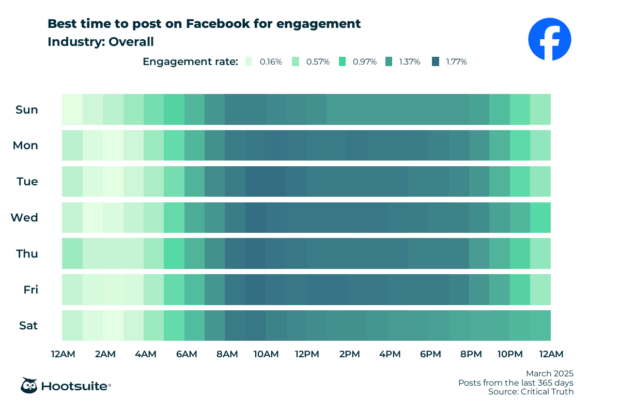
Of course, that’s a massive generalization. Like everything else in your strategy, experiment! Try different times and see when you get the most engagement.
Or, use Hootsuite’s powerful analytics to tell you when the best times to post are based on your personalized data. Then, with one click, you can auto-schedule your posts for these magic times.

5. Establish your Facebook marketing budget
Depending on your other marketing activities and what you want to achieve with Facebook, you may want to pursue ads, influencer partnerships, or other types of paid Facebook marketing.
While you can set your budget however you like, research shows that most companies spend 27.1% of their total marketing budget on social media ads.
Want some help? Read how to set your Facebook ads budget, then use our free Facebook ads budget calculator as a starting point or to evaluate your current budget.

6. Engage with your audience (like, all the time!)
Facebook isn’t a one way street. Postin’ and peacin’ out won’t get you very far. To grow your audience and encourage people to take action, you need to actually be… y’know, social.
Set aside time every day to reply to comments and messages and moderate any spam on your Page.
Every. Day? Really?!
Yep, but don’t sweat it: You can do this manually, but chances are you have other platforms to manage besides Facebook. Switching between them and engaging with everyone can quickly turn into its own full-time job.
Enter: Hootsuite Inbox.
Picture this: one place to view and reply to all comments and private messages across multiple social profiles, plus everything else you need to do on your social media channels in the same app. Easily see which messages have been replied to and who’s still waiting, plus assign conversations to colleagues so everyone knows who they need to engage with at a glance.
7. Scale up your Facebook marketing with AI and other tools
Facebook Messenger chatbots
Over one billion people message businesses on Facebook every single week. How can you get more leads or inquiries from Facebook Messenger? Use the power of automation to serve customers without taking up more time.
Besides using Hootsuite Inbox to personally reply to Facebook comments and messages right inside Hootsuite, you can set up a chatbot to automatically answer incoming Facebook Messages. Hootsuite’s chatbot can reduce your customer service team’s workload by 80% while improving productivity by 25%… and help your customers much, much faster.

Learn how to set up your own automated DMs on Facebook (including a free option from Meta!).
Facebook Marketplace
If you sell products or services locally, consider listing on Facebook Marketplace. Over 1.2 billion people use Facebook Marketplace each month, and 16% of Facebook users are on the platform only to shop on Marketplace.
You can either create a regular, free listing or run a Facebook Marketplace-specific ad. These highly targeted ads can have a big impact: 54.2% of Marketplace users who click on an ad end up making a purchase from the platform.
Marketplace ads are shown alongside relevant organic listings and are noted by a small “Sponsored” text underneath them.

You can also include Marketplace ads within a larger campaign, using Meta’s automatic Advantage+ placements. For more on ad placements, read our complete guide to Facebook advertising.
Facebook Groups
Over 1.8 billion people use Facebook Groups every month. Groups can be public or private. While many Groups are managed by people and simply a way to connect with others over shared interests, Groups offer some unique benefits for organizations.
A private group is a much more intimate way to connect with your top customers. It’s a great way to bypass the unpredictable Facebook algorithm and get your posts in front of your ideal audience of people who want to see more from you.
A Facebook Group can:
- Foster brand loyalty by offering exclusive discounts or content.
- Provide valuable customer feedback.
- Inspire new marketing ideas.
- Help refine your brand voice and tone.
However, Facebook Groups require regular moderation and effort to keep users engaged, so weigh the benefits of having one against the time it will take to manage.
OwlyWriter AI
Save time writing content? Uh, yes, please!
Hootsuite includes OwlyWriter AI, our unique AI creative tool to help you draft, repurpose, and inspire awesome content. More than a basic AI copywriting tool, OwlyWriter combines our proprietary social media expertise as the world’s #1 social media marketing platform with the best custom AI model.

Use OwlyWriter to:
- Instantly generate new social media posts—and ads!
- Generate posts based on a link, like a blog post or product page.
- Brainstorm post ideas then generate options based on them.
- Repurpose your top performing social content into new, high quality posts you can schedule with just a few clicks.
- Identify upcoming holidays and write appropriate captions.
- Edit and proofread content.
8. Regularly audit performance
Your Facebook marketing strategy will change over time. Get the data and insights you need to evaluate what’s working and what’s not by completing regular social media audits.
In addition to checking analytics reports often, a full social media audit includes:
- Listing all accounts. Know which platforms you’re on and consider adding new ones, if it makes sense for your goals.
- Reviewing branding. Do all your social profiles use current brand materials for profile photos, banners, and post templates?
- Evaluating content strategy. What types of posts have been the most successful for you? Are certain posts performing better on Facebook than other platforms?
To learn how to do yours, grab our free social media audit template and follow along with this step-by-step social media audit.
When to start using Facebook ads
The day after creating your shiny new business Page isn’t the best time to try out Facebook ads. But letting someone else arbitrarily tell you when you’re ready isn’t the answer, either. (Hehehe.)
Yep, as with most marketing things, there isn’t one correct answer or KPI that can tell you when to start experimenting with ads.
We’d argue you should have these things first:
- A complete Page (don’t forget to add that profile pic!)
- At least 100 Page Likes (followers)
- Meta Pixel set up
- At least 20 Page posts (ideally more)
- Multiple creative assets for each ad
- An A/B testing strategy
You also should make sure advertising on Facebook aligns with your social media goals. Are you interested in extending your reach? Are you digital-advertising curious? Do you want to find new customers? Do you want access to in-depth insights about those customers?
If the answer’s yes to any of these, you’re ready to dive in. But do you want to do this the easy way…. or the hard way?
The easy way: Boost a Facebook post
“Boosting” a post is Facebook lingo for taking a regular, organic Page post and turning it into an ad. You can also boost Facebook Events and Marketplace listings.
Boosting is the gateway ad those senior content marketers warned you about. Side effects of success include conversions, audience growth, and a newfound appreciation for digital advertising.
You can boost any existing post on your Facebook Page by going to your Page and clicking Boost post at the bottom of the post.

When you should consider it: If you’re completely new to Facebook advertising and want to test the waters.
Ready to try it? Here’s how to boost a Facebook post the right way.
The advanced method: Create your first Facebook ad campaign
Creating a Facebook ad campaign from scratch can seem overwhelming the first time, but it’s worth it. Combining organic and paid content is the secret recipe for Facebook marketing success.

When you should consider it: You want to build focused momentum for an upcoming promotion, and/or long-term sales campaigns.
The success of your Facebook ads will depend on how accurately they’re targeted. You know when you see an ad and think Wow, I’m the target market? Like this one for a couch desk that apparently knows where I’m typing this right now…

That’s how you want people to feel when they see your ad: mildly creeped out by the depth of your knowledge about them but overall thinking, “This product was made for me.”
Even newbies can rock a successful Facebook ad campaign, though we suggest doing lots of research before you start. You can also hire an agency or freelance ads consultant to help plan your first campaign. You’ll learn a lot and optimize your chances of success.
If you want to ✨ go your own waaay ✨, here are a few Facebook ads resources to start with:
- How to Advertise on Facebook: A Complete Guide
- How To Calculate And Set Your Facebook Ad Budget [Free Tool]
- All the Facebook Ad Sizes You Need to Know in 2024
- 22 Facebook Ad Examples to Inspire Your Next Campaign
7 Facebook marketing examples for inspiration
1. Mesmerizing stop motion
Nomatic’s quick ad shows everything this backpack can fit with magically floating items going into all its pockets. It catches your attention and is just downright neat to watch.

2. The power of color
These highly colorful ads stopped my scroll right away. Strategic messages are contained in more colorful graphics, like “24 hours only,” and “free shipping.”

3. The power of cute
Yes, this retailer sells matching dog and human outfits. And yes, I own some, much to my dog’s embarrassment.
The cuteness factor of SparkPaws’ Reels is sure to be a hit with dog-obsessed people everywhere.

4. Educational promo
Travel and camera gear supplier Peak Design regularly posts tips about new ways to use their products that many wouldn’t think of, like this one for attaching a camera strap to a packing cube to make a trendy sling bag.
The high-quality photos here make the post successful by proving it doesn’t look dorky, and the “Click to View Products” feature is a natural segue.

5. Make feedback fun
Bouclair uses interactive Facebook Story elements like this agree/disagree slider, links, countdowns, and polls to both remind customers of upcoming events and gather intel about their audience in a fun way.

6. Personalize engagement
Beverage manufacturer Innocent Drinks is known for having a cheeky, funny social feed, but what really stands out is how they reply to followers. They respond to every comment with a personalized response, including a name. The attention to detail can build lasting, loyal fans.

7. Cinematic… shoes?
Vans leans heavily on video to promote their products, with each Reel feeling like a mini-movie.

6 Facebook marketing tips from SMMs
We asked some top social media managers what the secret ingredient is to successfully managing a brand on Facebook and how they keep things exciting.
Some experts pointed out the importance of being social on social media:
I believe the secret to a successful brand on Facebook is engaging with your audience. It’s important not only to publish posts frequently, but also to respond to comments, messages, and mentions. In my experience, it is active communication with followers that helps to establish a genuine connection and gain their trust.
One way I keep things exciting on Facebook in 2024 is by using interactive content like live videos, polls, and quizzes. These features not only engage users but also make them feel involved with the brand. It creates a lively community and keeps the content fresh and interesting.
– Evgen Tymoshenko, Chief Marketing Officer, Skylum
As simple as it sounds, you must connect with your audience. They keep coming back for what you’re giving them. A rebrand is one thing, but I am amazed at how many marketers feel the need to jump on trends, even if they don’t align with their company’s mission. Sure, put your own spin on the trend if it serves your audience, but always make sure every post brings value to loyal followers.
– Jessica Yost, Strategic Marketing Consultant, Powerhouse Planning
Others pointed out how there’s no “one size fits all” Facebook marketing strategy:
As an experienced social media manager, I’ve learned that the secret to a successful brand presence on Facebook is authenticity. When I started managing social media for a niche page aimed at driving pet adoptions, I made the mistake of trying to emulate what the big brands were doing, but it fell flat with our audience.
It wasn’t until I started focusing on our unique brand story and engaging directly with our audience that things really took off. I shared behind-the-scenes glimpses, interviewed our passionate volunteers, and highlighted happy adoption stories.
Staying authentic to your brand while providing value and entertainment will help you cut through the noise and build a loyal community of brand advocates.
– Abhishek Joshi, Digital Marketer, Dog with Blog
Imagine your Facebook page is a living room. You want people to feel comfy, right? So, let your brand’s personality shine through. Are you funny, serious, or somewhere in between? Whatever it is, be consistent. People love knowing what to expect. And don’t be afraid to show a little vulnerability. Everyone loves a brand with a heart.
Now, let’s talk about keeping things fresh. User-generated content is like finding a pot of gold at the end of a rainbow. People love seeing themselves in the spotlight. Run a contest, encourage tagging, and make ’em feel special when you share their stuff. It’s like giving your audience a virtual high-five.
– Sherif Adel, Digital Marketing Manager, Evolvice GmbH
Alex points out that while it’s important to change up content across platforms, you can also target different audiences within the same platform, too:
One way I keep things exciting on Facebook is by tailoring our content strategy to these generational differences. For brand posts, we focus on content that resonates with millennials and Gen X. This might include corny phrases or dad jokes that would fall flat on TikTok but get great engagement on Facebook. Older audiences find them hilarious!
At the same time, we’ve found great success in building followings through niche Facebook Groups. By frequently offering free, valuable content in these groups, we’ve been able to engage Gen Z users who might not interact with our regular posts. This approach allows us to cater to multiple generations simultaneously.
– Alex O’Neil, Owner, City on the Hill Consultancy
Lastly, a helpful reminder that social media is always changing.
We keep the social-media golden rule in mind: everything (trends, algorithms, and even platforms) evolves constantly. We are always optimizing our content to fit the needs of the community, and we don’t let what worked well in the past keep us from improving content for the future.
– Holly Nguyen, Social Media Manager, National Breast Cancer Foundation
4 Facebook marketing tools
1. Hootsuite
Chances are you’re managing more than only a Facebook Page and if so, Hootsuite is here to save time as your all-in-one social media management dashboard for all platforms.
Take four minutes to learn what Hootsuite can do for you and start saving three hours per week (a.k.a. one month per year!):

Use Hootsuite to:
- Plan and schedule engaging content using templates and the built-in Canva editor
- Draft posts instantly with OwlyWriter AI
- Automatically publish your content at the best times to post to reach more of your audience
- Boost Facebook posts and create ads—for Facebook, Instagram, LinkedIn, and X—without leaving Hootsuite
- Reply to comments and messages across all your platforms in one place
- Serve customers faster with auto-replies and chatbots
- Do competitive research and uncover new engagement opportunities
- Measure brand sentiment and trends with the world’s best social listening tool, powered by Talkwalker
- Understand your social media performance with customizable, easy-to-read reports with Hootsuite Analytics
And last but not least…
- Manage all your Facebook, Instagram, TikTok, X, YouTube, LinkedIn, Pinterest, and Threads social media accounts in one dashboard.
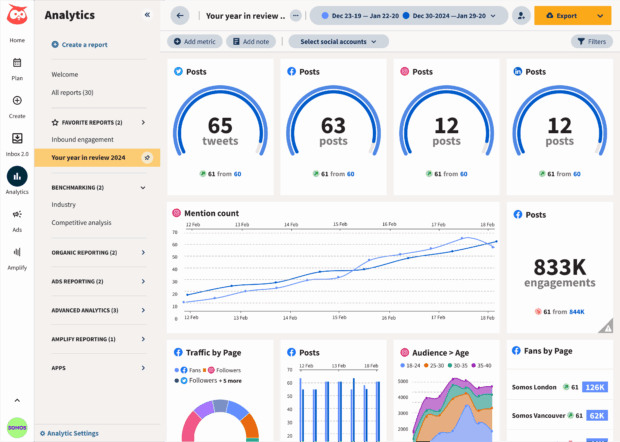
Hootsuite allows us to be really nimble in how we approach our marketing in real time. We set up alerts in our Insights tool. We also set up weekly reports so that we can make realistic decisions on where to pivot, where to allocate more resources, or where to ante up our existing strategies.
– Christina Minshull, Head of Marketing and Design, Stocksy
2. Facebook Ad Library
Facebook Ads Library is a searchable database of all the ads currently running on Facebook. You can filter by location, type of ad, and keywords.
Get ideas for your next campaign, identify trending phrases or graphics, and check up on what your competitors are doing.

3. BrandFort
You can’t be online 24/7, so when you don’t have eyes on your Facebook Page, BrandFort does. It automatically detects and hides negative, offensive, or spammy comments to keep your Page a safe space for all.
BrandFord also integrates with Hootsuite for even easier Facebook Page management.

4. Chute
User-generated content is a fantastic resource for building trust with authentic content and diversifying your Page to showcase all different kinds of people.
Chute helps you find UGC content to share, and its free Hootsuite integration allows you to create a content library to schedule with Hootsuite Composer later.

Make Facebook marketing easier by managing everything you do on social media—for all your platforms—in one place. Schedule content, discover trends with social listening, get actionable insights and analytics, create ads, measure ROI, and much more with Hootsuite. Try it today.