Billions of people post on social media every day, but creating content that actually performs takes work.
Strong social content comes down to strategy, the right tools, and a workflow your team can stick to.
This guide breaks down everything you need to build one, from brainstorming ideas to tracking what’s working.
Key takeaways
- Social media content creation is crafting posts for social platforms like TikTok and X. It includes short videos, photos, and graphics.
- Focus on mobile-friendly content for 2026 success. Keep videos under 30 seconds, use vertical formats, and test polls for quick engagement across platforms.
- Use tools like Hootsuite to streamline creation and scheduling. Start with OwlyWriter AI for ideas, then plan posts for peak times with minimal effort.
Social media content creation is the process of planning, producing, and sharing content — including videos, images, and text — for platforms like TikTok, Instagram, and LinkedIn.
It’s not just about posting for the sake of it, either. The goal is creating engaging content that connects with your target audience, builds your brand awareness, and drives results.
The best content creators mix creativity with strategy, and they adapt to each platform. That means tailoring content styles, character counts, image sizes, and video formats for the network you’re posting on.
Key content types
The main kinds of social media content are:
- Photos: Apps like Instagram and Pinterest are very image-forward, but all social media platforms use some kind of photography or visual elements.
- Videos: Video content captures attention, and often keeps it: platforms old and new (we’re looking at you, YouTube and TikTok) champion videos as their main form of content.
- Graphics: High-quality visuals like infographics are an excellent tool to communicate clear and engaging information. If you’re not an expert graphic designer, no sweat — there are lots of apps that can help you.
- Text: Many of the posts on X (formerly Twitter) and Instagram Threads are text-based. The copy written for the captions on your photos and videos counts as content, too.
- Audio: Audio content like podcasts should never be underestimated: platforms like TikTok and Instagram Reels are built, in part, on sound.
- Carousels: A carousel is a collection of two or more photos. Carousels are best known as an Instagram feature, but every app is getting in on the scrollable action, including LinkedIn and TikTok.
The social media content creation workflow is a five-step process: Research and ideation, strategy and planning, content creation, publishing, and analysis and optimization. This repeatable workflow keeps your content consistent, helps your team avoid burnout, and makes it way easier to scale.
Here are the 5 steps of social media content creation:
- Research and ideation: Get to know your audience and competitors, then keep a running list of content ideas.
- Strategy and planning: Pick your content pillars, set your goals, and plot it all on a calendar.
- Content creation: Batch your content and captions.
- Publishing: Post at the best times for each platform.
- Analysis and optimization: Check your numbers, learn what’s working, and use what you find to make your next posts better.
1. Research and ideation
Before you make anything, figure out who you’re making it for. Look into your audience’s age, interests, and favorite platforms, and pay attention to the kinds of posts that already do well in your space.
Then, check out 3-5 competitors to see what’s landing. Don’t just scroll their feeds and call it research. Pay attention to:
- What content formats they post most often (Reels, carousels, static images, text-only)
- Which posts get the most engagement, and what those posts have in common (e.g., patterns in hooks, topics, or visual style)
- What they’re not doing, including gaps in their content marketing strategy
Next, start an idea vault. This is one spot (a Google Doc, a Slack channel, a whiteboard in Hootsuite) where your team can share content ideas the moment it shows up. Think: weird questions from customers, a competitor post you could do better, or a trending sound.
2. Strategy and planning
Strategy is how ideas turn into an actual plan. Pick a handful of content pillars, then set a goal for each one (e.g., awareness, engagement, leads, or sales).
Most brands build their content plan around four pillars: educate, entertain, inspire, and promote. Here’s a quick overview:
| Content pillar | What it is | Example |
| Educate | Content that teaches your audience something useful. The goal is to spark curiosity and build trust. | A carousel breaking down “5 signs your social strategy needs a refresh” |
| Entertain | Content that’s fun, surprising, or punchy. It doesn’t have to be hilarious, just engaging. | A before-and-after of your office redesign |
| Inspire | Content that hits emotionally and makes people want to act, share, or feel something. | A customer success story, or a post about your team’s community volunteer day. |
| Promote | Content that promotes your offerings. This type of content is usually paired with a call-to-action (e.g., “click the link in bio!”). | A product launch announcement. |
Aim for a healthy mix across all four pillars instead of leaning hard on promotional posts. If every post is asking for something, your audience will stop giving.
Once you’ve picked your pillars, plot your upcoming posts on a social calendar. Work backwards from the big moments, like launches, holidays, and campaigns.
3. Content creation
Content creation is where ideas finally become posts. The trick is to batch your work.
For example, film a bunch of videos, design a week of thumbnails, and write a stack of captions back to back. It’s way faster than starting from scratch every day.
Batching works best for content that follows a pattern, like weekly tips or customer spotlights. One filming session or design sprint can fuel two to three weeks of posts.
Pro tip 💡: AI-powered content tools can quickly scale your content production. Check out our top tools here.
4. Publishing
Publishing is more than hitting the post button. Schedule each piece of content for when your audience is actually online (Psst: Hootsuite’s Best Time to Post tool figures this out for you), and tweak the caption, hashtags, and CTA to fit each platform.
A scheduling tool like Hootsuite makes it easy to publish, schedule content across multiple platforms, and shift posts around when things change.

5. Analysis and optimization
Analysis is what turns a lucky, one-off post into a system that keeps paying off. Once a week, check your social metrics, including views, follower growth, engagement rate, clicks, and conversions. Then, look for patterns.
For example, which pillars are pulling their weight? Which formats keep showing up in your top posts? When are people actually engaging?
Then put what you learned to work. Send your best-performing hooks back to your ideation bank, drop the formats that aren’t landing, and adjust your calendar based on what the data says.
The workflow isn’t a straight line, it’s a loop. Every round of analysis makes the next round of ideas sharper.
Creating stronger social content means picking the right platforms, building pillars that fit your brand, setting clear goals for every post, and using analytics to figure out what’s actually working.
Here are our top tips:
- Select your platforms carefully
- Pick content pillars that fit your brand
- Make sure every post ladders up to a goal
- Choose your aesthetic
- Study the competition
- Work with influencers and content creators
- Create a content series
- Build social proof with user-generated content
- Experiment with AI
- Use accessibility features
- Include curated content in your strategy
- Optimize your content for social search
- Leave room in your content calendar to pivot
- Post when your audience is actually online
- Review your analytics
1. Select your platforms carefully
The right platforms are the ones your audience actually uses and where you can show up consistently.
Start with your target audience. Your research should tell you:
- Where they spend the most time. A Pinterest-heavy audience doesn’t need you on X. For all the deep data on social media demographics, check out the latest numbers here.
- What kind of content they engage with. If your audience watches long-form video, lean on YouTube and LinkedIn. If they prefer bite-sized content, lean on TikTok and Instagram.

Then, look at your brand. Pick platforms you can actually keep up with:
- Match the platform to your strengths. If you can’t film video weekly, TikTok and Reels probably aren’t your starting point.
- Match the platform to your goals. LinkedIn is built for B2B and lead gen, whereas TikTok is built for awareness. Pick the platforms that will help you meet your goals.
- Be realistic about bandwidth. Two platforms done well will outperform five done badly, every time.
Remember: picking the right platforms isn’t about being everywhere your audience is. It’s about being somewhere they’ll actually notice you.
2. Pick content pillars that fit your brand
Generic content pillars lead to generic content. The pillars that actually work are the ones built around your specific brand and audience.
Here’s how to find pillars that actually fit your brand:
- Audit your top posts from the last year. What do they have in common? That pattern is probably already a pillar, you just haven’t named it yet.
- Steal from your customer service team. The questions they answer over and over again are the topics your audience needs content on.
- Tap into social listening: Track what people are saying about your brand, your competitors, and your industry in general. The themes that keep showing up are potential pillars.
For example, a skincare brand might land on these pillars: “ingredient breakdowns” (educate), “real customer before-and-afters” (inspire), “team skincare routines” (entertain), and “monthly deals” (promote).
Pillars aren’t permanent, either. You can try a new one for 30 days, watch how it performs, and swap it out if it’s not pulling weight. Your pillars should evolve as your brand and audience do.
3. Make sure every post ladders up to a goal
Every post should have a job. If you can’t say what a post is supposed to do, don’t publish it.
Good social media goals are specific and measurable. “Get more followers” is a wish. “Grow our Instagram following by 10% this quarter” is a goal. We recommend using the SMART framework.
Here are the most common social media goals, and what to track:
- Awareness: You want more people to know you exist. Track reach, impressions, and new follower count.
- Engagement: You want your existing audience to interact with you. Track likes, comments, shares, and saves.
- Traffic: You want to send people somewhere (e.g., your website or landing page). Track link clicks and click-through rate.
- Conversion: You want people to buy, sign up, or book. Track sales, leads, and revenue tied to social.
Pick one or two as your primary goals for the quarter and let the rest be bonuses.
4. Choose your aesthetic
A strong visual identity makes your content instantly recognizable and builds trust with your audience. Start by defining your brand’s colors, fonts, and imagery style. Ask yourself:
- What colors and fonts represent my brand?
- What kind of visuals or editing style fits my content?
Take West Elm, for example. Their Instagram feed is a masterclass in consistency, with warm tones, clean lines, and modern interiors.

Source: Instagram
You don’t need a design degree to achieve this. Use free tools like Canva to create a style guide and stick to it. Over time, a cohesive aesthetic will make your content more recognizable.
While you’re at it, nail down a consistent brand voice. Copywriting is an important part of great content, and consistency matters here, too.
5. Study the competition
Studying competitors can reveal what works (and what doesn’t) in your industry. Look at other social media accounts with strong engagement and ask yourself:
- What types of content are they posting?
- Which formats (Reels, carousels, text posts) perform best?
- How do they interact with their audience?
Completing a competitor analysis (finding your competitors through search engines and gathering intel on their success) helps you track competitor performance and spot trends. Learn from their successes, identify gaps, and refine your own marketing strategy to stand out.

If you use Facebook, Instagram, or X, Hootsuite can do a competitor analysis for you.
6. Work with influencers and content creators
Partnering with influencers and content creators is one of the fastest ways to expand your reach and build credibility. The key is finding the right fit — someone whose audience and values align with your brand.
Instead of focusing on follower count, look for creators with strong engagement and authentic connections with their community. Give them creative freedom while ensuring your brand stays consistent.
Take Marimekko, for example. The brand collaborates with stylish senior creators, showing how their fashion fits effortlessly into real life. A well-matched partnership feels natural, not forced, making it more impactful for both the creator’s audience and your brand.

Source: Marimekko
Or, check out this collab between Olympian Suni Lee and a dry shampoo brand.

Source: @sunisalee
Pro tip 💡: For more follow-worthy advice on working with influencers, read our step-by-step guide.
7. Create a content series
A content series solves two problems at once: It makes content way easier to produce, and it gives your audience a reason to keep coming back. Instead of inventing something new every time, you’re just making the next episode.

Source: @revolve
For example, film four “Marketing Myth Monday” videos in one afternoon, then schedule them out over the next month. Meanwhile, your audience starts looking for the next one.
Drop it on the same day each week so your audience knows when to show up. Also use the same opening line, format, and length each time. That repetition is what turns a series into signature content.
8. Build social proof with user-generated content (UGC)
People trust other people more than they trust brands. That’s why user-generated content (UGC) is one of the highest-performing types of content on social media right now.
UGC is anything created by your customers, fans, or followers about your brand. It’s content you didn’t make — featuring people you didn’t pay — vouching for you in their own voice.

Source: @veggiekins
Here’s how to make UGC part of your content strategy:
- Make it easy to tag you. Use a branded hashtag and make sure to remind your audience how to mention you.
- Ask for it directly. Run a contest or giveaway, request reviews after purchase, or DM your most engaged followers and see if you can share their post.
- Always get permission. Reposting someone’s content without asking permission is a fast way to lose trust (and sometimes followers). A quick “mind if we share this?” goes a long way.
The best part: UGC is content your team didn’t have to make.
9. Experiment with AI
Artificial intelligence is a handy tool for brainstorming new content ideas, generating text and coming up with hashtags. If you’re feeling stuck, use AI tools like Hootsuite’s OwlyWriter to combat the creator’s block.
Just make sure you give anything AI-generated a good read, a good edit and then another good read. You don’t want a social media crisis on your hands.
Ready to take Hootsuite’s OwlyWriter out for a spin?
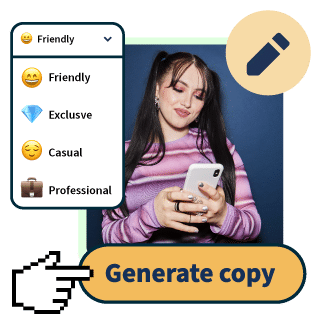
OwlyWriter AI instantly generates captions and content ideas for every social media network. It’s seriously easy.
Start your free trial10. Use accessibility features
Accessibility isn’t just the right thing to do. It’s how you reach more of your audience.
Captions get more views (most people scroll with the sound off), alt text helps your content show up in search, and inclusive design just performs better across the board.
We’ve created a list of inclusive design tips to improve your brand’s accessibility, but we’ll go over a few key elements below:
- Add alternative text (alt text) whenever you can. Alt text describes what’s in an image so people using screen readers can understand it. It also helps platform algorithms figure out what your post is about.
- Use captions in your videos. Most platforms generate auto-captions now, but always check them for accuracy.
- Camel-case your hashtags. Write #SocialMediaTips, not #socialmediatips. Screen readers read camel-cased hashtags as separate words. Lowercase ones get read as one long garbled sentence.
- Mind your color contrast. Light gray text on a white background might look elegant but it’s hard to read. Check that your text and background have enough contrast, especially for visual content (e.g., infographics and thumbnails).
Accessible content isn’t a separate thing from good content. It’s just good content that reaches more people.
11. Include curated content in your strategy
Content planning can be overwhelming, but you don’t have to create all of your content in-house.
Thanks to features like sharing, retweeting, stitching, and reposting, you can present content created by other creators or brands while still crediting the original poster.
This is called content curation. Like a museum or art gallery curator, you’re picking the very best of the best from the internet and showcasing it to your followers.

Accounts like Instagram’s @Veryasian.co consist almost entirely of curated content. They gather news, ideas, and stories relevant to their audience and repost them.
Just like influencer partnerships, it’s best to research the original creator before sharing their content. You’ll want to make sure you’re not accidentally amplifying a message or person who doesn’t align with your brand.
12. Optimize your content for social search
Social platforms aren’t just feeds anymore. They’re search engines.
67% of Gen Z prefer Instagram and 62% prefer TikTok for local searches, both outpacing Google. If your content isn’t built to be found, you’re missing a huge chunk of traffic.
Social SEO is how you fix that. Here are a few strategies to make your content searchable:
- Use keywords in your captions. Write the way your audience would search. “Vegan dinner inspo” beats “Yum!” if discoverability is the goal.
- Use the search bar for keyword research. Open TikTok or Instagram and type your topic into the search bar. The autocomplete suggestions are real searches from real users. That’s your keyword research.
- Put keywords in strategic spots. That includes your caption (especially the first sentence), on-screen text in videos, and your alt text on images.
Social SEO is still new enough that most brands aren’t optimizing for it yet. Getting in early means showing up for searches your competitors are still ignoring.
13. Leave room in your content calendar to pivot
Your content calendar’s job isn’t to lock you in. It’s to keep your team organized enough to actually pivot when it matters most.
Aim for a 70/30 split: Plan about 70% of your content in advance, and leave 30% open for whatever shows up. That could be news in your industry, a meme format your audience is suddenly obsessed with, or a trending sound you can riff on.
You can’t schedule any of that in advance.
Hootsuite’s scheduler and free calendar template make it easy to plan ahead, leave room to pivot, and keep everything in one place.
14. Post when your audience is actually online
Posting time matters way more than people think. Most platforms use the first few hours after you post to decide how far your content gets pushed. Early engagement signals to the algorithm that your post is worth amplifying.
Here’s how to find your audience’s actual active times:
- Check your platform analytics. Most platforms (Instagram, TikTok, LinkedIn, Facebook) show you when your followers are online. Start there. It’s free and it’s specific to your audience.
- Use a best time to post tool. You don’t want all your hard work to go to waste, and a scheduling platform like Hootsuite will tell you the optimal time to post according to your specific goals.
- Look at industry benchmarks. Benchmarks are useful when you’re starting out and don’t have enough of your own data yet.
For a full breakdown of the best times to post on each platform, check out our guide on the best time to post on social media.

15. Review your analytics
You can’t go back in time and change your social content to make it perform better, but you can use the analytics from your past posts to help you know what kinds of content to create in the future.
Your analytics will break down how many views, likes, comments, and shares a post received, and how many people followed you after seeing it.
For a deeper look at your numbers, Hootsuite Analytics brings all of this into one dashboard so you can spot patterns across platforms without exporting spreadsheets.
1. Social media image sizes
Bookmark this image, print it out and stick it on your fridge. Because even though it’s not technically a template, knowing the proper specs for your social media images is essential for content creation.
Save yourself from disappointment by reviewing the proper sizes and dimensions for each app.

2. Instagram Story templates
Half a billion people worldwide watch Instagram stories daily. While they may only last 24 hours (unless you turn them into highlights), you shouldn’t leave them out of your content creation plans.
These 72 free Instagram story templates can help get you started.

3. TikTok and Instagram Reel templates
You don’t need to be a video pro to make a beautiful, engaging Reel or TikTok — you just need one of these four video templates.
Thanks to Hootsuite’s Canva integration, modifying these videos with your own clips is a breeze.
Psst: If you’re scrolling through the ‘gram and see a Reel you’d like to recreate, Instagram offers video templates within the app, too.

4. Instagram Ad templates
If your brand’s budget allows, you can invest in Instagram Ads to target specific audiences.
In need of some marketing inspo? Here are 15 Instagram ad templates.

5. Pinterest templates
Standing out from the crowd is extra important on Pinterest, as users will be able to see your Pins at the same time as a collection of others.
Set your brand apart by using one of these five Pinterest post templates (and edit them to your heart’s desire).

6. YouTube Banner templates
Your YouTube banner is the first thing visitors see when they land on your channel. A polished, on-brand banner signals that your channel is worth subscribing to. A blurry or generic one signals the opposite.
Don’t overthink it. Use one of these 5 customizable YouTube banner templates to get a strong banner up in minutes.

The best social media content creation tools are Hootsuite for planning and scheduling, Canva for graphic design, Photoshop Express for photo editing, and CapCut for short-form video.
Let’s take a closer look at each tool.
1. Hootsuite
Hootsuite is an all-in-one social media management platform that helps you plan, create, schedule, publish, and analyze content across every major network from a single dashboard.
It’s built to handle the full content creation workflow, so your team isn’t bouncing between five different apps to get a week of social media posts out the door.
Start with OwlyWriter AI to spark ideas fast. Then, edit social content with Hootsuite’s built-in photo editor and video editor, so you can get your assets publish-ready directly in the platform. Hootsuite also offers a Canva integration — it’s like two editing apps in one (more on that later).
When it’s time to write captions, Hootsuite’s AI helps you draft captivating, informative copy, plus generate relevant hashtags so your post can get maximum engagement.
Plus, you can batch-schedule your posts ahead of time, knowing they’ll publish automatically at exactly the right moment.

Finally, there’s analytics.
Studying your analytics is key for future content creation: learning what works and what doesn’t will help you improve your social media strategy. Hootsuite’s analytics offer clear insight into your post performance, and a road map on what to focus on next time.

2. Canva
Canva is a graphic design tool that lets anyone create professional-looking visuals without design experience or expensive software.
It comes with thousands of free templates, photos, icons, and fonts you can mix and match to build social media graphics, carousels, story templates, video thumbnails, and pretty much anything else your brand needs.

Source: Canva
If graphic design is your passion, we’ve assembled a list of other helpful (and free) design tools to help you embrace your inner artist.
3. PhotoShop Express
Photoshop Express is Adobe’s free, mobile-friendly photo editing app that gives you pro-level editing tools without the full Photoshop learning curve (or price tag). It covers everything you actually need for social media photos: retouching, filters, cropping, dehazing, noise reduction, and collages.

Source: PhotoShop Express
The mobile app means you can edit straight from your phone, which is usually where social photos live anyway.
4. CapCut
CapCut is a free video editing app built for short-form social content. It was originally made by the same parent company as TikTok, which is why it has every tool you’d want for creating Reels, TikToks, and Shorts.
For social media content creation, CapCut is the fastest way to turn raw footage into a finished short-form video. Drop your clips into a trending template, swap in your own music, add auto-captions, and you have a publish-ready video in a few minutes.

Source: CapCut
FAQ: Social media content creation
What is social media content creation and how do businesses scale it?
What are the best tools for social media content creation for teams?
How do brands create high-performing social media content consistently?
What is an effective social media content creation workflow for enterprises?
How do companies measure the success of social media content?
Save time managing your social media marketing with Hootsuite. Publish and schedule posts, find relevant conversations, engage your audience, measure results, and more — all from one dashboard. Try it free today.
With files from Liz Stanton.